
GPT Image 2AI 提示词
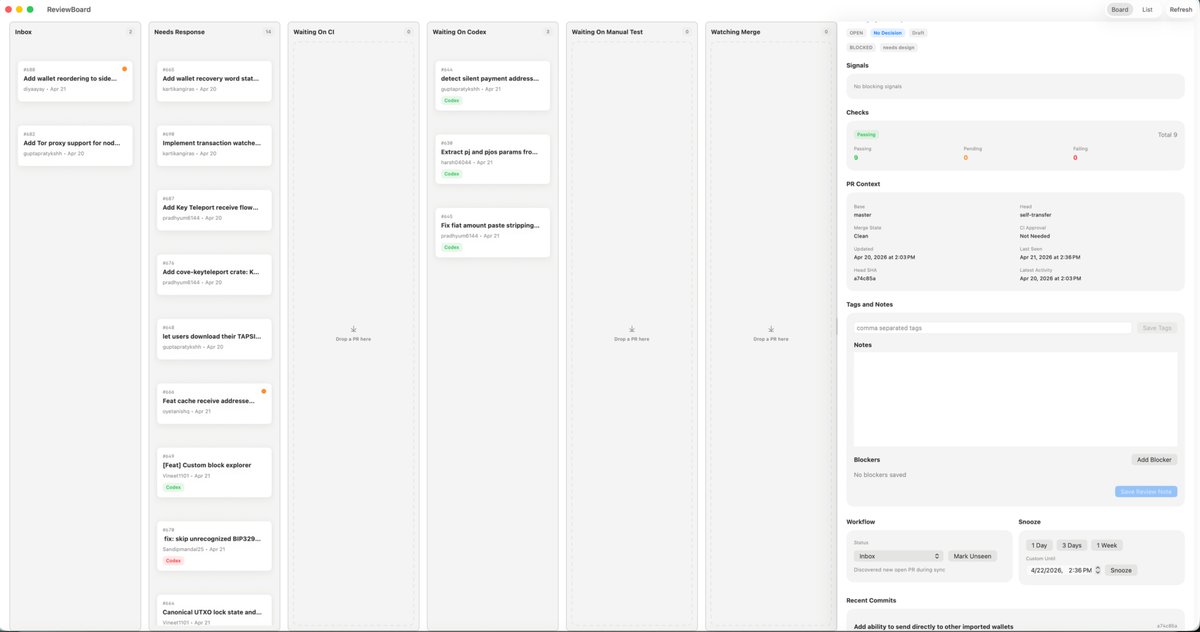
macOS Kanban Board UI — ReviewBoard Productivity Mockup
Generate a polished macOS light-mode kanban dashboard complete with columns, cards, and inspector panel for engineering task management prompts.
提示词 · EN
type
桌面应用 UI 模型platform
macOSstyle
简洁的浅色模式生产力仪表盘,柔和的灰色背景,圆角卡片,细腻的阴影,细分割线,极简现代 SaaS 美学,布局紧凑而从容app
name
ReviewBoardwindow_controls
左上角 macOS 红黄绿交通灯按钮layout
structure
单个宽屏应用窗口,分为 7 个垂直列和一个右侧检查器面板sections
item 1
title
收件箱position
最左侧列count
2labels
item 1
添加钱包重排序到侧边...item 2
添加 Tor 代理支持以实现节点...item 2
title
需要响应position
左起第二列count
7labels
item 1
添加钱包恢复助记词状态...item 2
实现交易监控...item 3
添加 Key Teleport 接收流程...item 4
添加 cove-keyteleport crate: K...item 5
允许用户下载其 TAPSI...item 6
功能:缓存接收地址...item 7
[功能] 自定义区块浏览器item 3
title
等待 CIposition
第三列count
0labels
item 4
title
等待 Codexposition
第四列count
3labels
item 1
检测静默支付地址...item 2
提取 pi 和 pjs 参数从...item 3
修复法币金额粘贴截断...item 5
title
等待人工测试position
第五列count
0labels
item 6
title
观察合并position
第六列count
0labels
item 7
title
检查器position
最右侧边栏count
8labels
item 1
信号item 2
检查item 3
PR 上下文item 4
标签与备注item 5
备注item 6
阻塞项item 7
工作流item 8
最近提交top_right_controls
count
3labels
item 1
项目item 2
列表item 3
刷新board
column_style
高大的浅灰色看板通道,配有标题标签、微型计数箭头,以及空通道中居中的空状态放置目标cards
shape
带有微弱阴影和细边框的小型白色圆角矩形metadata
左上角显示问题或 PR 编号,加粗的截断标题,下方为作者和日期行,偶尔出现小的彩色状态胶囊(如绿色的 Code 或红色的 Codex),部分卡片右上角带有微小的橙色通知点inspector
tabs
count
3labels
item 1
打开item 2
需要设计item 3
草稿active
需要设计signals
空的浅灰色面板,显示无阻塞信号的文本checks
summary
水平状态卡片,包含通过、待定、失败三列,右侧显示总计 9 项counts
Passing
9Pending
0Failing
0pr_context
fields
item 1
基准分支item 2
头分支item 3
合并状态item 4
CI 审批item 5
已清理item 6
上次需求item 7
更新时间item 8
2026 年 4 月 21 日 下午 2:36item 9
最后推送item 10
2026 年 4 月 20 日 下午 2:03item 11
SHAitem 12
a7c48b5atags_and_notes
elements
3labels
item 1
逗号分隔的标签item 2
保存标签item 3
备注blockers
elements
3labels
item 1
无已保存的阻塞项item 2
添加阻塞项item 3
保存评审备注workflow
groups
2labels
item 1
收件箱item 2
小睡buttons
item 1
标记为未读item 2
1 天item 3
3 天item 4
1 周item 5
小睡recent_commits
visible_count
1labels
item 1
添加直接发送到其他导入钱包的功能camera
正向全窗口截图text_rendering
微小清晰的 UI 文本,逼真的产品设计展示color_palette
background
极浅暖灰色columns
浅灰色cards
白色accent
绿色激活状态,浅蓝色选中标签,橙色通知点,柔和的黑色文本关于这个提示词
Generate a polished macOS light-mode kanban dashboard complete with columns, cards, and inspector panel for engineering task management prompts. 它更适合作为 GPT Image 2 的概念艺术起点:先保留画面结构、主体关系和风格约束,再替换成你的品牌、人物或场景。
这条提示词使用结构化 JSON 组织信息,包含 type、platform、style、app、layout、board、inspector 等字段。保留这种层级能让模型更清楚地区分画面主题、布局、界面元素和细节约束。
使用时建议先小幅修改主体、场景、镜头和色调,再生成多个版本对比构图与细节。这样页面内容对用户有实际帮助,也避免把模型名或标签机械堆在正文里。
如何使用这个提示词
- Copy the full prompt body from the JSON block.
- Paste it into a capable text-to-image or UI design AI model (e.g., Midjourney, DALL·E, or a Figma plugin).
- Adjust the column counts and label details to match your own project or team workflow.
- Generate the image and iterate by refining the labeling or board structure as needed.


