
GPT Image 2AI 提示词
Manga Style Comparison Prompt — Generic vs. Gag-Manga
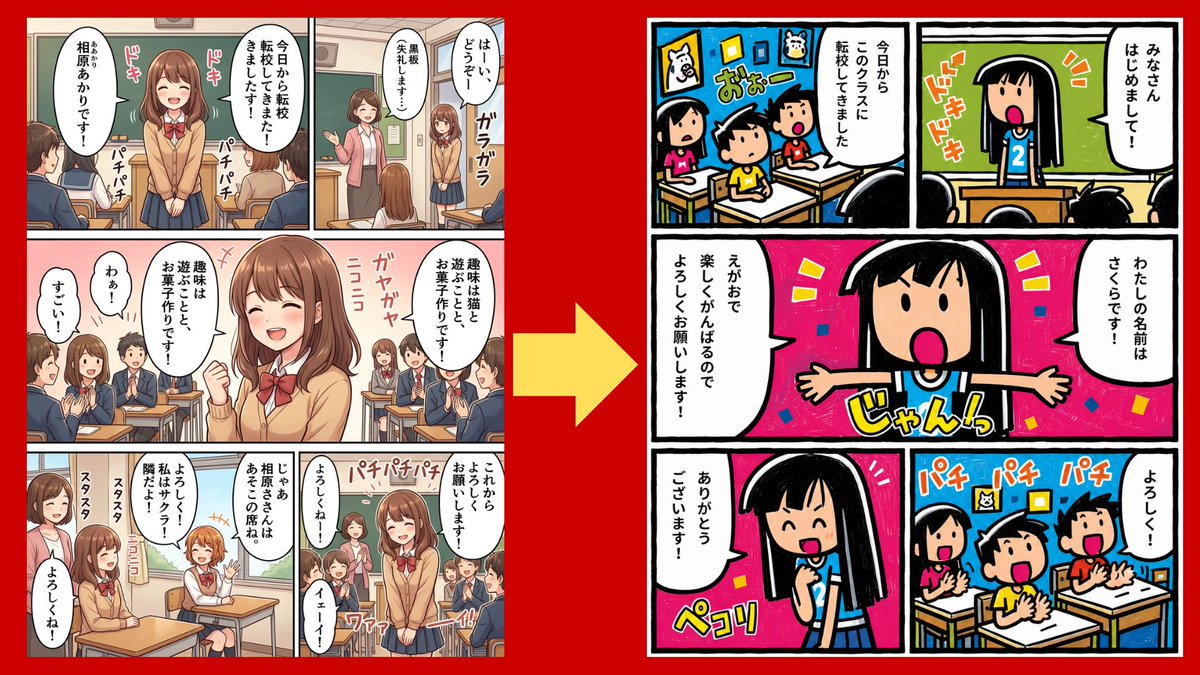
Generate a side-by-side classroom manga comparison graphic highlighting the difference between a polished anime style and a unique gag-manga style.
提示词 · EN
type
side-by-side comparison graphic showing the importance of manga art stylecanvas
16:9 horizontal composition with a solid vivid red backgroundmain_elements
count
3items
item 1
left manga page in generic polished anime styleitem 2
large yellow arrow pointing from left to right in the centeritem 3
right manga page in a distinctive simple gag-manga styleleft_page
position
left third of canvaspanel_count
7style
modern clean school manga, soft shading, semi-realistic anime proportions, detailed classroom backgrounds, beige and brown palette, thin panel gutters, speech bubbles filled with Japanese text, classmates in navy uniforms, teacher at chalkboard, multiple student faces intentionally blurred with mosaic/soft blur to anonymize themsubject
a transfer student girl in a tan cardigan, white shirt, red bow, navy skirt, medium brown bob hair, standing and introducing herself in class, then sitting at a desk among classmatesvisible_sound_effects_count
9visible_sound_effects
item 1
ドキitem 2
ドキitem 3
パチパチitem 4
パチパチitem 5
ガヤガヤitem 6
ニコニコitem 7
スタスタitem 8
スタスタitem 9
パチパチパチoverall_impression
competent but generic, no distinctive visual identityright_page
position
right third of canvaspanel_count
5style
highly distinctive retro children’s gag manga, thick uneven black outlines, flat saturated colors, intentionally simple faces, exaggerated expressions, hand-drawn panel borders, bold katakana sound effects, energetic composition, looks like a unique personal comic style rather than generic animesubject
a black-haired elementary school transfer girl wearing a blue shirt with the number 2 introduces herself to a classroom; classmates react enthusiastically and clapcharacter_design
round face, straight black hair with blunt bangs, dot eyes or simple oval eyes, wide open pink mouth, tiny simplified body, very thick ink linescolor_palette
hot pink, cyan blue, yellow, green, white, black, high contrastvisible_sound_effects_count
6visible_sound_effects
item 1
ドキドキitem 2
おおーitem 3
じゃんっitem 4
ペコリitem 5
パチ パチ パチitem 6
よろしく!speech_bubble_text_count
7speech_bubble_text
item 1
みなさん はじめまして!item 2
今日からこのクラスに転校してきましたitem 3
わたしの名前はさくらです!item 4
えがおで楽しくがんばるのでよろしくお願いします!item 5
ありがとうございます!item 6
よろしく!item 7
今日から転校してきました!center_arrow
position
center between pagescolor
bright yellowshape
large thick right-pointing arrowmeaning
transformation from no art-style specification to a specified distinctive stylecomposition_notes
Both manga pages are shown as complete rectangular pages with white margins and black gutters, slightly separated on the red background. The left page should look like an ordinary AI manga output; the right page should clearly feel more memorable, stylized, and original. Do not include extra captions outside the manga pages and arrow.customizable_text
comparison theme
{argument name="comparison theme" default="AI manga is 90% art style"}left style
{argument name="left style" default="generic polished anime school manga"}right style
{argument name="right style" default="distinctive retro children’s gag manga"}transfer student name
{argument name="transfer student name" default="さくら"}background color
{argument name="background color" default="vivid red"}关于这个提示词
Generate a side-by-side classroom manga comparison graphic highlighting the difference between a polished anime style and a unique gag-manga style. 它更适合作为 GPT Image 2 的概念艺术起点:先保留画面结构、主体关系和风格约束,再替换成你的品牌、人物或场景。
这条提示词使用结构化 JSON 组织信息,包含 type、canvas、main elements、left page、right page、center arrow、composition notes 等字段。保留这种层级能让模型更清楚地区分画面主题、布局、界面元素和细节约束。
使用时建议先小幅修改主体、场景、镜头和色调,再生成多个版本对比构图与细节。这样页面内容对用户有实际帮助,也避免把模型名或标签机械堆在正文里。
如何使用这个提示词
- Copy the entire prompt JSON from the page.
- Open your preferred AI image generator (e.g., Midjourney, DALL-E, Stable Diffusion).
- Paste the prompt into the generator's input field.
- (Optional) Adjust variables like background color or character details to match your vision.
- Generate the image to create your own side-by-side style comparison.


