GPT Image 2AI 提示词
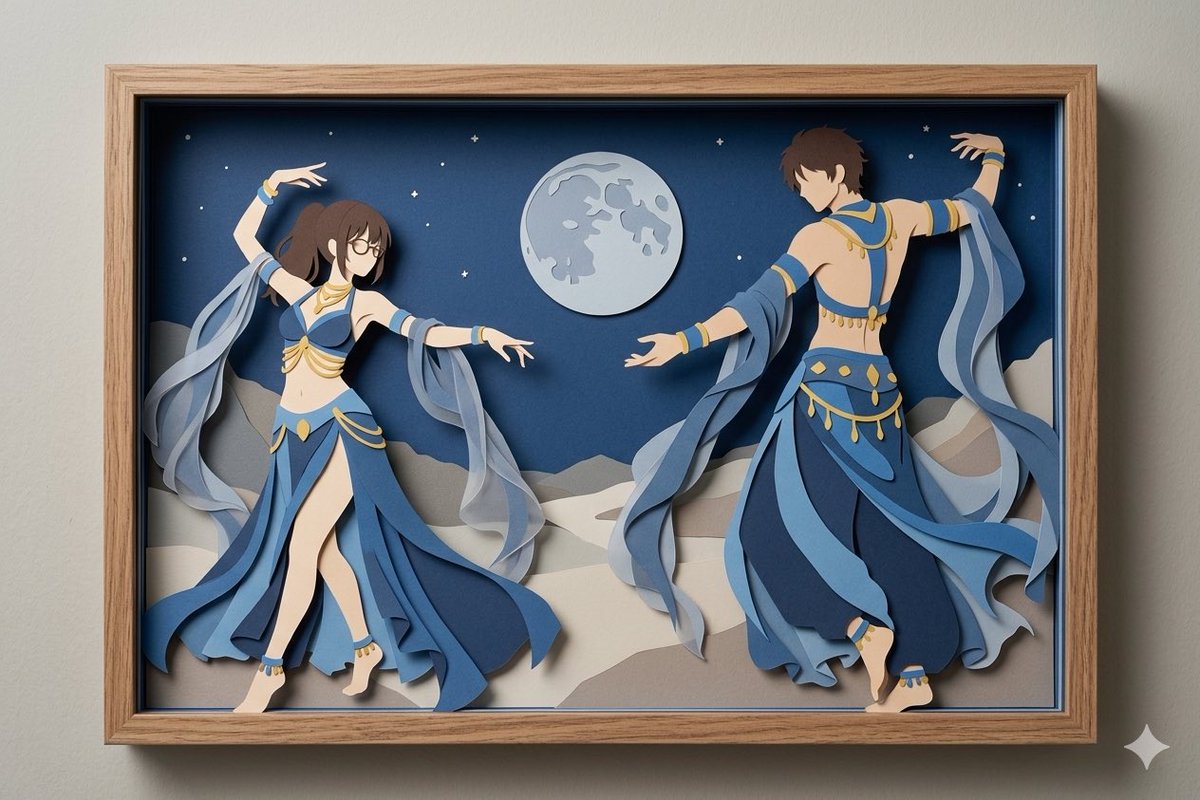
Anime Shadow Box Diorama — Paper-Cut Dancers
Generate a stunning 3D paper-cut shadow box of anime dancers under a moonlit desert sky, with customizable frame and costume colors.
1 / 2
提示词 · EN
Create a horizontal framed paper-cut shadow box artwork mounted on a pale gray wall, with a light natural wood frame and a deep black inner recess casting realistic layered shadows. Inside the box, depict a moonlit desert dance scene made from stacked cut paper and foam layers: two anime-inspired belly dancers in flowing blue and gold costumes, one female dancer on the left facing inward with long dark brown ponytail, glasses, bare midriff, raised left arm and extended right arm, and one male dancer on the right turned partly away with short brown hair, bare back, raised right arm and extended left arm. Both dancers wear layered sapphire, navy, and pale blue fabric panels, translucent gauzy sleeve ribbons, gold trim, jewelry, anklets, and bare feet, with the ribbons curling outward as separate cut-paper layers. The background is a deep navy night sky with exactly one large pale full moon near the upper center and 16 small white stars scattered around it, above layered beige and gray desert dunes. Emphasize a handcrafted 3D paper diorama look, clean anime silhouettes, crisp cut edges, soft drop shadows between layers, elegant motion, balanced composition, museum-like craft photography, realistic wall lighting, high detail, no text. Use argframe material: light natural wood, argmain costume color: sapphire blue, argaccent color: gold, argscene setting: moonlit desert, and argart style: anime paper-cut shadow box.
关于这个提示词
Generate a stunning 3D paper-cut shadow box of anime dancers under a moonlit desert sky, with customizable frame and costume colors. 它更适合作为 GPT Image 2 的概念艺术起点:先保留画面结构、主体关系和风格约束,再替换成你的品牌、人物或场景。
使用时优先替换 frame material、main costume color、accent color、scene setting 等占位符,并保持镜头、构图和材质描述的顺序不变。这样更容易获得稳定的画面结果,也方便继续做多版本对比。
如何使用这个提示词
- Copy the full prompt text from the page.
- Choose your preferred AI image generator (e.g., Sora, Midjourney).
- Edit the variables in curly braces, like
{frame material}or{main costume color}, to match your vision. - Paste the customized prompt into the model.
- Generate and refine until you achieve the perfect layered diorama effect.