
GPT Image 2AI 提示词
Cinematic Museum Robot Art Duel — Sora 2 Prompt
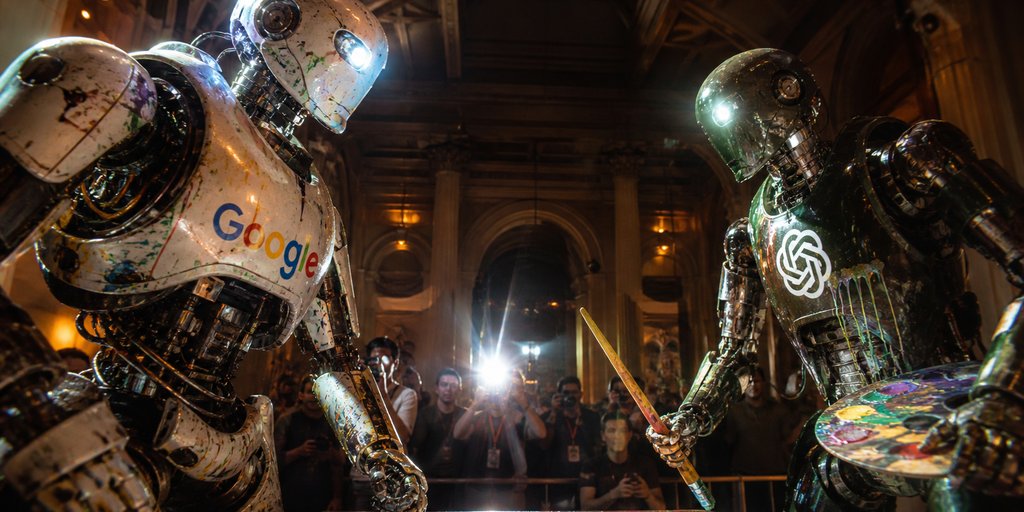
Generate a photoreal, blockbuster-style scene of two giant, branded painting robots facing off in a grand museum gallery at night.
提示词 · EN
Create a cinematic ultra-realistic wide-angle photo of two giant humanoid painting robots facing off in an ornate, dimly lit museum gallery at night. On the left, a battered white chrome robot with peeling paint, exposed mechanical joints, splattered pigments, a glowing blue eye, and the multicolored argleft robot logo: Google wordmark across its chest leans forward aggressively. On the right, a darker gunmetal chrome robot with glossy black mechanical limbs, paint stains, a bright white eye light, and a glowing argright robot logo: OpenAI knot logo emblem on its chest holds a wooden paintbrush like a sword in one hand and a colorful artist palette in the other. The robots should look enormous, scratched, dented, wet with reflective paint, and illuminated by dramatic warm museum lighting mixed with cold blue robot lights. Behind them, show a crowd of photographers and spectators behind a barrier, with one intense camera flash bursting in the center background; faces are slightly blurred for realism. The setting is a grand classical interior with tall columns, arched doorways, dark wood ceiling beams, gilded wall sconces, and deep shadows. Use strong perspective, low camera angle, 2.39:1 cinematic aspect ratio, shallow depth of field, high contrast, lens flare, gritty photorealism, blockbuster robot duel atmosphere, no captions or extra text beyond the chest logos.
关于这个提示词
Generate a photoreal, blockbuster-style scene of two giant, branded painting robots facing off in a grand museum gallery at night. 它更适合作为 GPT Image 2 的概念艺术起点:先保留画面结构、主体关系和风格约束,再替换成你的品牌、人物或场景。
使用时优先替换 left robot logo、right robot logo 等占位符,并保持镜头、构图和材质描述的顺序不变。这样更容易获得稳定的画面结果,也方便继续做多版本对比。
如何使用这个提示词
- Copy the entire prompt text above.
- Choose an AI video or image model like Sora 2 or a similar text-to-image generator.
- Paste the prompt into the input field. You can change the brand names in the
{left robot logo}and{right robot logo}arguments to customize the robots' chest emblems. - Generate the image. For best results, use the model's highest quality or cinematic settings if available.
- Review and regenerate, or use the output as a base for further editing in a video editor or image tool.


