
GPT Image 2AI 提示词
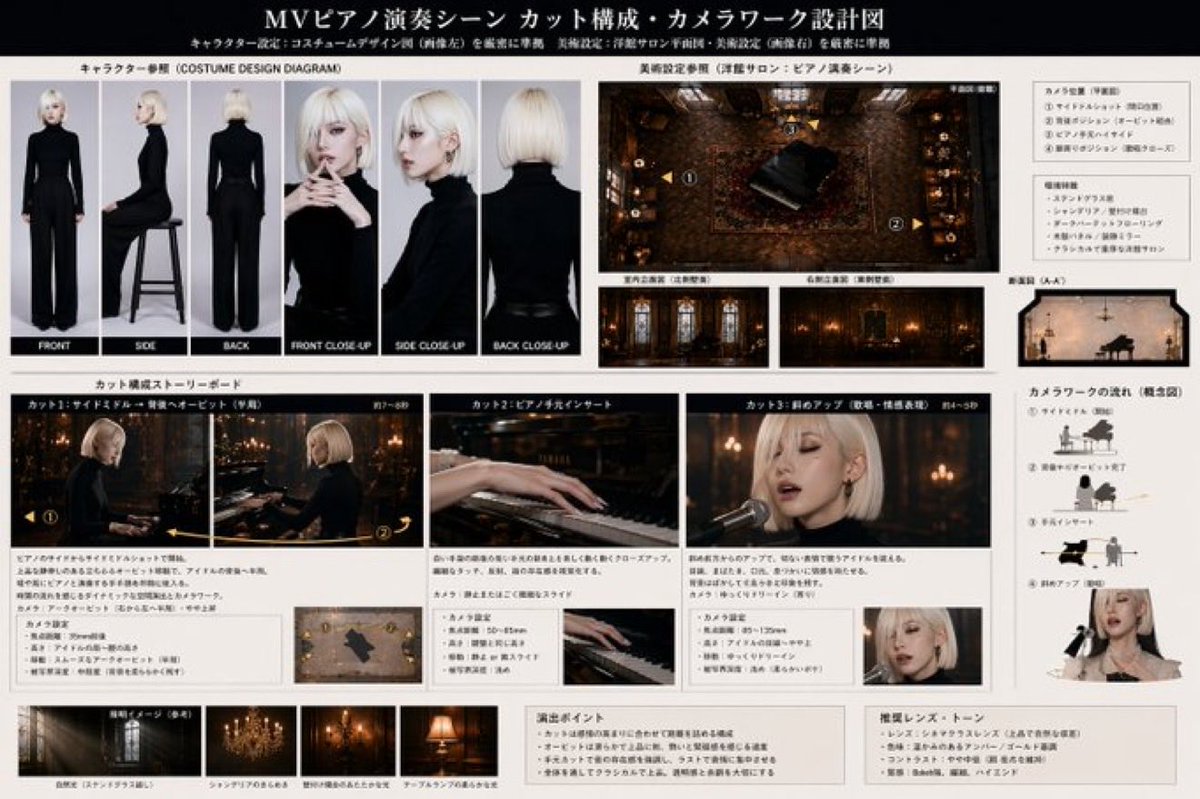
Music Video Previsualization Blueprint — Sora 2 Prompt
Generate a comprehensive music video pre-viz doc with character sheets, storyboards, floor plans, and lighting guides for AI production.
提示词 · EN
type
音乐视频预演蓝图header
title
{argument name="document title" default="MV 钢琴演奏场景 镜头构成与运镜设计图"}subtitle
角色设定:严格遵循服装设计图(左图);美术设定:严格遵循洋馆沙龙平面图及美术设定(右图)character
description
{argument name="character description" default="留着铂金色波波头的年轻女性,身穿修身黑色高领毛衣和黑色长裤"}setting
description
{argument name="scene setting" default="昏暗、华丽的西式洋馆沙龙,配有三角钢琴、花纹地毯和吊灯"}layout
sections
item 1
title
角色参考 (COSTUME DESIGN DIAGRAM)position
top-leftcount
6labels
item 1
正面item 2
侧面item 3
背面item 4
正面特写item 5
侧面特写item 6
背面特写description
在纯灰色背景下的角色转场图和特写参考图。item 2
title
美术设定参考 (洋馆沙龙:钢琴演奏场景)position
top-rightcount
4labels
item 1
平面图 (俯瞰)item 2
室内立面图 (左侧墙面)item 3
右侧立面图 (右侧墙面)item 4
剖面图 (A-A')description
钢琴室的俯视平面图,标注了摄像机位置,以及侧面立面图和剖面图。item 3
title
镜头构成分镜脚本position
middlecount
3labels
item 1
镜头 1:侧面中景 → 绕背轨道拍摄 (序幕)item 2
镜头 2:钢琴手部特写item 3
镜头 3:斜向特写 (演唱与情感表达)description
展示 {argument name="main action" default="深情弹奏钢琴并演唱"} 的分镜面板。每个面板下方均包含描述性文字和小型摄像机机位图。item 4
title
运镜流程 (概念图)position
middle-rightcount
4labels
item 1
① 侧面中景 (开始)item 2
② 绕背轨道完成item 3
③ 手部特写item 4
④ 斜向特写 (演唱)description
展示摄像机相对于钢琴和歌手运动的概念图。item 5
title
灯光意向 (参考)position
bottom-leftcount
4labels
item 1
自然光 (透过彩色玻璃)item 2
吊灯的闪烁item 3
壁挂烛台的暖光item 4
台灯的柔光description
展示室内不同光源的灯光参考缩略图。item 6
title
导演与色调笔记position
bottom-rightcount
2labels
item 1
演出要点item 2
推荐镜头与色调description
详细说明演出要点以及推荐镜头和色调设置的文本框。关于这个提示词
Generate a comprehensive music video pre-viz doc with character sheets, storyboards, floor plans, and lighting guides for AI production. 它更适合作为 GPT Image 2 的概念艺术起点:先保留画面结构、主体关系和风格约束,再替换成你的品牌、人物或场景。
这条提示词使用结构化 JSON 组织信息,包含 type、header、character、setting、layout 等字段。保留这种层级能让模型更清楚地区分画面主题、布局、界面元素和细节约束。
使用时建议先小幅修改主体、场景、镜头和色调,再生成多个版本对比构图与细节。这样页面内容对用户有实际帮助,也避免把模型名或标签机械堆在正文里。
如何使用这个提示词
- Copy the prompt below.
- Choose an AI model that supports detailed image generation and layout instructions (e.g., Sora 2, Midjourney, DALL·E 3).
- Customize the variables like character description and scene setting to match your project.
- Generate the output, then refine the pre-visualization by iterating on specific sections.


