
GPT Image 2AI 提示词
Character Sheet: Multi-View Concept Art — Sora 2 Prompt
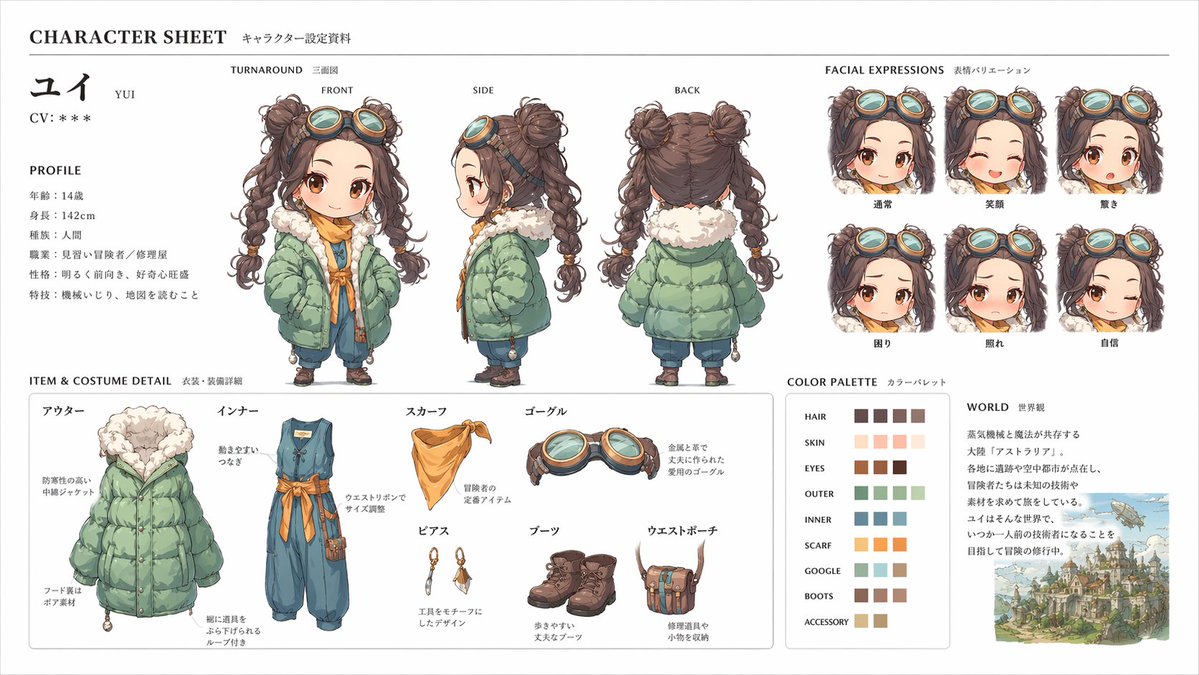
Produce a professional character sheet with front, side, & back views, expression variations, exploded outfit details, color palette, and worldbuilding note in high-res concept art.
提示词 · EN
Create a professional character sheet based on this character and background, similar to an official setting guide. Include front, side, and back views, expression variations, exploded outfit or equipment details, a color palette, and a short worldbuilding note. Keep the whole composition organized on a clean white background with a diagram-like layout and high-resolution concept art quality.
关于这个提示词
Produce a professional character sheet with front, side, & back views, expression variations, exploded outfit details, color palette, and worldbuilding note in high-res concept art. 它更适合作为 GPT Image 2 的概念艺术起点:先保留画面结构、主体关系和风格约束,再替换成你的品牌、人物或场景。
常见用途包括 character design、intermediate、character sheet、concept art。这些标签只作为创作方向参考,实际生成时仍应以提示词结构和预览图为准。
使用时建议先小幅修改主体、场景、镜头和色调,再生成多个版本对比构图与细节。这样页面内容对用户有实际帮助,也避免把模型名或标签机械堆在正文里。
如何使用这个提示词
- Copy the entire prompt text.
- Replace [CHARACTER DESCRIPTION] with your own character’s details and background.
- Choose an AI image generation model (e.g., Midjourney, DALL·E 3, Stable Diffusion).
- Paste the modified prompt into your chosen platform and generate.
- Review the output; adjust your character description or style tags as needed for best results.


