
GPT Image 2AI 提示词
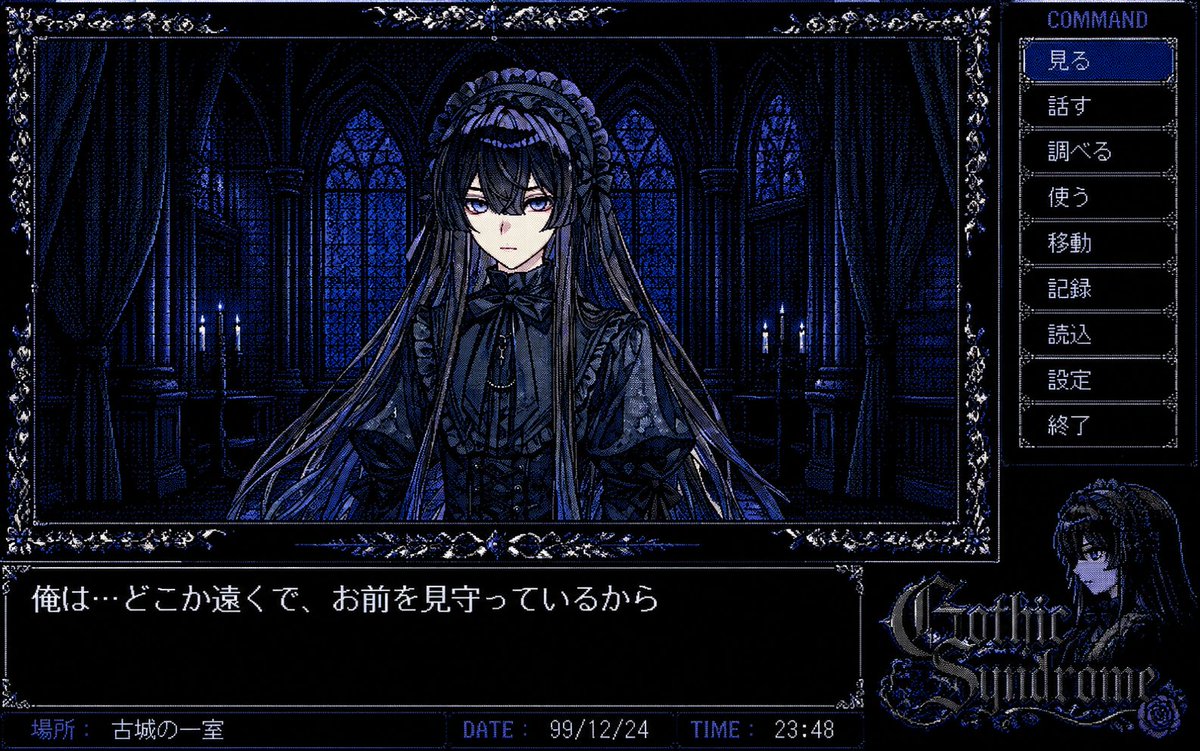
PC-98 Gothic Adventure Game UI — Retro Visual Novel Prompt
Generate an authentic 1990s Japanese PC-98 visual novel interface with a gothic castle scene, ornate command menu, dialogue box, and pixel art style.
提示词 · EN
type
PC-98 哥特式冒险游戏截图style
20 世纪 90 年代末日式视觉小说界面,16 色抖动像素艺术,深蓝与黑色调,华丽的银蓝色哥特边框,高对比度 CRT 显示器质感,复古电脑游戏 UI,阴郁的恐怖浪漫氛围canvas
宽屏 4:3 游戏画面构图,1200 x 750 分辨率风格main_scene
position
左上方大型边框插画setting
夜晚昏暗的哥特城堡房间,高大的拱形彩色玻璃窗,厚重的窗帘,石柱,两侧微弱的烛光,深海军蓝阴影subject
房间中央的一位神秘哥特萝莉少女,正面半身像,极长的飘逸秀发,蕾丝头饰,荷叶边黑色连衣裙,领口系着丝带蝴蝶结,层叠的袖子和华丽的维多利亚风格细节,面部眼睛和鼻子区域刻意使用柔和的方块模糊/马赛克遮挡mood
寂静、诡异、忧郁、私密interface
ornamental_frame
主插画周围的细长矩形边框,带有精致的花卉边角装饰和宝石蓝高光right_command_panel
title
COMMANDposition
右侧垂直菜单count
9buttons
item 1
見るitem 2
話すitem 3
調べるitem 4
使うitem 5
移動item 6
記録item 7
読込item 8
設定item 9
終了selected_button
見るselected_style
蓝色高亮矩形框配白色像素文字,其他按钮为黑色配灰色边框dialogue_box
position
左下方宽黑色文本窗口text
{argument name="dialogue text" default="俺は…どこか遠くで、お前を見守っているから"}font
白色日文像素字体,PC-98 风格status_bar
position
最底部条状栏count
3fields
item 1
label
場所:value
{argument name="location text" default="古城の一室"}item 2
label
DATE:value
{argument name="date" default="99/12/24"}item 3
label
TIME:value
{argument name="time" default="23:48"}logo_area
position
右下方content
深色头发哥特少女的小肖像,旁边是华丽的游戏 Logo,文字为 {argument name="game title" default="Gothic Syndrome"}style
带有蓝色高光和玫瑰装饰的哥特式装饰字体text_rendering
所有 UI 文字应为清晰的像素字体;保留日文标签;使界面具有 20 世纪 90 年代末 PC-98 冒险游戏的真实感color_palette
近黑色、午夜蓝、钴蓝色、柔和紫罗兰色、浅灰白色高光composition_notes
主插画占据约四分之三的宽度,指令菜单占据右侧栏,对话框横跨左下方,状态栏位于底部,Logo 和角色肖像填充右下方关于这个提示词
Generate an authentic 1990s Japanese PC-98 visual novel interface with a gothic castle scene, ornate command menu, dialogue box, and pixel art style. 它更适合作为 GPT Image 2 的概念艺术起点:先保留画面结构、主体关系和风格约束,再替换成你的品牌、人物或场景。
这条提示词使用结构化 JSON 组织信息,包含 type、style、canvas、main scene、interface、text rendering、color palette 等字段。保留这种层级能让模型更清楚地区分画面主题、布局、界面元素和细节约束。
使用时建议先小幅修改主体、场景、镜头和色调,再生成多个版本对比构图与细节。这样页面内容对用户有实际帮助,也避免把模型名或标签机械堆在正文里。
如何使用这个提示词
- Copy the prompt JSON from Sora2Hub.
- Paste it into your chosen AI image generator (e.g., Sora, Midjourney).
- Customize variables like dialogue text, location, or game title in the arguments.
- Adjust the prompt if needed to emphasize specific UI elements or mood.
- Generate the image and enjoy your retro dark fantasy game screen!


