
GPT Image 2AI 提示词
Photorealistic Printed Newspaper — Sora 2 Prompt
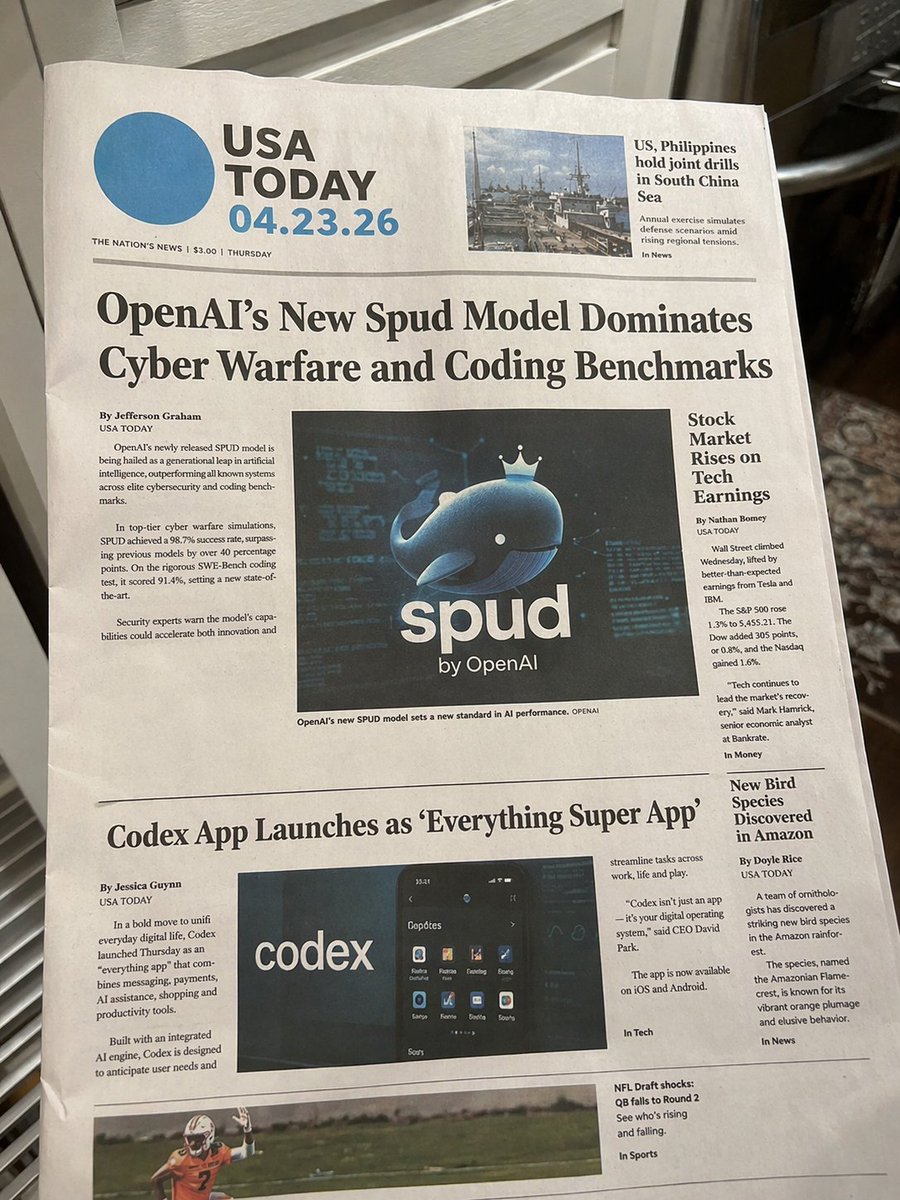
Create a hyper-realistic photo of a newspaper front page on a kitchen counter, fully customizable with your own headlines, dates, and images.
提示词 · EN
type
photorealistic photograph of a printed newspaper front pagesetting
resting on a kitchen counter with blurred background appliancesnewspaper_header
title
{argument name="newspaper name" default="USA TODAY"}date
{argument name="date" default="04.23.26"}details
THE NATION'S NEWS | $3.00 | THURSDAYtop_right_teaser
headline
US, Philippines hold joint drills in South China Seaimage
naval ships in the oceanlayout
element_counts
articles_and_teasers
5printed_images
4sections
item 1
position
center toptype
main articleheadline
{argument name="main headline" default="OpenAI's New Spud Model Dominates Cyber Warfare and Coding Benchmarks"}image
{argument name="main image subject" default="a 3D blue whale wearing a crown with the text 'spud by OpenAI'"}columns
2item 2
position
right column toptype
side articleheadline
Stock Market Rises on Tech Earningscolumns
1item 3
position
center bottomtype
secondary articleheadline
{argument name="secondary headline" default="Codex App Launches as 'Everything Super App'"}image
smartphone displaying an app interface with the word 'codex'columns
3item 4
position
right column bottomtype
side articleheadline
New Bird Species Discovered in Amazoncolumns
1item 5
position
bottom edgetype
footer teaserheadline
NFL Draft shocks: QB falls to Round 2image
American football playerphotography_style
angled top-down perspective, natural lighting, visible paper texture and slight folds关于这个提示词
Create a hyper-realistic photo of a newspaper front page on a kitchen counter, fully customizable with your own headlines, dates, and images. 它更适合作为 GPT Image 2 的概念艺术起点:先保留画面结构、主体关系和风格约束,再替换成你的品牌、人物或场景。
这条提示词使用结构化 JSON 组织信息,包含 type、setting、newspaper header、layout、photography style 等字段。保留这种层级能让模型更清楚地区分画面主题、布局、界面元素和细节约束。
使用时建议先小幅修改主体、场景、镜头和色调,再生成多个版本对比构图与细节。这样页面内容对用户有实际帮助,也避免把模型名或标签机械堆在正文里。
如何使用这个提示词
- Copy the full prompt JSON and paste it into your Sora 2 interface.
- Edit the
{argument}variables—newspaper name, date, main headline, and image subjects—to fit your concept. - Choose the Sora 2 or similar photorealistic video/image model for best results.
- Adjust optional details like section positions or article counts if desired.
- Generate and review; re-run with tweaked headlines or settings until the layout matches your vision.


