
GPT Image 2AI 提示词
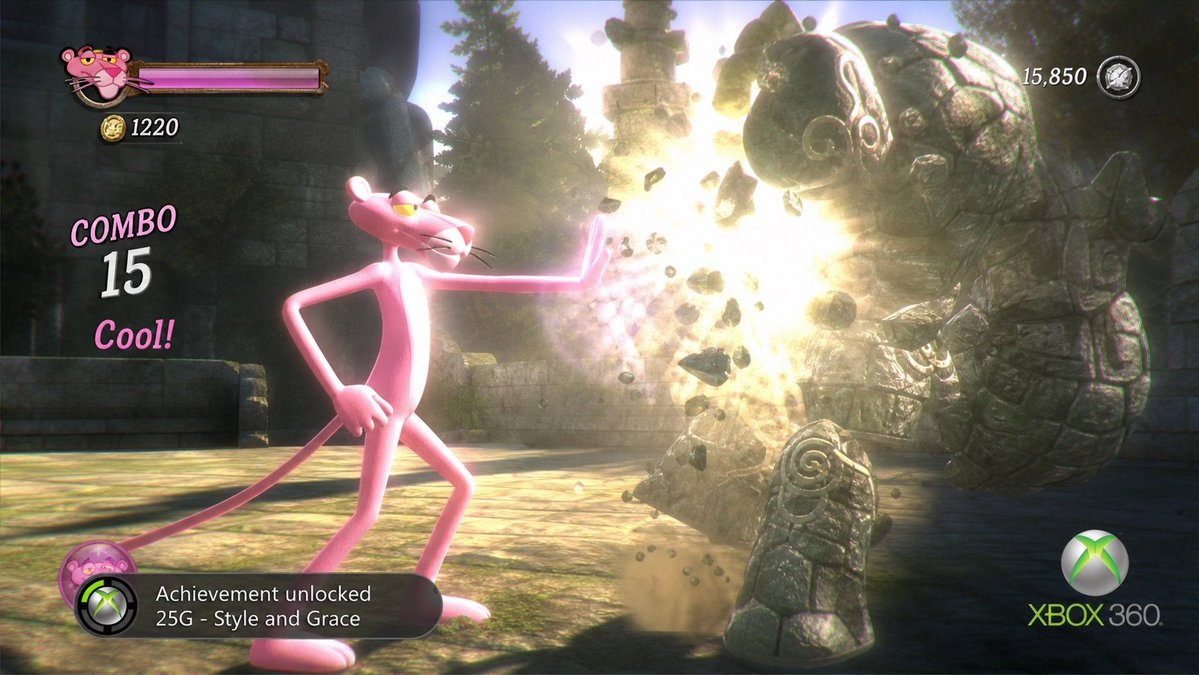
Pink Panther Xbox 360 Action Game Screenshot
Generate a cinematic, retro-styled Xbox 360 game screenshot featuring the Pink Panther in stylish combat with a gargoyle, complete with a full HUD and achievement UI.
提示词 · EN
type
电影感 Xbox 360 时代 3D 动作游戏截图恶搞aspect_ratio
16:9 宽屏scene
setting
古老的苔藓石庙庭院,背景有残垣断壁、雕刻石柱和常青树,带有尘埃的阳光和体积光camera
第三人称侧视角,低位电影感游戏镜头,轻微运动模糊,景深,高对比度泛光照明mood
时尚街机战斗,幽默的授权角色格斗游戏,2000 年代末主机画质main_subject
character
{argument name="main character" default="Pink Panther"}appearance
高瘦的粉色卡通豹,白色口鼻部和腹部,半眯的黄色眼睛,黑色胡须,长尾巴,超大爪子,自信的坏笑pose
站在画面左侧中心,一只手叉腰,右臂向前伸展,手掌张开,以优雅的姿态随意地阻挡或击飞敌人enemy
description
右侧的大型石像鬼,由厚重的裂纹灰色岩石块组成,带有螺旋雕刻和古代装饰图案,身体前倾,正因冲击而碎裂count
1 个敌方石像鬼effects
手掌冲击点有明亮的金白色爆炸,飞溅的碎片,尘云,悬浮在空中的巨石和裂块hud_and_ui
count
6 个独立的 UI 元素elements
item 1
label
玩家头像和生命值条position
左上角description
青铜边框内的小型 Pink Panther 头像图标,旁边是长条状的品红色生命值条item 2
label
金币计数器position
左上角生命值条下方text
1220description
金币图标后跟白色数字item 3
label
连击指示器position
左中text
COMBO 15 Cool!description
粉色风格化的 COMBO 文字,巨大的白色 15,粉色的 Cool!item 4
label
分数计数器position
右上角text
15,850description
白色分数数字旁有一个银色小奖章图标item 5
label
成就通知position
左下角text
Achievement unlocked 25G - Style and Gracedescription
黑色半透明圆角 Xbox 通知栏,带有 Xbox 球体图标和小型粉色角色徽章item 6
label
主机品牌标识position
右下角text
XBOX 360description
绿色和灰色的 Xbox 球体 Logo 以及 Xbox 360 字标text_to_render
achievement
{argument name="achievement text" default="Achievement unlocked 25G - Style and Grace"}combo
{argument name="combo text" default="COMBO 15 Cool!"}coin_count
{argument name="coin count" default="1220"}score
{argument name="score" default="15,850"}visual_style
精致的 3D 渲染,类似于虚构 Xbox 360 动作游戏的暂停游戏截图,光泽感的卡通角色与写实的石质废墟形成对比,强烈的泛光效果,粒子碎片,屏幕空间特效,清晰易读的 HUD 叠加层,真实的 2000 年代末成就弹窗,非真实游戏标题画面关于这个提示词
Generate a cinematic, retro-styled Xbox 360 game screenshot featuring the Pink Panther in stylish combat with a gargoyle, complete with a full HUD and achievement UI. 它更适合作为 GPT Image 2 的概念艺术起点:先保留画面结构、主体关系和风格约束,再替换成你的品牌、人物或场景。
这条提示词使用结构化 JSON 组织信息,包含 type、aspect ratio、scene、main subject、enemy、hud and ui、text to render 等字段。保留这种层级能让模型更清楚地区分画面主题、布局、界面元素和细节约束。
使用时建议先小幅修改主体、场景、镜头和色调,再生成多个版本对比构图与细节。这样页面内容对用户有实际帮助,也避免把模型名或标签机械堆在正文里。
如何使用这个提示词
- Copy the entire prompt body text provided.
- Choose a compatible AI image generation model like Sora.
- Replace the placeholder arguments (e.g.,
{argument name="main character" default="Pink Panther"}) with your desired character or text to customize the output. - Adjust the aspect ratio or other scene details if needed.
- Generate the image to create your unique, nostalgic Xbox 360-style action screenshot.


