
GPT Image 2AI 提示词
Retro Survival Death Game — Pixel Art UI Prompt
Create a customizable 8-bit video game mockup featuring a deadly survival game scene with editable HUD, menus, and iconic players.
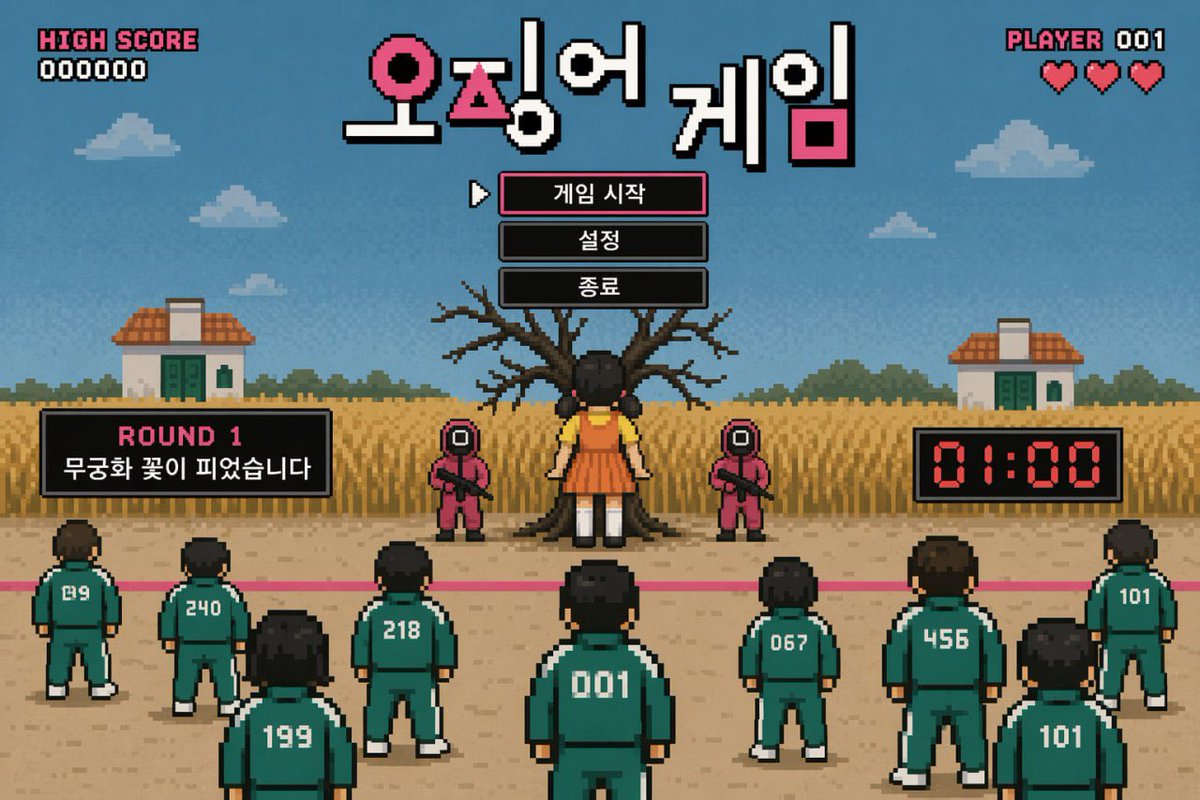
提示词 · EN
type
retro pixel art video game mockuptheme
survival death gamehud
top_left
item 1
HIGH SCOREitem 2
000000top_center_title
{argument name="game title" default="오징어 게임"}top_right
item 1
PLAYER 001item 2
3 red heartsmenu
style
centered under title, black boxes, white pixel font, cursor pointing to first itemitems
item 1
{argument name="menu item 1" default="게임 시작"}item 2
{argument name="menu item 2" default="설정"}item 3
{argument name="menu item 3" default="종료"}gameplay_ui
mid_left_panel
item 1
ROUND 1item 2
{argument name="round description" default="무궁화 꽃이 피었습니다"}mid_right_panel
item 1
01:00 digital red timerscene
background
blue sky, pixel clouds, 2 small houses, tall yellow grass fieldmidground
large bare tree, 1 giant doll in yellow shirt and orange dress facing the tree, 2 guards in pink jumpsuits with square masks holding riflesforeground
pink starting line on dirt ground, 9 players in green tracksuits facing away from the viewerplayer_numbers
item 1
019item 2
240item 3
199item 4
218item 5
001item 6
067item 7
456item 8
101item 9
101关于这个提示词
Create a customizable 8-bit video game mockup featuring a deadly survival game scene with editable HUD, menus, and iconic players. 它更适合作为 GPT Image 2 的概念艺术起点:先保留画面结构、主体关系和风格约束,再替换成你的品牌、人物或场景。
这条提示词使用结构化 JSON 组织信息,包含 type、theme、hud、menu、gameplay ui、scene 等字段。保留这种层级能让模型更清楚地区分画面主题、布局、界面元素和细节约束。
使用时建议先小幅修改主体、场景、镜头和色调,再生成多个版本对比构图与细节。这样页面内容对用户有实际帮助,也避免把模型名或标签机械堆在正文里。
如何使用这个提示词
- Copy the entire prompt JSON and paste it into your preferred AI model.
- Look for the
{argument name="..." default="..."}tags in the code. - Replace the text inside the
defaultquotes to change titles, menu items, and game rules. - Generate the image to see your unique retro pixel art survival scene.


