
GPT Image 2AI 提示词
Minimalist Productivity App UI — Sora 2 Prompt
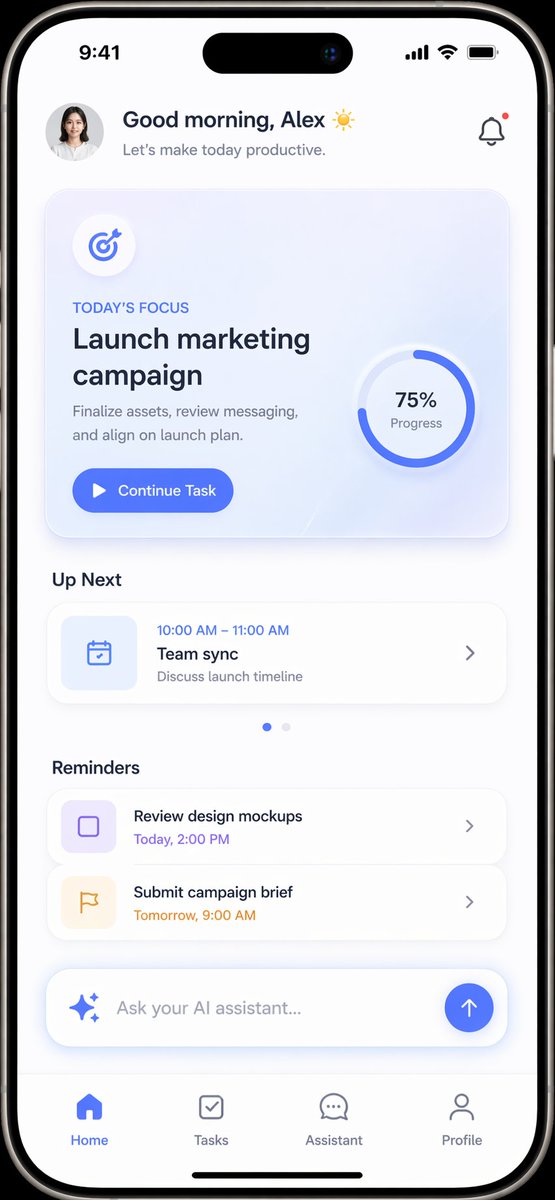
Create a clean, customizable mobile app mockup with a daily focus card, schedule, and built-in AI assistant input for modern productivity interfaces.
提示词 · EN
type
mobile app UI mockupdevice
modern smartphone with dynamic islandtheme
light mode, minimalist, {argument name="primary color" default="soft blue"} accents, soft drop shadowslayout
header
profile
small circular photo of a womangreeting
Good morning, {argument name="user name" default="Alex"} ☀️subtitle
Let's make today productive.icon
notification bell with red dothero_card
title
TODAY'S FOCUSheadline
{argument name="focus task" default="Launch marketing campaign"}description
Finalize assets, review messaging, and align on launch plan.button
Continue Taskgraphic
circular progress ring showing 75% Progresssections
item 1
title
Up Nextcount
1items
item 1
Team sync (10:00 AM - 11:00 AM)item 2
title
Reminderscount
2items
item 1
Review design mockupsitem 2
Submit campaign briefbottom_elements
ai_input
pill-shaped text field with sparkle icon and placeholder '{argument name="ai placeholder" default="Ask your AI assistant..."}'navigation_bar
count
4tabs
item 1
Homeitem 2
Tasksitem 3
Assistantitem 4
Profile关于这个提示词
Create a clean, customizable mobile app mockup with a daily focus card, schedule, and built-in AI assistant input for modern productivity interfaces. 它更适合作为 GPT Image 2 的概念艺术起点:先保留画面结构、主体关系和风格约束,再替换成你的品牌、人物或场景。
这条提示词使用结构化 JSON 组织信息,包含 type、device、theme、layout 等字段。保留这种层级能让模型更清楚地区分画面主题、布局、界面元素和细节约束。
使用时建议先小幅修改主体、场景、镜头和色调,再生成多个版本对比构图与细节。这样页面内容对用户有实际帮助,也避免把模型名或标签机械堆在正文里。
如何使用这个提示词
- Copy the entire JSON prompt block.
- Paste it into your preferred AI image generator (e.g., Sora, Midjourney, or DALL·E).
- Customize the variables — set your preferred
primary color,user name,focus task, andAI placeholdertext. - Generate the image and iterate by tweaking layout or color values for variations.


