
GPT Image 2AI 提示词
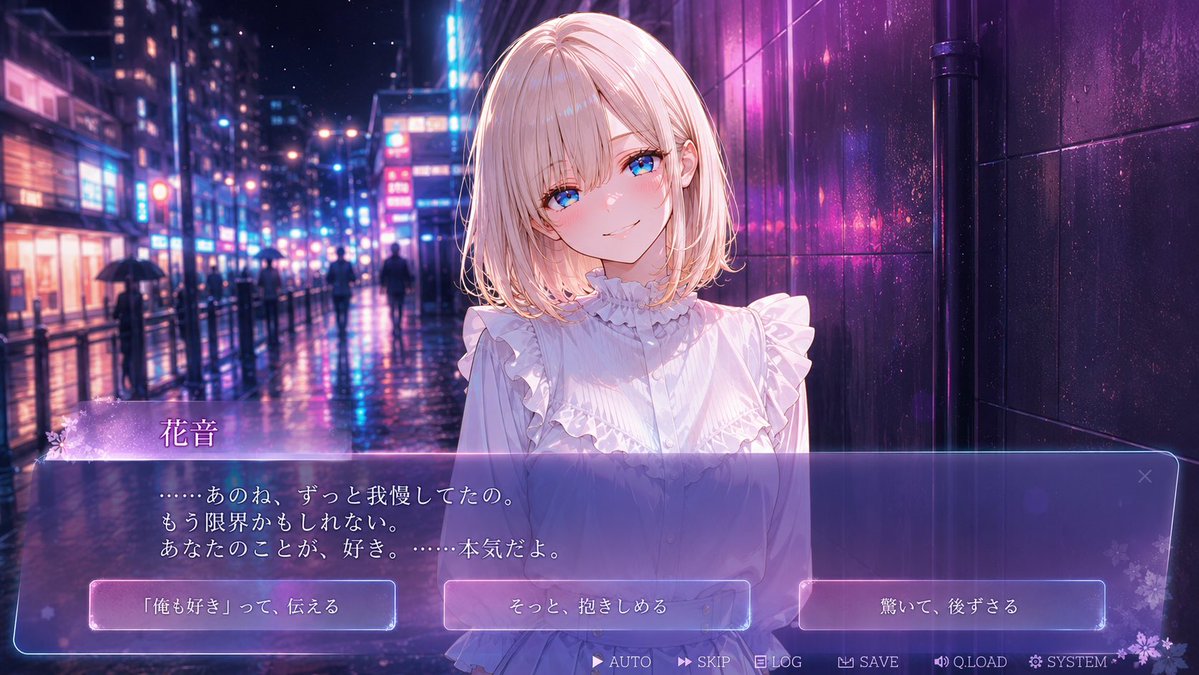
Rainy Night Neon Confession — Anime Visual Novel Game Screenshot Prompt
Generate a cinematic anime romance sim game screenshot with a heroine, Japanese dialogue UI, and three romantic choice buttons.
提示词 · EN
type
动漫视觉小说游戏截图genre
浪漫剧情恋爱模拟aspect_ratio
16:9 宽屏style
高细节日本动漫插画,电影感视觉小说 UI,光泽霓虹灯效,柔和光晕,浅景深,雨夜氛围character
name
{argument name="character name" default="花音"}position
前景中心,半身像appearance
年轻女性,皮肤白皙,气质温柔细腻;面部特征处覆盖有一个粉尘色的不透明正方形遮挡块,居中对齐hair
{argument name="hair color" default="浅金色"},齐肩波波头,内扣柔和,带有侧发,边缘有发光高光outfit
白色荷叶边衬衫,高领褶皱设计,垂直褶裥,前襟纽扣,肩部和胸部有层叠荷叶边,浪漫女性化风格pose
靠近观众站立,双肩微前倾,亲密的告白场景background
setting
雨夜霓虹城市街道,类似现代日本娱乐区details
湿润的反射路面,高耸的建筑带有发光招牌,模糊的打伞行人,蓝色与洋红色霓虹反射,右侧为深色光泽瓷砖墙,电影感焦外成像延伸至远方mood
苦乐参半,浪漫,感性,雨后深夜告白visual_novel_ui
overall
半透明玻璃拟态界面覆盖层,带有紫蓝色渐变,发光边框,淡雅花卉装饰与星光components_count
12components
item 1
type
nameplatecount
1position
对话框左下方visible_text
花音style
薰衣草色半透明标签,左侧带有小白花装饰item 2
type
dialogue boxcount
1position
底部三分之一处,横跨近全宽visible_text
……あのね、ずっと我慢してたの。
もう限界かもしれない。
あなたのことが、好き。……本気だよ。style
大型半透明紫蓝色圆角矩形框,细发光轮廓,柔和内部渐变item 3
type
choice buttonscount
3position
对话框底部区域内,水平排列labels
item 1
「俺も好き」って、伝えるitem 2
そっと、抱きしめるitem 3
驚いて、後ずさるstyle
矩形半透明按钮,带有淡粉蓝色光晕及白色日语文字item 4
type
bottom menu buttonscount
6position
最底端,居中偏右labels
item 1
AUTOitem 2
SKIPitem 3
LOGitem 4
SAVEitem 5
Q.LOADitem 6
SYSTEMstyle
小型白色文字配微型图标,极简视觉小说控制栏item 5
type
close iconcount
1position
对话框右上角label
×style
精致半透明图标composition
角色居中略偏右,左侧为霓虹街道纵深,右侧为深色墙壁,UI 占据底部三分之一,强烈的粉蓝色彩对比,精致的商业游戏 CG 质量rendering_instructions
创建一张可游玩的视觉小说场景截图,而非海报;保持所有 UI 文字清晰易读,包含精确的 3 个选项按钮和 6 个底部菜单标签,使用发光的雨水反射和浪漫的情感光效dialogue_customization
{argument name="dialogue text" default="……あのね、ずっと我慢してたの。\nもう限界かもしれない。\nあなたのことが、好き。……本気だよ。"}choice_customization
{argument name="choice options" default="「俺も好き」って、伝える / そっと、抱きしめる / 驚いて、後ずさる"}关于这个提示词
Generate a cinematic anime romance sim game screenshot with a heroine, Japanese dialogue UI, and three romantic choice buttons. 它更适合作为 GPT Image 2 的概念艺术起点:先保留画面结构、主体关系和风格约束,再替换成你的品牌、人物或场景。
这条提示词使用结构化 JSON 组织信息,包含 type、genre、aspect ratio、style、character、background、visual novel ui 等字段。保留这种层级能让模型更清楚地区分画面主题、布局、界面元素和细节约束。
使用时建议先小幅修改主体、场景、镜头和色调,再生成多个版本对比构图与细节。这样页面内容对用户有实际帮助,也避免把模型名或标签机械堆在正文里。
如何使用这个提示词
- Copy the entire prompt text.
- Paste it into a capable AI image generator like Sora 2.
- Adjust the
character nameorhair colorvariables if desired. - Generate the image to get a complete visual novel scene with UI.
- Refine the prompt based on the output for a different mood or style.


