
GPT Image 2AI 提示词
Minimalist Cordless Vacuum Hand-drawn Sketch — Sora 2 Prompt
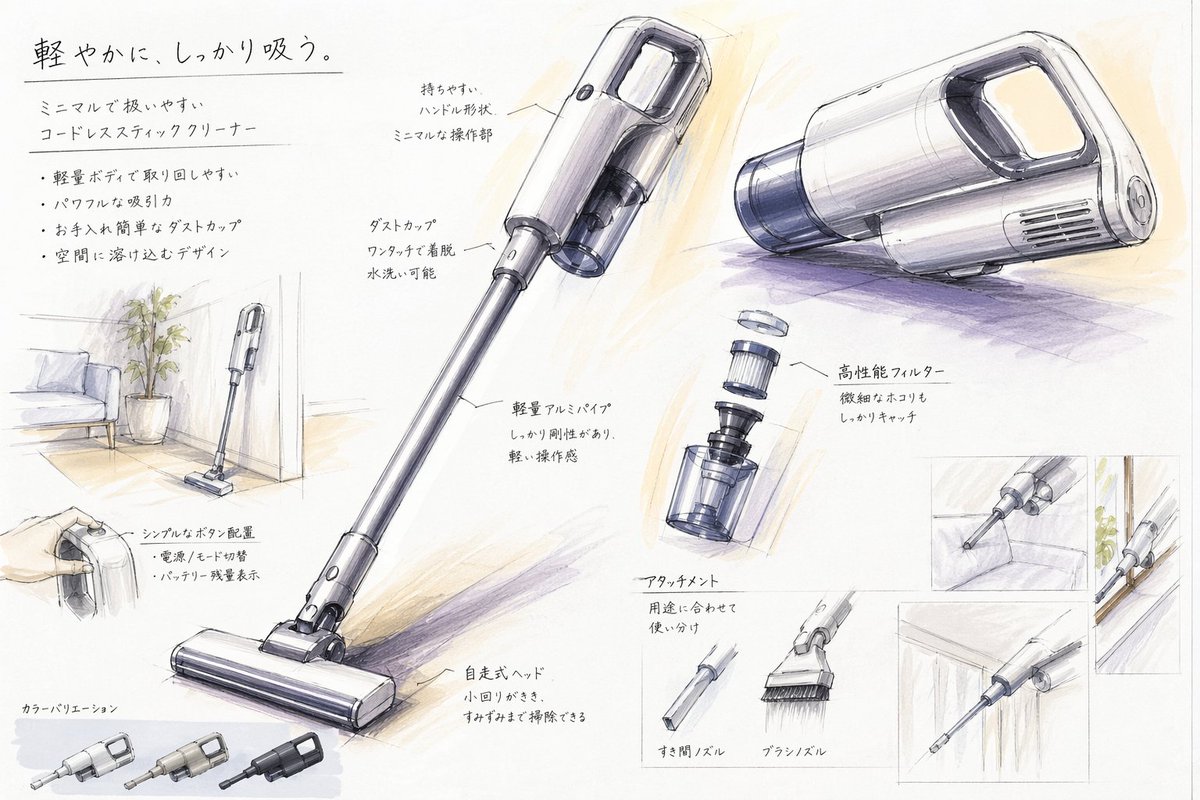
Generate a Japanese-style industrial design sketch of a minimalist cordless vacuum, with annotations, exploded views, and usage scenes.
提示词 · EN
type
工业设计展示项目style
手工产品概念草图,白纸上的马克笔和彩色铅笔渲染,干净的日式产品设计学院展示美学,浅灰色线条搭配柔和的紫色和暖米色阴影subject
product
极简无线手持吸尘器headline
{argument name="headline text" default="轻盈灵动,强力吸尘。"}subheadline
极简且易于操作的无线手持吸尘器features
item 1
轻量化机身,操作灵活item 2
强劲吸力item 3
易于清洁的尘杯item 4
融入家居空间的设计color
{argument name="product color" default="珍珠白与烟熏透明灰"}materials
哑光塑料机身,半透明尘杯,金属铝管layout
orientation
横向展示页sections
item 1
title
主产品视图position
中心及右上角count
3labels
item 1
吸尘器全貌四分之三视角item 2
主机上方中心透视图item 3
主机右上方侧面透视图item 2
title
功能标注position
围绕主视图count
7labels
item 1
易握手柄形状,极简操作区item 2
一键拆卸尘杯,可水洗item 3
轻量化铝管,刚性强,操作感轻盈item 4
高性能滤网,有效捕捉细微灰尘item 5
简洁按钮布局,电源/模式切换,电量显示item 6
自走式吸头,转弯灵活,清洁无死角item 7
多种配件,满足不同使用需求item 3
title
使用场景草图position
左侧及右侧插图count
5labels
item 1
吸尘器立于客厅角落,旁有盆栽和沙发item 2
手持手柄特写item 3
缝隙吸头清洁沙发缝隙item 4
吸尘器机身沿墙壁或狭窄空间收纳item 5
缝隙吸头清洁柜底或边缘item 4
title
附件配件position
中下方偏右count
2labels
item 1
缝隙吸头item 2
毛刷吸头item 5
title
组件爆炸图position
中右侧count
1labels
item 1
滤网与尘杯垂直拆解图item 6
title
颜色变体position
左下角count
3labels
item 1
浅银色item 2
暖灰色item 3
哑光黑text_language
日语composition
页面中心为大型对角线全长吸尘器,辅以透视渲染图和小型使用场景插图,留白充裕,带有引线的手写注释rendering
line_quality
松弛而精准的工业草图线条shading
柔和的马克笔渐变和铅笔交叉排线paper
略带纹理的白色素描纸mood
高端、亲和,兼具学生概念项目与专业产品提案风格关于这个提示词
Generate a Japanese-style industrial design sketch of a minimalist cordless vacuum, with annotations, exploded views, and usage scenes. 它更适合作为 GPT Image 2 的概念艺术起点:先保留画面结构、主体关系和风格约束,再替换成你的品牌、人物或场景。
这条提示词使用结构化 JSON 组织信息,包含 type、style、subject、layout、rendering 等字段。保留这种层级能让模型更清楚地区分画面主题、布局、界面元素和细节约束。
使用时建议先小幅修改主体、场景、镜头和色调,再生成多个版本对比构图与细节。这样页面内容对用户有实际帮助,也避免把模型名或标签机械堆在正文里。
如何使用这个提示词
- Copy the prompt text from this page.
- Paste it into your preferred AI image generator (e.g., DALL·E 3, Midjourney).
- Adjust the arguments
headline textandproduct colorto customize the product name and color palette. - Generate the image. For DALL·E, enable high resolution; for Midjourney, add
--ar 16:9for landscape. - Review the output and regenerate with a new seed if adjustments are needed.


