
GPT Image 2AI 提示词
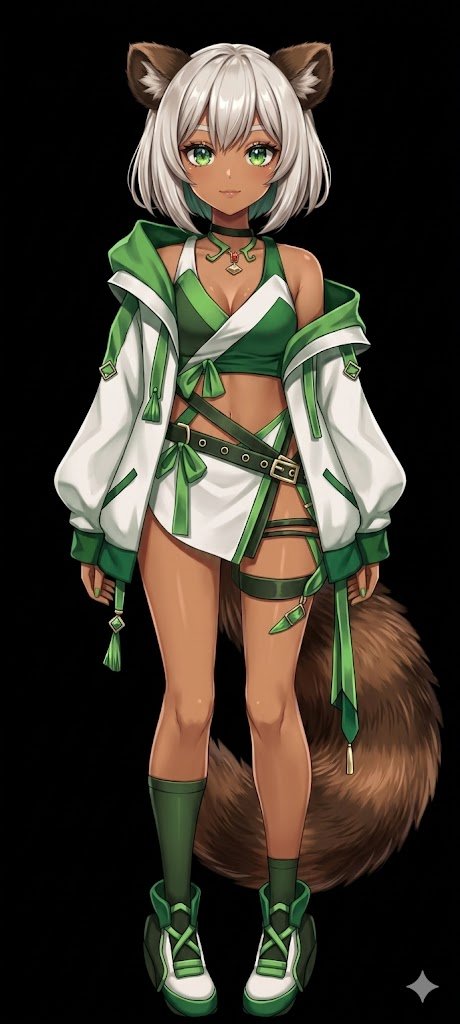
Flat Color to Anime Rendering — AI Illustration Prompt
Transform flat-colored character references into fully rendered anime illustrations with dynamic lighting, metallic accents, and a pure black background.
提示词 · EN
使用 REFERENCE_0,将平涂配色的角色转换为 argart style: 完整渲染的高质量动漫插画。为皮肤、头发、眼睛、服装和尾巴应用精细的 arglighting effect: 阴影、光泽高光和深度感,赋予 2D 设计精致的立体感。为扣环和珠宝添加金属光泽。将背景更改为 argbackground color: 纯黑色。请务必保留角色在参考图中的原始设计、服装和中性姿势。
关于这个提示词
Transform flat-colored character references into fully rendered anime illustrations with dynamic lighting, metallic accents, and a pure black background. 它更适合作为 GPT Image 2 的概念艺术起点:先保留画面结构、主体关系和风格约束,再替换成你的品牌、人物或场景。
使用时优先替换 art style、lighting effect、background color 等占位符,并保持镜头、构图和材质描述的顺序不变。这样更容易获得稳定的画面结果,也方便继续做多版本对比。
如何使用这个提示词
- Copy the prompt and paste it into your AI image generation tool.
- Select an anime-specialized model (e.g., Niji Journey, NovelAI, Stable Diffusion with anime checkpoints).
- Customize the
art style,lighting effect, andbackground colorarguments to fit your vision. - Generate the image and refine by iterating with slight adjustments if needed.
- For optimal outcome, use a reference character with a neutral pose and distinct design elements.


