
GPT Image 2AI 提示词
Blood Sugar Monitoring Flyer Prompt — Sora 2
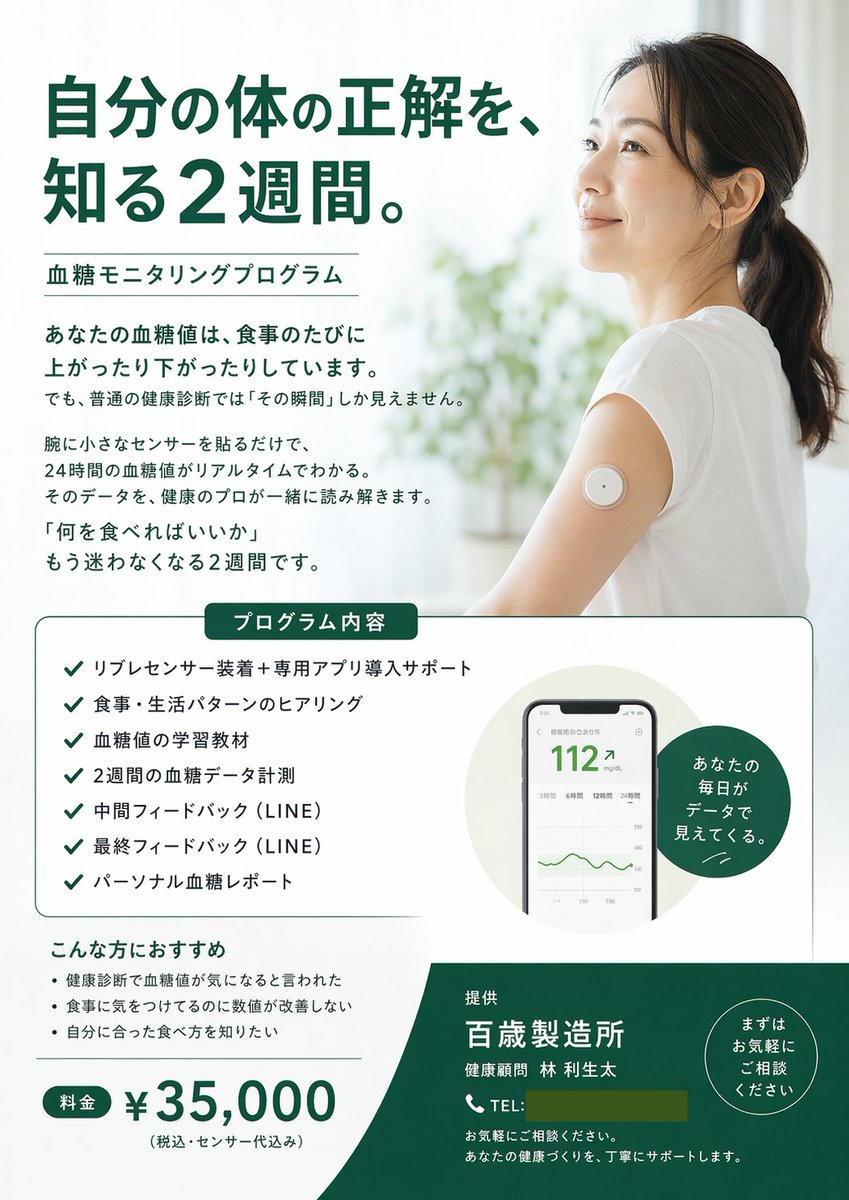
Generate a clean, medical-style promotional flyer for glucose monitoring programs, complete with hero image, checklist, device mockups, and pricing table.
提示词 · EN
type
宣传单style
简洁、医疗、专业、通透color_palette
item 1
白色item 2
深绿色item 3
黑色layout
hero
headline
{argument name="main headline" default="了解身体真相的 2 周时间。"}subheadline
{argument name="program name" default="血糖监测项目"}image
{argument name="hero image subject" default="一位身穿白色 T 恤的亚洲女性微笑着,看向右上方,上臂佩戴着圆形的白色动态血糖监测传感器。背景明亮通透,带有模糊的植物。"}intro_text_paragraphs
4middle_section
box_title
项目内容checklist_count
7checklist_items
item 1
Libre 传感器佩戴及专属 App 安装支持item 2
饮食与生活习惯问询item 3
血糖值学习资料item 4
2 周血糖数据监测item 5
中期反馈 (LINE)item 6
最终反馈 (LINE)item 7
个人血糖报告visuals
item 1
显示血糖读数为 '112' 和绿色折线图的智能手机 UI 模型item 2
深绿色圆形徽章,文字为 '通过数据洞察你的每一天。'bottom_section
recommendations_title
推荐人群recommendations_count
3recommendations_items
item 1
体检时被告知需要关注血糖值item 2
注意饮食但数值没有改善item 3
想了解适合自己的饮食方式pricing
label
费用amount
{argument name="price" default="¥35,000"}note
(含税,包含传感器费用)footer
background_color
深绿色provider
{argument name="company name" default="百岁制造所"}representative
健康顾问 林 利生太contact_info
电话占位符及支持文本badge
圆形徽章,文字为 '欢迎随时咨询'关于这个提示词
Generate a clean, medical-style promotional flyer for glucose monitoring programs, complete with hero image, checklist, device mockups, and pricing table. 它更适合作为 GPT Image 2 的概念艺术起点:先保留画面结构、主体关系和风格约束,再替换成你的品牌、人物或场景。
这条提示词使用结构化 JSON 组织信息,包含 type、style、color palette、layout 等字段。保留这种层级能让模型更清楚地区分画面主题、布局、界面元素和细节约束。
使用时建议先小幅修改主体、场景、镜头和色调,再生成多个版本对比构图与细节。这样页面内容对用户有实际帮助,也避免把模型名或标签机械堆在正文里。
如何使用这个提示词
- Copy the JSON prompt from the snippet above.
- Open Sora 2 and paste it into the design input field.
- Customize the arguments in curly braces: main headline, program name, price, and company details.
- Click 'Generate' to see the flyer layout.
- Tweak any section—like colors or checklist items—and regenerate until satisfied.


