
GPT Image 2AI 提示词
Generate a Custom Voxel Game Screenshot — Sora 2 Prompt
Generate a detailed, customizable first-person voxel game screenshot with editable documents, UI, and environment elements using this AI prompt.
提示词 · EN
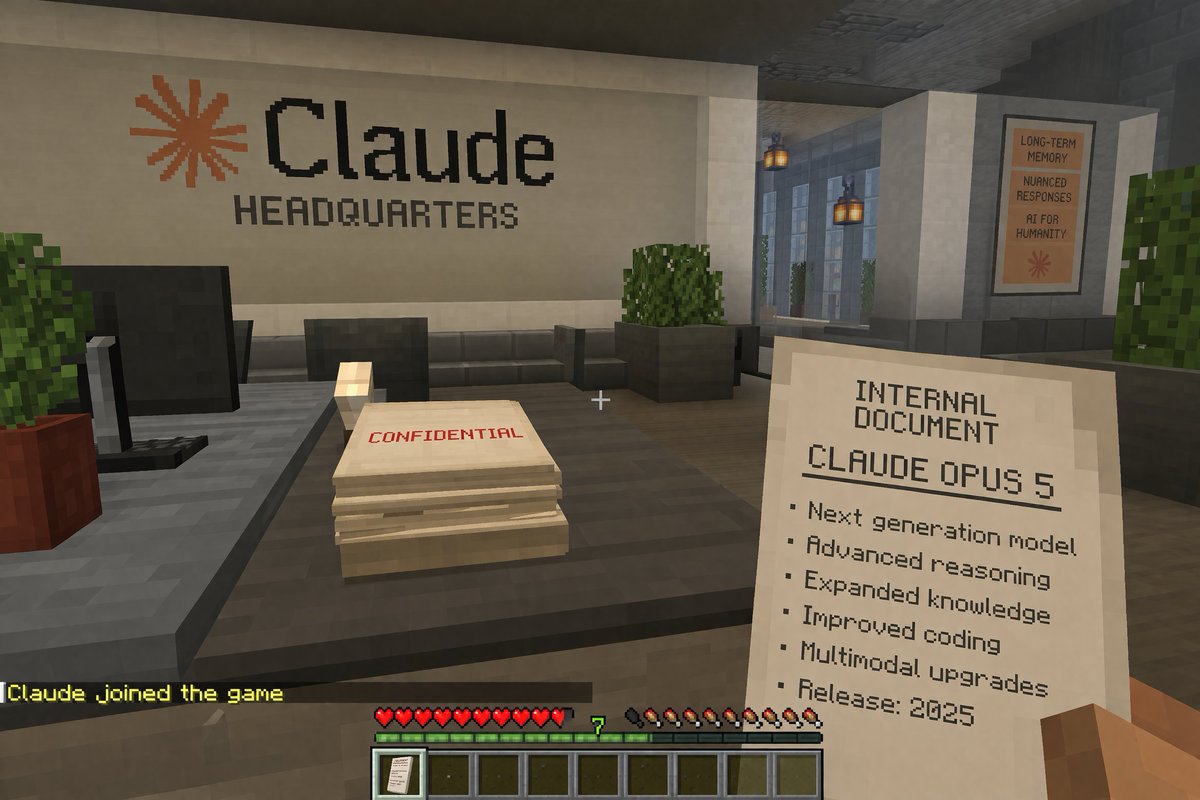
一张第一人称体素游戏截图。玩家方块状的右手拿着一份写有“INTERNAL DOCUMENT”的纸张,内容包含“argdocument title: CLAUDE OPUS 5”以及一个以“Release: 2025”结尾的 6 项列表。屏幕中央有一个白色准星。前方是一张深灰色办公桌,上面放着一台黑色显示器和一叠标有红色“CONFIDENTIAL”字样的纸张。后方的白色墙壁上显示着一个橙色星号,以及“argcompany name: Claude”和“HEADQUARTERS”字样。右侧走廊悬挂着灯笼,并贴有一张写着“LONG-TERM MEMORY”、“NUANCED RESPONSES”、“AI FOR HUMANITY”的海报。底部 HUD 显示黄色的聊天文本“argchat message: Claude joined the game”、10 颗红心、一个显示“7”的绿色经验条、10 个饥饿度鸡腿,以及一个在第一个槽位带有文档图标的 9 格快捷栏。
关于这个提示词
Generate a detailed, customizable first-person voxel game screenshot with editable documents, UI, and environment elements using this AI prompt. 它更适合作为 GPT Image 2 的概念艺术起点:先保留画面结构、主体关系和风格约束,再替换成你的品牌、人物或场景。
使用时优先替换 document title、company name、chat message 等占位符,并保持镜头、构图和材质描述的顺序不变。这样更容易获得稳定的画面结果,也方便继续做多版本对比。
如何使用这个提示词
- Copy the prompt above.
- Paste it into a compatible AI image generator, such as Sora 2.
- Modify the argument values (e.g., document title, company name, chat message) to customize the scene.
- Generate the image to receive your personalized voxel game screenshot.
- Iterate by adjusting variables to create different office or game UI mockups.


