
GPT Image 2AI 提示词
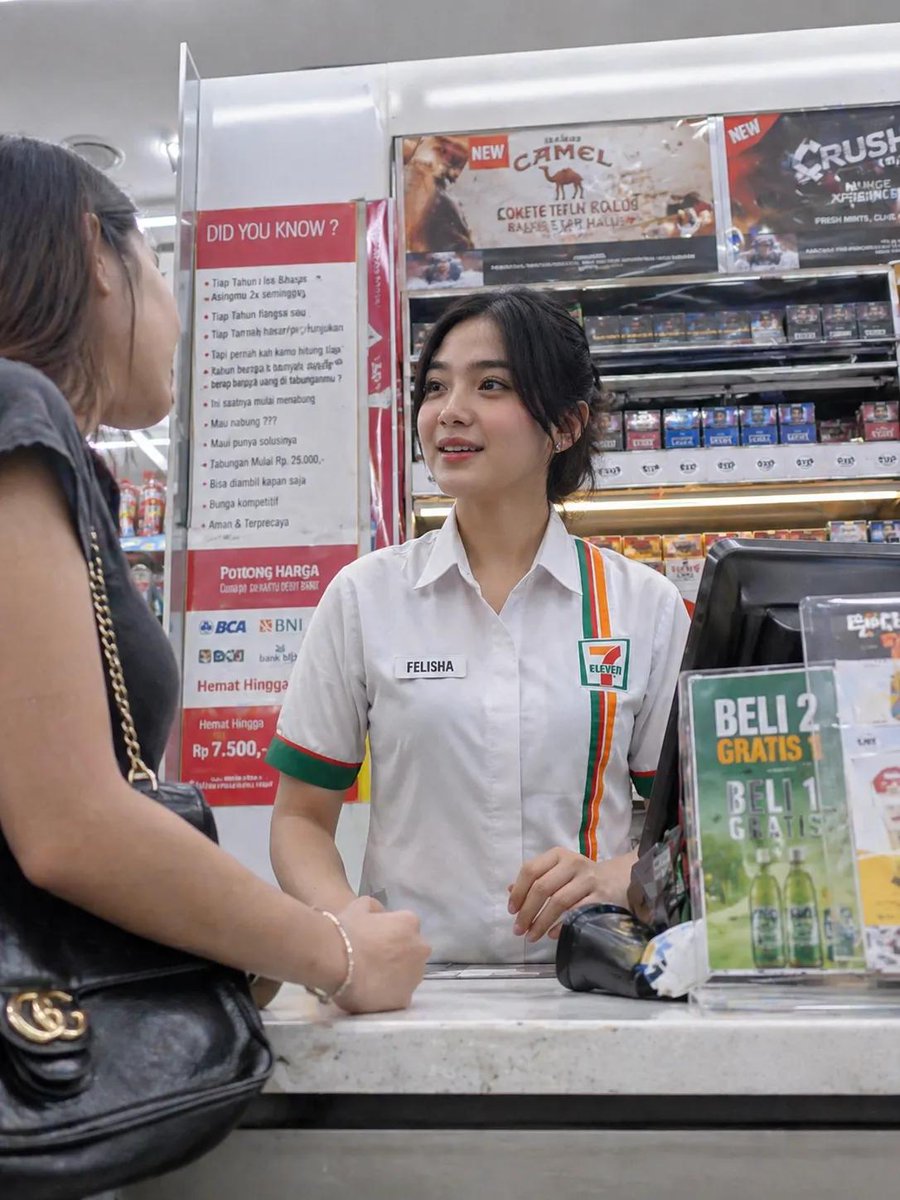
Convenience Store Cashier Snapshot — Sora 2 Prompt
Create ultra-realistic candid photos of a convenience store cashier with this AI prompt, complete with customizable uniform and action details for authentic snapshots.
1 / 4
提示词 · EN
一位美丽的 argnationality: 年轻印尼女性,20 出头,在便利店担任收银员,身穿 arguniform: 典型的 7-Eleven 制服(带有绿、红、橙色装饰的白衬衫,名牌上写着“FELISHA”,头发整齐地扎在脑后)。她站在收银台后,面带友好而自然的表情为顾客服务。柜台上放着 POS 机、条形码扫描仪以及糖果和饮料等小商品。抓拍瞬间:照片由顾客视角使用智能手机隐蔽拍摄,前景略有模糊,构图不完美,具有未经摆拍的自发感。光线来自明亮且分布均匀的便利店霓虹灯。环境:现代便利店内部,收银台后货架上的商品摆放整齐,营造出干净明亮的氛围。摄影风格:写实摄影、抓拍、浅景深、自然的肤色、高细节、轻微的运动模糊以增加真实感、4K 画质。可选的变体添加项:略微倾斜的角度、智能手机摄像头噪点效果、玻璃展示柜上的反光、argaction: 收银员温柔地微笑着递出收据或找零
关于这个提示词
Create ultra-realistic candid photos of a convenience store cashier with this AI prompt, complete with customizable uniform and action details for authentic snapshots. 它更适合作为 GPT Image 2 的概念艺术起点:先保留画面结构、主体关系和风格约束,再替换成你的品牌、人物或场景。
使用时优先替换 nationality、uniform、action 等占位符,并保持镜头、构图和材质描述的顺序不变。这样更容易获得稳定的画面结果,也方便继续做多版本对比。
如何使用这个提示词
- Copy the entire prompt text.
- Open your preferred AI image generator (e.g., Sora 2, DALL·E, Stable Diffusion).
- Modify the variables like
nationality,uniform, oractionto customize the scene. - Paste the prompt and generate your image; for more candid feel, adjust parameters like noise or motion blur.
- Refine by tweaking the description or using negative prompts if needed.


