Sora2 Hub
Sora2 Hub
  • 提示词库
  • 定价
  • 案例展示
Sora2 Hub
Sora2 Hub
Sora2 Hub

Sora2 Hub

由 Sora 2、Veo 3.1 和 Nano Banana Pro 驱动的专业 AI 创作平台。提供高级控制、高清画质和无水印的视频与工作室级图像创作。

Email:support@sora2hub.org

AI 视频生成

  • 文生视频
  • 图生视频
  • Veo 3.1
  • Sora 2
  • Kling 3.0
  • Kling 2.6
  • Kling 2.5
  • Runway
  • Wan 2.6
  • Seedance 2.0
  • Hailuo 2.3
  • Grok Imagine
  • HappyHorse-1.0
  • HappyHorse 1.1
  • Kling 3.0 Turbo
  • Volcengine Video-to-Video Lip Sync
  • OmniHuman 1.5
  • Grok Imagine Video 1.5
  • Gemini Omni
  • Wan 2.7 Video
  • Seedance 2.0 Mini

AI 图像生成

  • 文生图
  • 图生图
  • Nano Banana Pro
  • Nano Banana
  • 4o Image
  • Flux Kontext
  • Z Image
  • Seedream 4.5
  • Seedream 5.0 Lite
  • Nano Banana 2
  • GPT Image 2
  • AI 图片增强
  • Seedream 5.0 Pro
  • Nano Banana 2 Lite
  • Qwen Image 2.0

AI 特效

  • AI 年龄滤镜
  • AI 性别转换
  • AI 亲吻
  • AI 拥抱
  • 吉卜力图片
  • AI 美人鱼滤镜
  • AI 身体摇摆
  • 微笑滤镜
  • AI 变胖
  • 动作人偶

产品

  • 功能特点
  • 案例展示
  • 定价

公司

  • 关于我们
  • 联系我们

© 2025 • Sora2 Hub ORG 保留所有权利。

  • 隐私政策
  • 服务条款
  • 退款政策
  1. 首页
  2. /
  3. 提示词
  4. /
  5. GPT Image 2
  6. /
  7. Historical Aerial Photo Colorization — Sora 2 Prompt
GPT Image 2AI 提示词

Historical Aerial Photo Colorization — Sora 2 Prompt

Transform black-and-white aerial photos into realistic color images using a reference photo as a color guide for rivers, vegetation, soil, and structures.
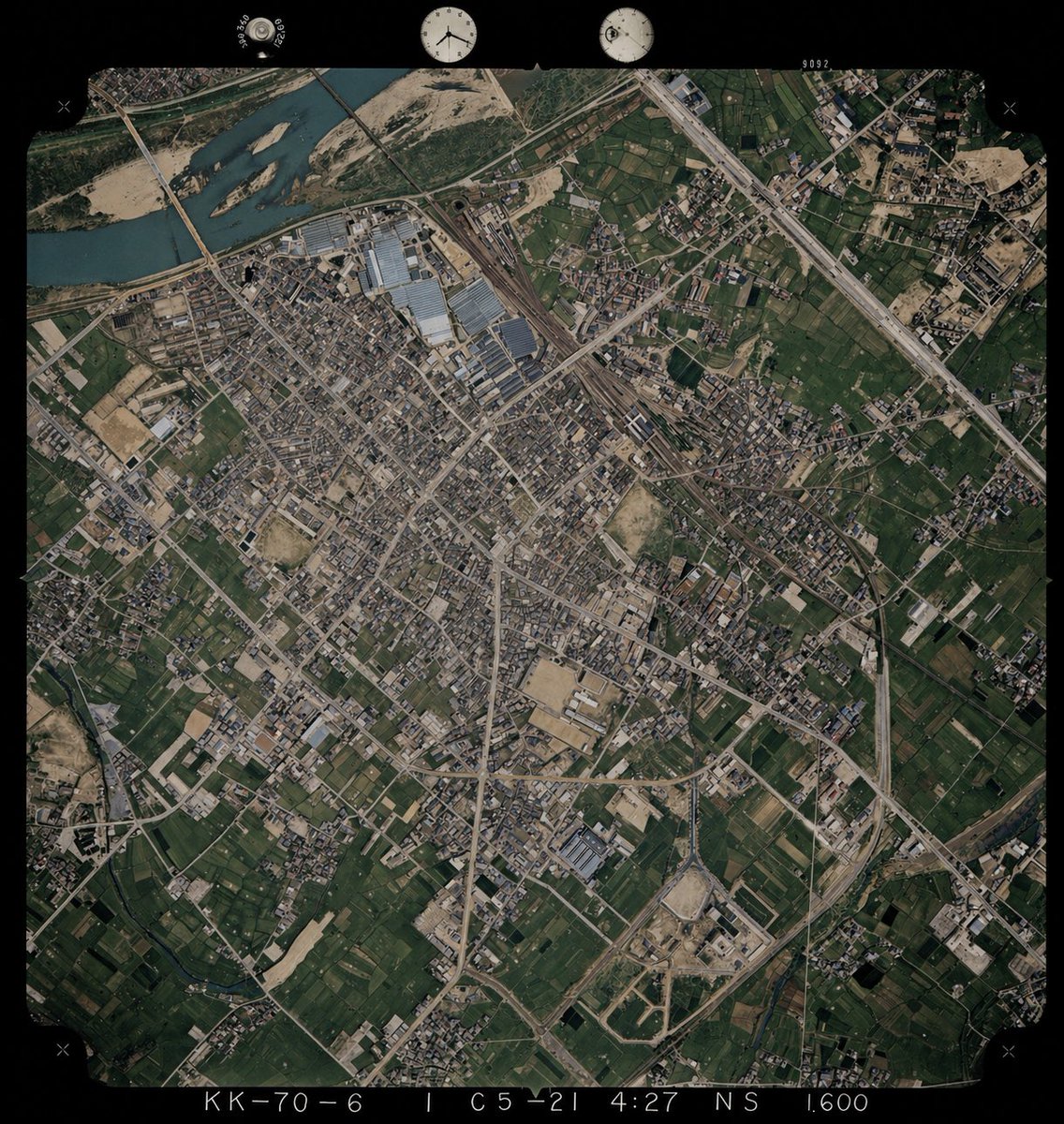
Historical Aerial Photo Colorization — Sora 2 Prompt
提示词 · EN
以 REFERENCE_0 为底图,为单色历史航拍照片上色,同时保留原始的构图、角度、比例、胶片边框、边缘标记以及所有地理结构。仅将 REFERENCE_1 作为从高空俯瞰时的地表颜色参考指南。保持旧照片的布局和地形细节不变,但需推断出 4 种主要地表类型的自然色彩:河流为柔和的蓝绿色,植被和农田为深浅不一的深绿色,裸露土壤/沙地和建筑区域为棕褐色,道路/建筑物/工业屋顶为低饱和度的灰色至浅棕色。保持写实的档案级航拍照片质感,而非现代卫星图像风格,确保色彩饱和度适中、对比度微妙,并使整张图像的色彩保持一致。

关于这个提示词

Transform black-and-white aerial photos into realistic color images using a reference photo as a color guide for rivers, vegetation, soil, and structures. 它更适合作为 GPT Image 2 的概念艺术起点:先保留画面结构、主体关系和风格约束,再替换成你的品牌、人物或场景。

使用时建议先小幅修改主体、场景、镜头和色调,再生成多个版本对比构图与细节。这样页面内容对用户有实际帮助,也避免把模型名或标签机械堆在正文里。

如何使用这个提示词

  1. Copy this prompt and paste it into your Sora 2 or compatible AI video/image model interface.
  2. Upload your black-and-white historical aerial photo as REFERENCE_0 (the base image).
  3. Upload a color aerial photo of a similar landscape as REFERENCE_1 (the color palette guide).
  4. Adjust any surface-type color preferences if needed, such as river tones or vegetation shades.
  5. Generate the output and review for color consistency, archival texture, and structural fidelity before downloading.

常见问题

まぬある

@lTlanual→

发布时间
2026年4月30日
原始语言
EN
模型
GPT Image 2
分类
概念艺术
GPT Image 2概念艺术gpt-image-2twitter
浏览
829
复制
47
点赞
64

分享

更多来自 GPT Image 2

浏览全部
Minimalist Japanese Electric Nail Clipper Product Landing Page — Sora 2 Prompt

Minimalist Japanese Electric Nail Clipper Product Landing Page — Sora 2 Prompt

@eisho_m
Dynamic Nike Ad Poster — Sora 2 Prompt with Sydney Sweeney

Dynamic Nike Ad Poster — Sora 2 Prompt with Sydney Sweeney

@im_shahid7
Luxury Tennis Fashion Poster — Bold Studio Shoot Sora Prompt

Luxury Tennis Fashion Poster — Bold Studio Shoot Sora Prompt

@blueski68251660

用 Sora2Hub 提示词更快创作。

把精选提示词页面作为可搜索入口,然后带着模型上下文直接进入生成流程。

探索更多提示词