
GPT Image 2AI 提示词
Bold Japanese Editorial Slide Infographic — Sora Prompt
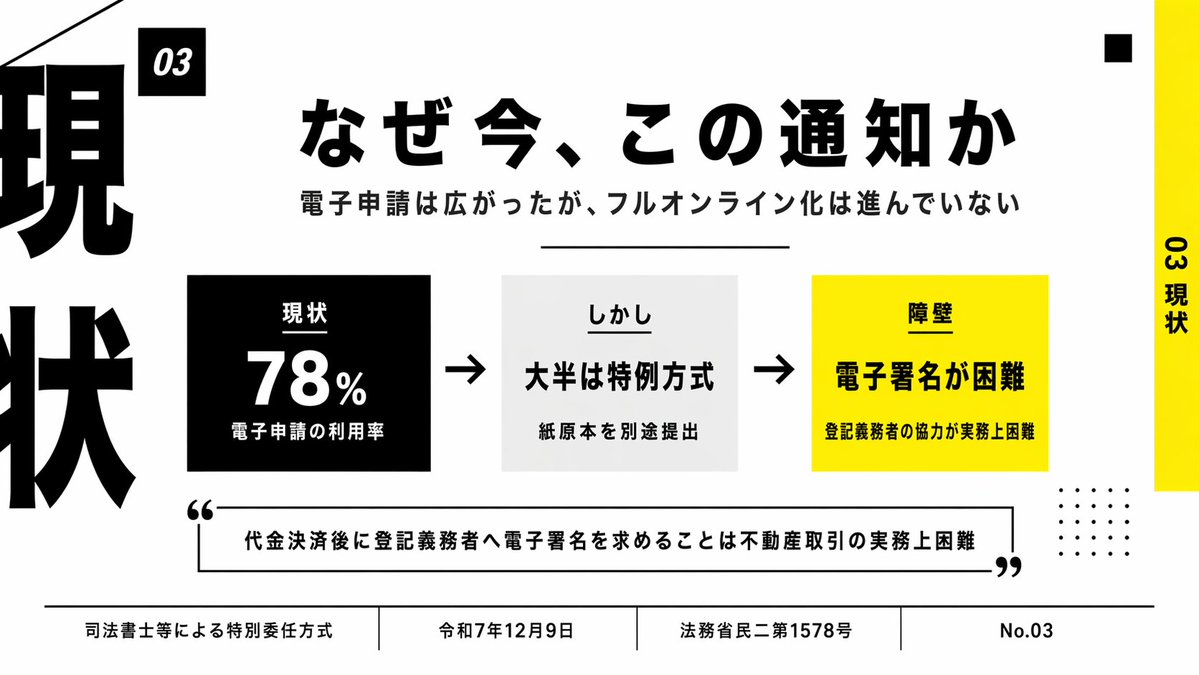
Craft a striking Japanese minimalist slide with bold typography, high-contrast black & yellow palette, and clean layout for business or policy presentations.
提示词 · EN
type
日式演示文稿style
极简编辑风格商务信息图表,大胆的排版布局,黑白黄高对比度配色,整洁的网格,大量留白,清晰的矢量文字与形状canvas
aspect_ratio
16:9background
浅灰色headline
text
{argument name="headline text" default="なぜ今、この通知か"}position
上中font
超粗日文无衬线体color
黑色size
超大subheadline
text
电子申请虽然普及,但全面线上化进程缓慢position
标题下方font
粗体日文无衬线体color
黑色size
中等layout
sections
item 1
title
03position
主内容左上角的小型黑色标签count
1labels
item 1
03item 2
title
主流程行position
居中count
3labels
item 1
现状item 2
然而item 3
壁垒item 3
title
底部页脚position
底部全宽count
4labels
item 1
司法书士等特别委任方式item 2
令和 7 年 12 月 9 日item 3
法务省民二第 1578 号item 4
No.03decorations
left_edge
左侧边缘有超大裁剪的黑色垂直汉字排版,显示“现”和“状”的部分笔画right_edge
最右侧有黄色垂直条,配有旋转的黑色文字“03 现状”top_right
1 个小黑方块bottom_right
4x5 的小黑点网格top_left
从左上角延伸出的细黑色对角线divider_under_subheadline
1 条细水平黑线center_graphic
items
item 1
kind
stat boxcount
1background
黑色text_lines
item 1
现状item 2
78%item 3
电子申请利用率text_color
白色position
居中偏左item 2
kind
arrowcount
2color
黑色positions
item 1
第一个与第二个方框之间item 2
第二个与第三个方框之间item 3
kind
statement boxcount
1background
极浅灰色text_lines
item 1
然而item 2
大半为特例方式item 3
需另行提交纸质原件text_color
黑色position
居中item 4
kind
barrier boxcount
1background
亮黄色text_lines
item 1
壁垒item 2
电子签名困难item 3
实务中难以获得登记义务人配合text_color
黑色position
居中偏右quote
count
1text
{argument name="quote" default="代金決済後に登記義務者へ電子署名を求めることは不動産取引の実務上困難"}position
下中部,位于带开口的轮廓矩形内,配有超大引号style
粗体日文无衬线体,黑色文字,黑色边框colors
black
#000000white
#FFFFFFlight_gray
#F2F2F2yellow
#FFF200rendering
扁平化幻灯片设计,精确排版,适合演示的企业级布局,日文文字渲染清晰易读关于这个提示词
Craft a striking Japanese minimalist slide with bold typography, high-contrast black & yellow palette, and clean layout for business or policy presentations. 它更适合作为 GPT Image 2 的概念艺术起点:先保留画面结构、主体关系和风格约束,再替换成你的品牌、人物或场景。
这条提示词使用结构化 JSON 组织信息,包含 type、style、canvas、headline、subheadline、layout、center graphic 等字段。保留这种层级能让模型更清楚地区分画面主题、布局、界面元素和细节约束。
使用时建议先小幅修改主体、场景、镜头和色调,再生成多个版本对比构图与细节。这样页面内容对用户有实际帮助,也避免把模型名或标签机械堆在正文里。
如何使用这个提示词
- Copy the prompt text into your AI image generation tool (e.g., Sora, Midjourney, Stable Diffusion).
- Select a model that excels at text rendering and complex layouts (DALL·E 3 or Sora recommended for Japanese text).
- Customize the headline, subheadline, or quote by replacing the argument placeholders (e.g.,
{headline text}) with your own content. - Generate the slide and use it as a professional template for meetings, reports, or policy briefings.
- For exact text accuracy, consider overlaying text in a design tool after generation.


