
GPT Image 2AI 提示词
Hyper-Realistic Portrait with Inset — Sora 2 Prompt
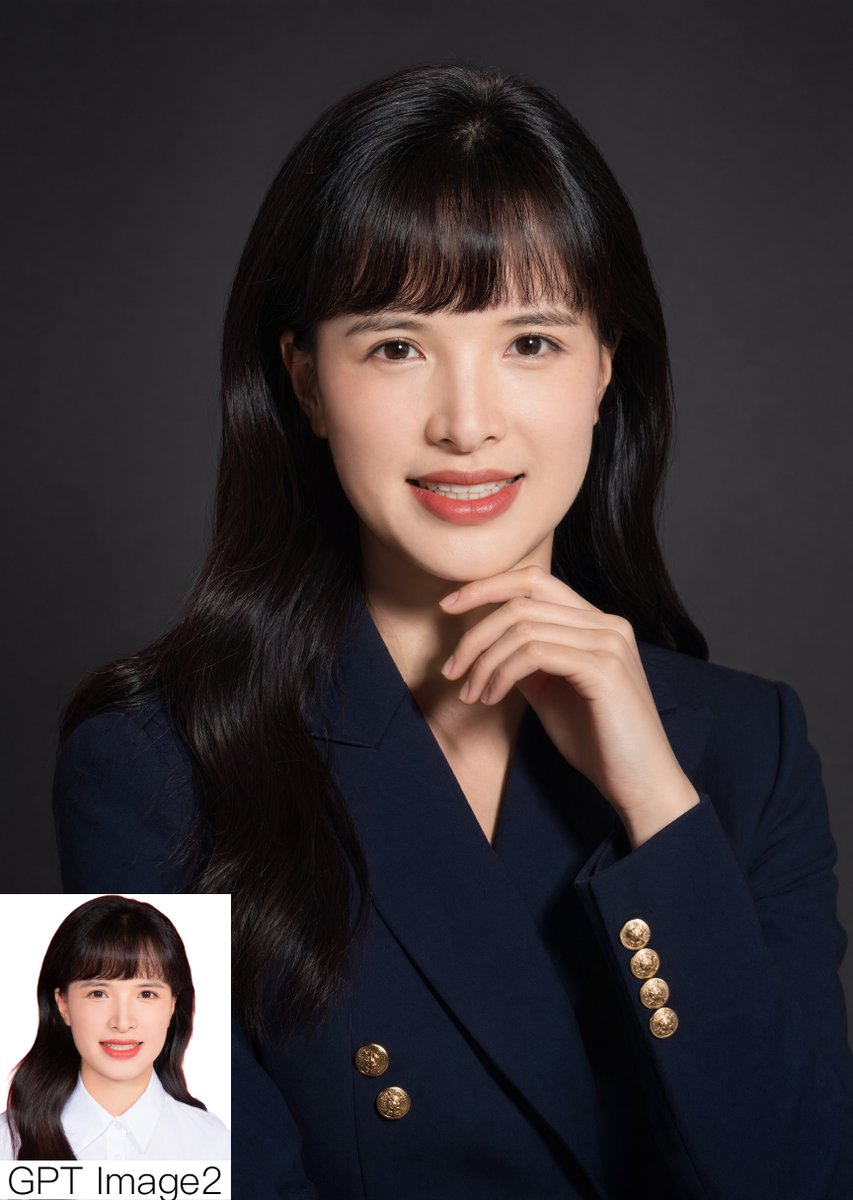
Generate a hyper-realistic business portrait with a thoughtful pose and embedded comparison inset—ideal for showcasing AI photorealism and model comparisons.
提示词 · EN
一张精致的摄影肖像,主体为 argsubject: 年轻东亚女性,半身像,居中面向前方,背景为平滑的深炭灰色,带有微妙的晕影灯光效果。她留着长而有光泽、微卷的 arghair color: 黑色 头发,垂在双肩两侧,配有柔和的直刘海和整齐的中分发线。她穿着一件剪裁考究的双排扣 argblazer color: 深海军蓝 西装外套,带有 6 枚明显的圆形金色徽章纽扣,营造出优雅的专业形象。她的右手若有所思地抬起托在下巴下方,手指放松,呈现出端庄的正式姿态。使用来自左前方的柔和定向摄影灯光,呈现高细节的皮肤纹理、逼真的面料质感、柔和的阴影以及高级商务头像的审美。画面采用竖构图,简洁明快,主体占据画面大部分空间。在左下角添加 1 张白色背景的小型矩形嵌入式对比照片,展示同一位女性穿着白色翻领衬衫的简约证件照风格,并在嵌入图下方或上方叠加显示 argcorner text: GPT Image2 字样,使用醒目的黑色无衬线字体。超写实,精致,具备编辑级肖像品质。
关于这个提示词
Generate a hyper-realistic business portrait with a thoughtful pose and embedded comparison inset—ideal for showcasing AI photorealism and model comparisons. 它更适合作为 GPT Image 2 的概念艺术起点:先保留画面结构、主体关系和风格约束,再替换成你的品牌、人物或场景。
使用时优先替换 subject、hair color、blazer color、corner text 等占位符,并保持镜头、构图和材质描述的顺序不变。这样更容易获得稳定的画面结果,也方便继续做多版本对比。
如何使用这个提示词
- Copy the prompt text from above.
- Paste it into an AI image generator (e.g., Sora 2, Midjourney, DALL·E 3).
- Customize the variables:
subject(e.g., "young East Asian woman"),hair color(e.g., "black"),blazer color(e.g., "deep navy blue"), andcorner text(e.g., "GPT Image2"). - Generate the image using a model capable of high photorealism.
- Use the output for AI comparison articles, quality demonstrations, or portfolio pieces.


