
GPT Image 2AI 提示词
Minecraft Style Portrait — Sora 2 Prompt
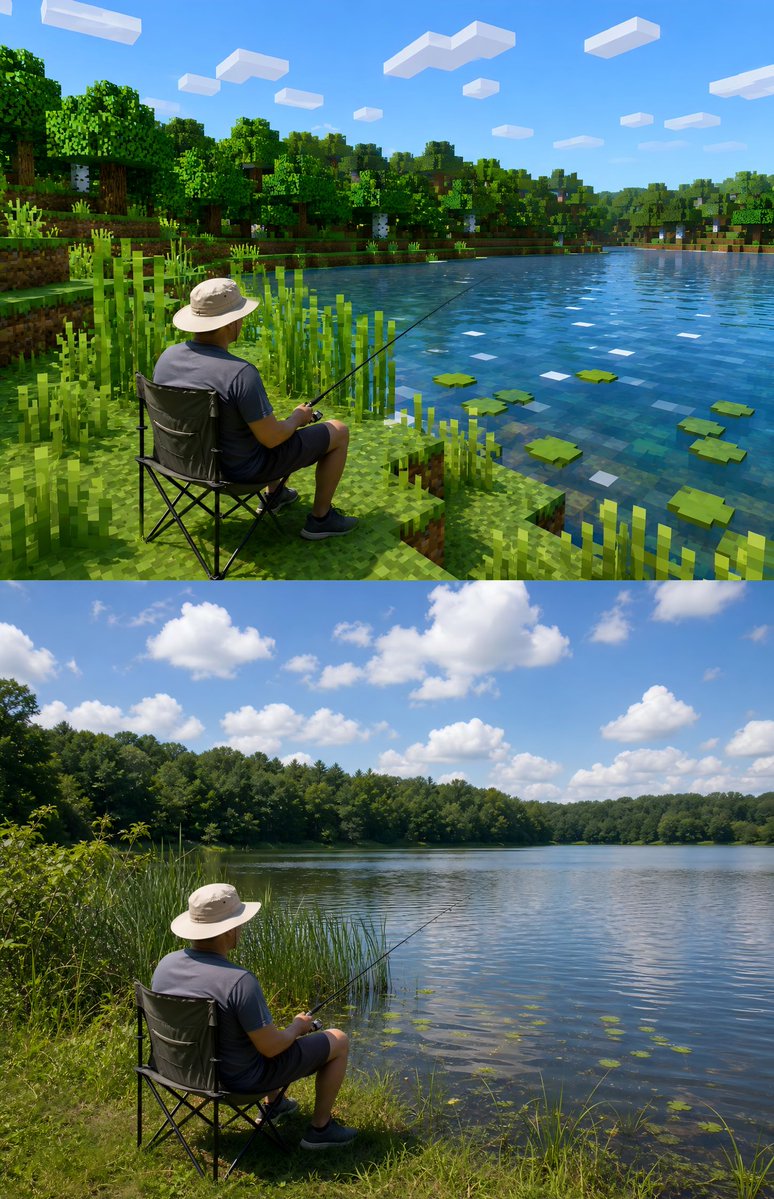
Transforms your real outdoor photo into a Minecraft-inspired style while preserving your face, pose, and authentic details.
1 / 4
提示词 · EN
请基于用户上传的真实户外照片进行风格化改造。 保留照片中的主体不变,主体可以是人物或动物。尽量保留主体的外貌识别度、姿态、服装、毛发、真实摄影感,不要换脸,也不要把主体彻底像素化。
关于这个提示词
Transforms your real outdoor photo into a Minecraft-inspired style while preserving your face, pose, and authentic details. 它更适合作为 GPT Image 2 的概念艺术起点:先保留画面结构、主体关系和风格约束,再替换成你的品牌、人物或场景。
使用时建议先小幅修改主体、场景、镜头和色调,再生成多个版本对比构图与细节。这样页面内容对用户有实际帮助,也避免把模型名或标签机械堆在正文里。
如何使用这个提示词
- Copy the prompt text below.
- Open your preferred AI image generator (e.g., Sora 2, Midjourney, DALL-E).
- Upload your real outdoor photo as the input image.
- Paste the prompt and adjust the style intensity if needed.
- Generate and download your stylized portrait.


