
GPT Image 2AI 提示词
Burj Khalifa Epic Infographic Poster — Sora 2 Prompt
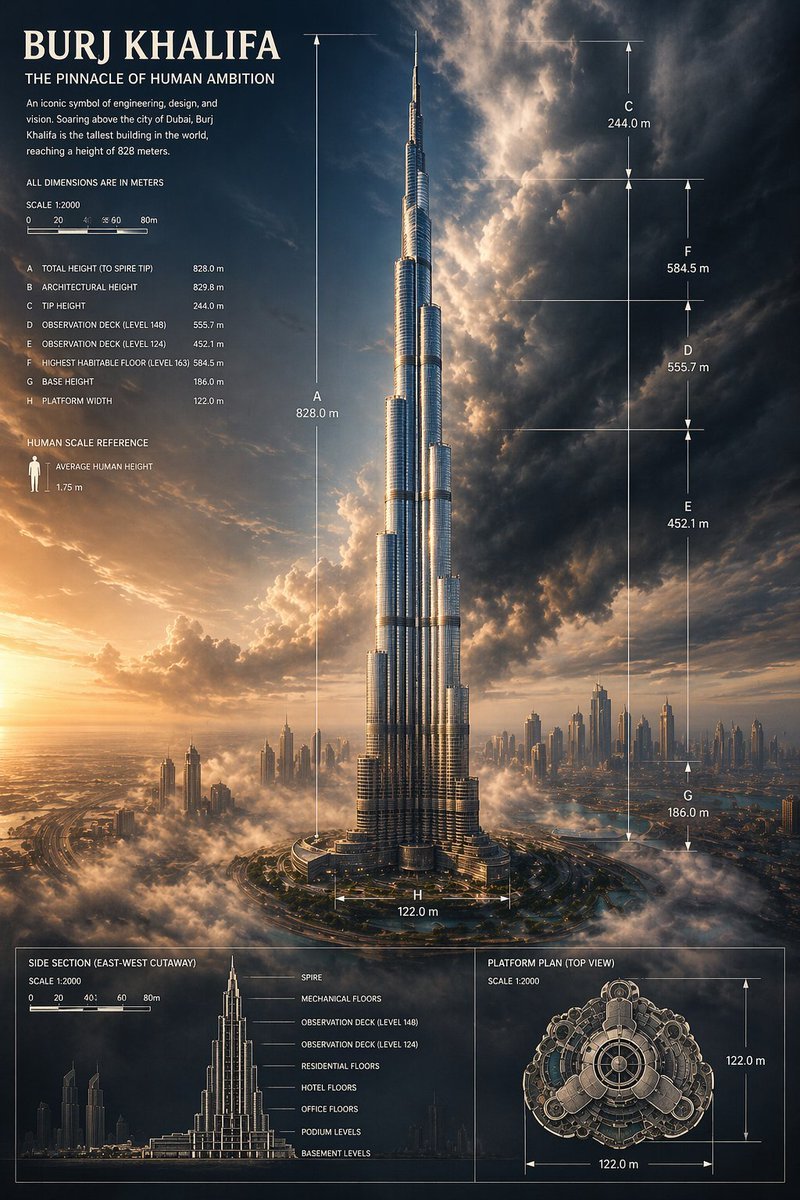
Generate a cinematic architectural infographic of the Burj Khalifa with precise dimensional annotations, dramatic sunset lighting, and magazine-quality rendering.
提示词 · EN
type
建筑信息图海报subject
building
哈利法塔location
迪拜composition
塔身居中,从基座到塔尖全貌展示,耸立在低空云层和远方现代城市天际线之上perspective
极具张力的低角度航拍城市视角lighting
左下方金色的日落光线,伴随深蓝色风暴云层,呈现强烈的电影级对比度materials
反光银色玻璃与钢结构幕墙,带有清晰的垂直高光style
genre
高端工程信息图与史诗级建筑可视化结合mood
宏伟、令人惊叹、精确、奢华color_palette
item 1
暖金色阳光item 2
深海军蓝天空item 3
炭灰色风暴云item 4
银色金属item 5
柔和白雾text
headline
哈利法塔subheadline
人类雄心的巅峰之作body
工程、设计与愿景的标志性象征。哈利法塔耸立在迪拜市上空,是世界上最高的建筑,高度达到 828 米。note
所有尺寸单位均为米human_scale_label
人体比例参考human_scale_text
平均人体高度 1.75 米layout
sections
item 1
title
主立面及尺寸position
全画布中心count
8labels
item 1
A 总高度(至塔尖)828.0 米item 2
B 建筑高度 829.8 米item 3
C 塔尖高度 244.0 米item 4
D 观景台(148 层)555.7 米item 5
E 观景台(124 层)452.1 米item 6
F 最高可居住楼层(163 层)584.5 米item 7
G 基座高度 186.0 米item 8
H 平台宽度 122.0 米item 2
title
侧剖面(东西向剖面)position
左下角面板count
8labels
item 1
塔尖item 2
设备层item 3
观景台(148 层)item 4
观景台(124 层)item 5
住宅楼层item 6
酒店楼层item 7
办公楼层item 8
裙楼item 9
地下室item 3
title
平台平面图(俯视图)position
右下角面板count
2labels
item 1
122.0 米水平item 2
122.0 米垂直item 4
title
比例尺position
左上角及底部面板count
2labels
item 1
比例 1:2000 主面板item 2
比例 1:2000 底部面板graphic_elements
纤细的白色技术引导线、箭头、尺寸标注括号、精细的无网格绘图标记、用于比例参考的小型人体图标、底部带有窄边框的面板scene
sky
塔尖后方云层翻涌,阳光从中穿透而出city
迪拜天际线散布在地平线上,伴有较小的摩天大楼和薄雾ground
环形道路系统和基座周围的景观平台,部分被薄雾覆盖rendering
detail
超精细finish
杂志封面级质感aspect_ratio
2:3 纵向关于这个提示词
Generate a cinematic architectural infographic of the Burj Khalifa with precise dimensional annotations, dramatic sunset lighting, and magazine-quality rendering. 它更适合作为 GPT Image 2 的概念艺术起点:先保留画面结构、主体关系和风格约束,再替换成你的品牌、人物或场景。
这条提示词使用结构化 JSON 组织信息,包含 type、subject、style、text、layout、scene、rendering 等字段。保留这种层级能让模型更清楚地区分画面主题、布局、界面元素和细节约束。
使用时建议先小幅修改主体、场景、镜头和色调,再生成多个版本对比构图与细节。这样页面内容对用户有实际帮助,也避免把模型名或标签机械堆在正文里。
如何使用这个提示词
- Copy the full prompt JSON and paste it into your preferred AI image generator like Sora 2, Midjourney, or DALL·E.
- Select a model that supports high-resolution, detail-rich outputs (e.g., Sora 2 Pro, Midjourney v6).
- Customize variables such as the
aspect_ratio,lightingdirection, orcolor_paletteto match your project needs. - Generate the image and review the rendered engineering labels, scale bars, and infographic panels.
- Upscale or refine the output for print, editorial, or presentation use.


