
GPT Image 2AI 提示词
Cyberpunk Executive Hero — AI Poster Prompt with Frost Lighting
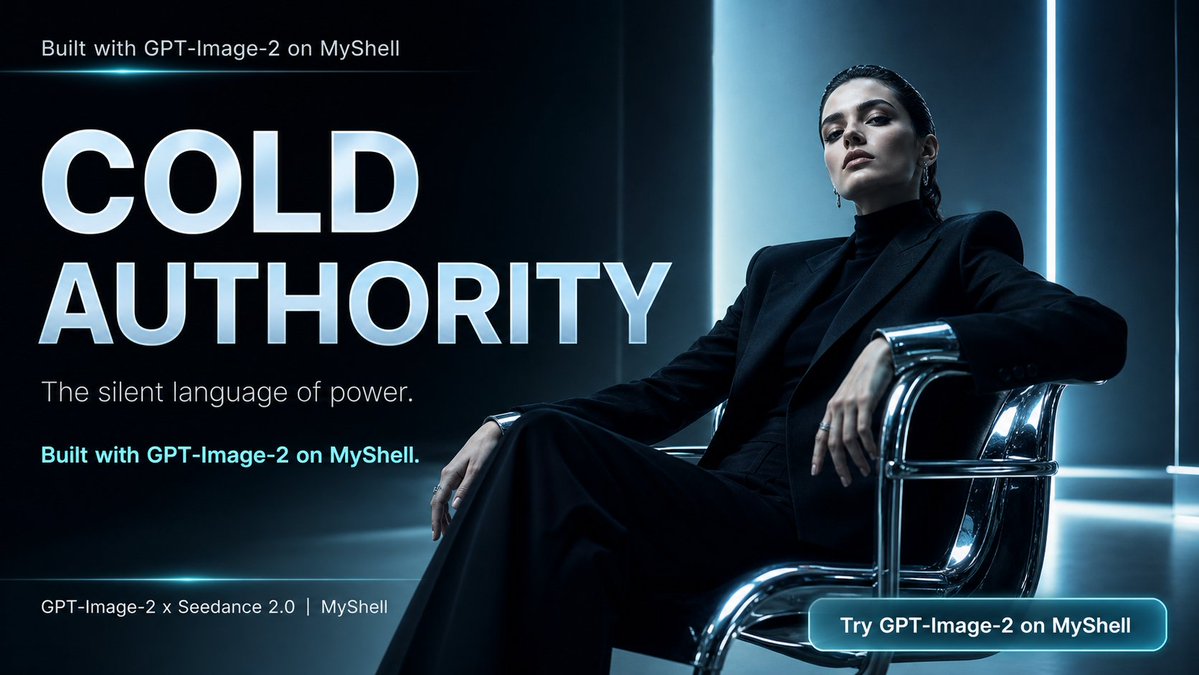
Generates a cinematic 16:9 tech-brand hero image with a commanding seated executive, neon cyan accents, and bold marketing typography for ads and banners.
提示词 · EN
type
电影感宣传海报 / 社交媒体横幅format
16:9 宽屏visual_style
奢华科技编辑风格,冷峻企业权威感,高对比度,照片级真实感,光泽反射,深邃黑色与冰青蓝色调,高端广告设计main_subject
description
一位中性化的高管形象,坐在画面右侧的一张低矮铬合金管状扶手椅上,姿态放松但充满掌控力,一条腿向前交叉,一只手臂搭在椅扶手上,手指自然下垂face
面部被柔和的中性灰色方块模糊处理,无可见面部特征hair
模糊区域周围可见深色后梳齐肩发clothing
全黑剪裁西装,肩部线条硬朗,黑色高领衫,阔腿黑裤,简约戒指,严谨的单色造型mood
静默的权威,疏离的自信,克制的权力scene
environment
黑暗的未来主义企业室内或摄影棚,配有光泽反射地板和垂直发光墙板lighting
来自后方和右侧的冷蓝色轮廓光,明亮的垂直灯带,微妙的青色光晕,戏剧性的阴影,椅子上的金属高光composition
大型排版占据左半部分,就座人物占据右半部分,强烈的留白,电影级裁剪,高端品牌营销布局text_elements
count
6items
item 1
position
左上角text
Built with GPT-Image-2 on MyShellstyle
小型纤细白色无衬线字体item 2
position
左侧居中text
{argument name="headline text" default="冷峻权威"}style
超大加粗大写无衬线字体,白色带淡冰蓝色渐变及微妙光晕item 3
position
标题下方左侧text
{argument name="subtitle text" default="权力的静默语言。"}style
中等纤细白色无衬线字体item 4
position
副标题下方左侧text
Built with GPT-Image-2 on MyShell.style
加粗青色无衬线字体item 5
position
左下角text
GPT-Image-2 × Seedance 2.0 | MyShellstyle
小型白色页脚文字item 6
position
右下角text
{argument name="button text" default="在 MyShell 上尝试 GPT-Image-2"}style
圆角矩形发光青色行动号召按钮,配白色加粗文字graphic_details
左上角附近有纤细的青色水平光束,底部附近有微妙的水平分割线,CTA 按钮周围有霓虹青色轮廓,抛光铬合金椅子反射着蓝光,边缘有暗角处理camera
低至中角度人像构图,35mm 电影广告视角,主体略微后仰,气势逼人render_quality
超精细照片级真实感,排版清晰,反射锐利,电影级情绪调色,高端科技发布美学parameters
brand name
{argument name="brand name" default="MyShell"}product name
{argument name="product name" default="GPT-Image-2"}关于这个提示词
Generates a cinematic 16:9 tech-brand hero image with a commanding seated executive, neon cyan accents, and bold marketing typography for ads and banners. 它更适合作为 GPT Image 2 的概念艺术起点:先保留画面结构、主体关系和风格约束,再替换成你的品牌、人物或场景。
这条提示词使用结构化 JSON 组织信息,包含 type、format、visual style、main subject、scene、text elements、graphic details 等字段。保留这种层级能让模型更清楚地区分画面主题、布局、界面元素和细节约束。
使用时建议先小幅修改主体、场景、镜头和色调,再生成多个版本对比构图与细节。这样页面内容对用户有实际帮助,也避免把模型名或标签机械堆在正文里。
如何使用这个提示词
- Copy the full prompt JSON above and paste it into your AI image generator.
- Select a high-fidelity or photorealistic model (e.g., Sora 2, DALL·E 3, Midjourney v6).
- Customize the three
argumentfields—headline text, subtitle text, and button text—to match your brand message. - Adjust the brand name and product name variables for your specific campaign.
- Generate the image, review the output, and upscale or iterate if needed for final use.


