
GPT Image 2AI 提示词
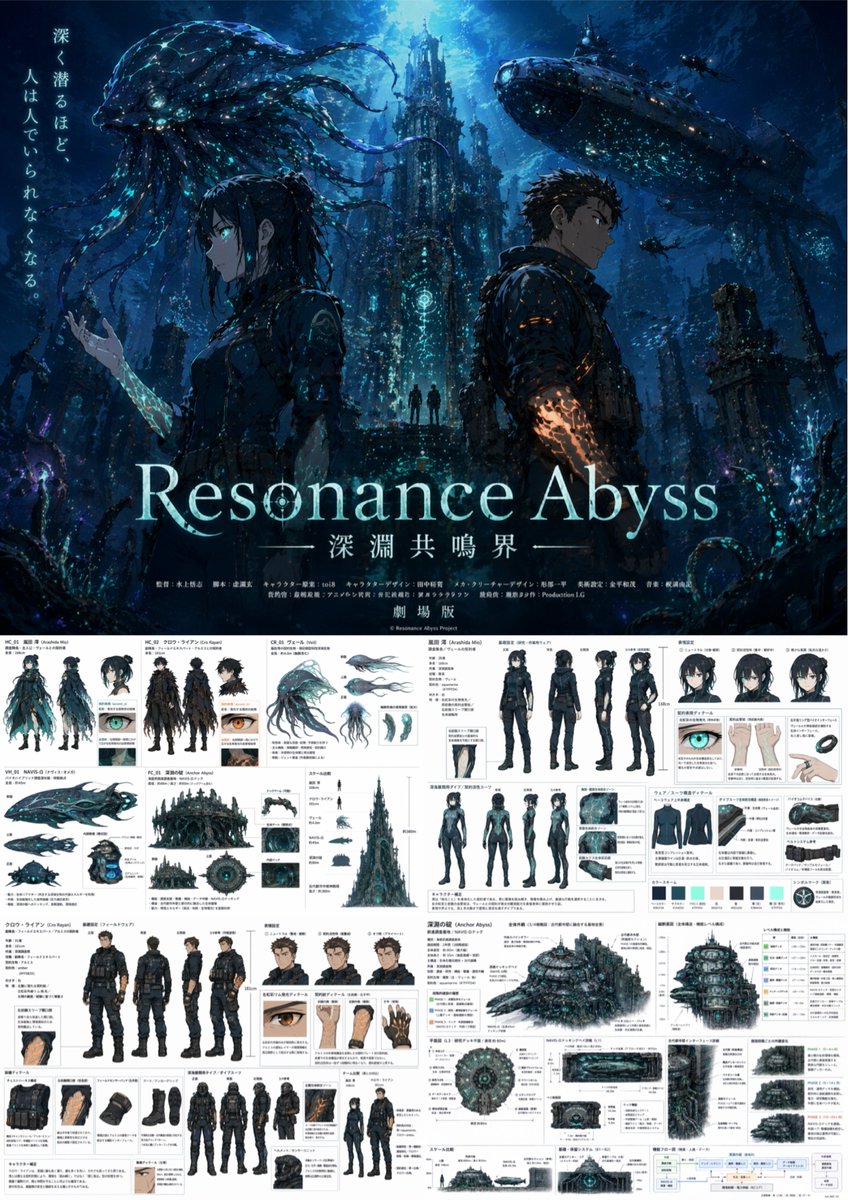
Dark Abyss Anime Poster & Design Reference Sheet Prompt
Generate a cinematic anime poster paired with a detailed multi-panel design reference sheet, perfect for dark deep-sea sci-fi concept art with customizable elements.
提示词 · EN
type
动漫剧场版海报与综合制作设计参考图overall_theme
{argument name="setting theme" default="暗黑深海科幻深渊"}layout
top_half
电影级主视觉海报bottom_half
密集的多面板制作设计文档poster_section
characters
item 1
description
侧面年轻女性,深色头发special_feature
手臂带有 {argument name="female glow color" default="青色"} 发光纹路item 2
description
侧面年轻男性,短深色头发special_feature
手臂带有 {argument name="male glow color" default="橙色"} 发光纹路background
高耸的哥特式水下建筑,巨大的生物发光水母生物,大型潜水艇typography
tagline
{argument name="tagline" default="深く潜るほど、人は人でいられなくなる。"}main_title
{argument name="main title" default="Resonance Abyss"}subtitle
深渊共鸣界footer
伪造的动漫制作人员名单和 剧场版reference_sheet_section
grid_layout
带有日文注释的密集建筑与角色设计网格panels
item 1
subject
女性角色设计elements
item 1
type
标准服装三视图count
4poses
item 1
正面item 2
背面item 3
侧面item 4
3/4侧面item 2
type
面部表情count
3item 3
type
潜水服三视图count
4poses
item 1
正面item 2
背面item 3
侧面item 4
3/4侧面item 4
type
服装细节特写count
3item 5
type
配色色板count
6item 2
subject
男性角色设计elements
item 1
type
标准服装三视图count
4poses
item 1
正面item 2
背面item 3
侧面item 4
3/4侧面item 2
type
面部表情count
3item 3
type
潜水服三视图count
4poses
item 1
正面item 2
背面item 3
侧面item 4
3/4侧面item 4
type
装备细节特写count
4item 3
subject
生物与机甲设计elements
item 1
type
水母生物视图count
4item 2
type
潜水艇视图count
3item 4
subject
环境与世界观构建elements
item 1
type
圆顶水下基地外观视图count
3item 2
type
比例对比图count
1item 3
type
内部横截面面板count
3item 4
type
UI 界面模型count
2item 5
type
系统流程图count
1关于这个提示词
Generate a cinematic anime poster paired with a detailed multi-panel design reference sheet, perfect for dark deep-sea sci-fi concept art with customizable elements. 它更适合作为 GPT Image 2 的概念艺术起点:先保留画面结构、主体关系和风格约束,再替换成你的品牌、人物或场景。
这条提示词使用结构化 JSON 组织信息,包含 type、overall theme、layout、poster section、reference sheet section 等字段。保留这种层级能让模型更清楚地区分画面主题、布局、界面元素和细节约束。
使用时建议先小幅修改主体、场景、镜头和色调,再生成多个版本对比构图与细节。这样页面内容对用户有实际帮助,也避免把模型名或标签机械堆在正文里。
如何使用这个提示词
- Copy the full prompt text.
- Paste it into your preferred AI image generator (Midjourney, DALL·E 3, or Stable Diffusion).
- Adjust the variables like
setting theme,female glow color,male glow color,tagline, andmain titleto your liking. - Generate the image. For a split layout, set aspect ratio to 4:5 or 9:16.
- If needed, iterate by refining the variables or using inpainting to hone details.


