
GPT Image 2AI 提示词
Soft Autumn Personal Color Analysis Infographic — Sora 2 Prompt
Generate a beautifully designed personal color analysis infographic card with blurred female portrait, soft autumn color palettes, and elegant Chinese typography layout.
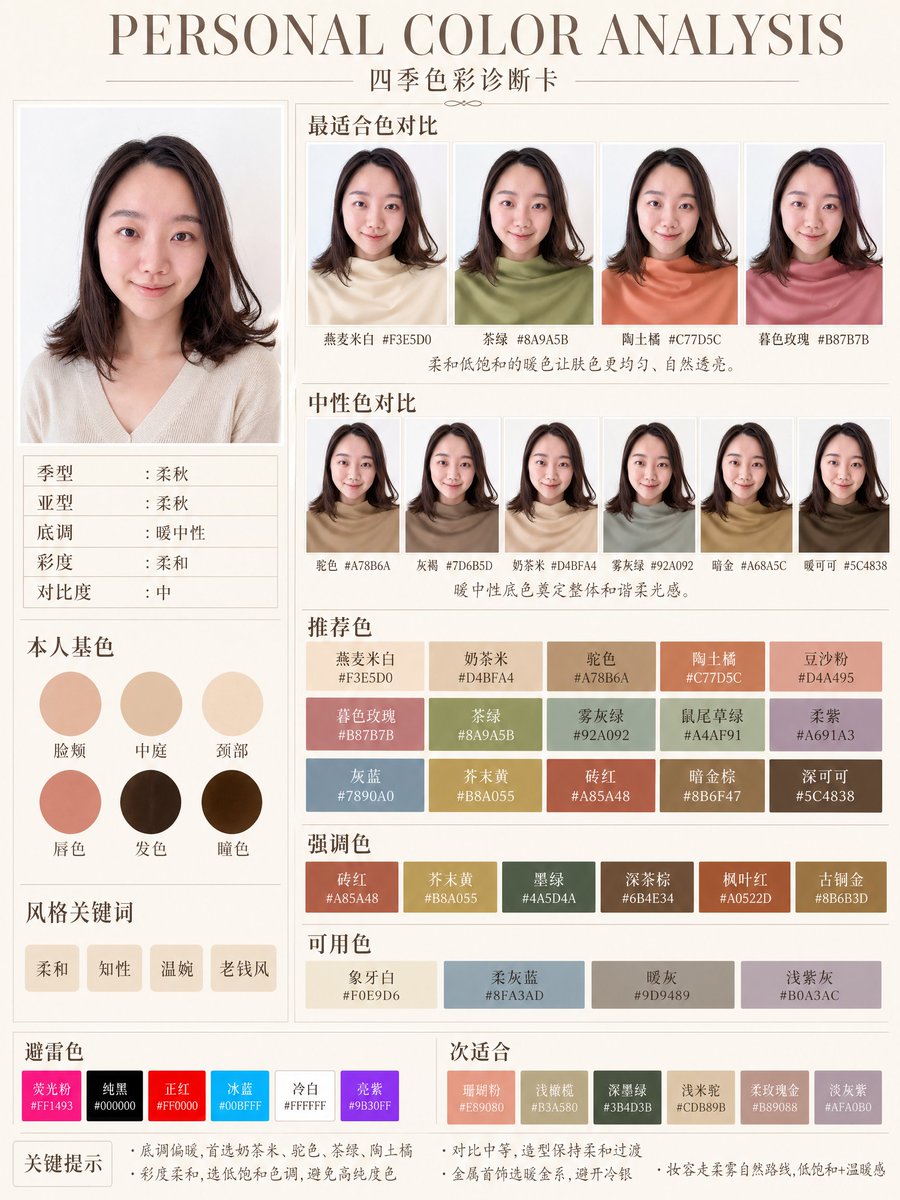
提示词 · EN
type
个人色彩分析信息图卡style
简洁的编辑风美妆信息图,柔和中性背景,优雅衬线标题,中文字体排版,极简奢华布局canvas
orientation
纵向background
暖象牙纸色,配有细灰褐色分割线headline
main
个人色彩分析sub
四季色彩诊断卡subject
count
1gender_presentation
女性pose
正面摄影棚肖像,露出肩部face
特意模糊处理,无具体五官hair
color
深棕色length
齐肩style
柔和层次感波波头,发尾微外翻,侧分刘海top
color
浅奶油米色针织衫neckline
柔和 V 领layout
sections
item 1
title
主肖像position
左侧栏上方count
1labels
item 2
title
适合色对比position
右上角count
4labels
item 1
燕麦米白 #F3E5D0item 2
茶绿 #8A9A5Bitem 3
陶土橘 #C77D5Citem 4
春色玫瑰 #B87B7Bitem 3
title
中性色对比position
右侧中部count
6labels
item 1
驼色 #A78B6Aitem 2
灰梅 #7D6B5Ditem 3
奶茶米 #D4BFA4item 4
雾灰绿 #92A092item 5
暗金 #A68A5Citem 6
暖可可 #5C4838item 4
title
本人基色position
左侧栏中部count
6labels
item 1
脸颊item 2
中庭item 3
颈部item 4
唇色item 5
发色item 6
瞳色item 5
title
风格关键词position
左侧栏下方count
4labels
item 1
柔和item 2
知性item 3
温婉item 4
老钱风item 6
title
推荐色position
右侧下方中心count
15labels
item 1
燕麦米白 #F3E5D0item 2
奶茶米 #D4BFA4item 3
驼色 #A78B6Aitem 4
陶土橘 #C77D5Citem 5
豆沙粉 #D4A495item 6
暮色玫瑰 #B87B7Bitem 7
茶绿 #8A9A5Bitem 8
雾灰绿 #92A092item 9
鼠尾草绿 #A4AF91item 10
柔紫 #A691A3item 11
灰蓝 #7890A0item 12
芥末黄 #B8A055item 13
砖红 #A85A48item 14
暗金棕 #8B6F47item 15
深可可 #5C4838item 7
title
强调色position
推荐色下方count
6labels
item 1
砖红 #A85A48item 2
芥末黄 #B8A055item 3
墨绿 #445D4Aitem 4
深茶棕 #6B4E34item 5
枫叶红 #A0522Ditem 6
古铜金 #8B6B3Ditem 8
title
可用色position
强调色下方count
4labels
item 1
象牙白 #F0E9D6item 2
柔灰蓝 #8FA3ADitem 3
暖灰 #9D9489item 4
浅紫灰 #B0A3ACitem 9
title
避雷色position
左下方条带count
6labels
item 1
荧光粉 #FF1493item 2
纯黑 #000000item 3
正红 #FF0000item 4
冰蓝 #00BFFFitem 5
冷白 #FFFFFFitem 6
亮紫 #9B30FFitem 10
title
次适合position
右下方条带count
6labels
item 1
珊瑚粉 #E89080item 2
浅橄榄 #B3A580item 3
深墨绿 #3B4D3Bitem 4
浅木桃 #CDB89Bitem 5
柔玫瑰金 #B89088item 6
淡灰紫 #AFA0B0left_info_table
count
5labels
item 1
季型:柔秋item 2
亚型:柔秋item 3
底调:暖中性item 4
彩度:柔和item 5
对比度:中footer_notes
title
关键提示count
4labels
item 1
底调偏暖,首选奶茶米、驼色、茶绿、陶土橘item 2
彩度柔和,选低饱和色调,避免高纯度色item 3
对比中等,造型保持柔和过渡item 4
金属首饰选暖金系,避开冷银color_palette
柔和秋季色板,暖中性底调,低饱和度,中等对比度rendering
高分辨率精致 App 风格信息图,逼真的织物与发质,细腻阴影,精准网格对齐,可打印的美妆咨询卡customization
headline text
{argument name="headline text" default="个人色彩分析"}subtitle text
{argument name="subtitle text" default="四季色彩诊断卡"}season result
{argument name="season result" default="柔秋"}character hair color
{argument name="character hair color" default="深棕色"}background color
{argument name="background color" default="暖象牙色"}关于这个提示词
Generate a beautifully designed personal color analysis infographic card with blurred female portrait, soft autumn color palettes, and elegant Chinese typography layout. 它更适合作为 GPT Image 2 的概念艺术起点:先保留画面结构、主体关系和风格约束,再替换成你的品牌、人物或场景。
这条提示词使用结构化 JSON 组织信息,包含 type、style、canvas、headline、subject、layout、color palette 等字段。保留这种层级能让模型更清楚地区分画面主题、布局、界面元素和细节约束。
使用时建议先小幅修改主体、场景、镜头和色调,再生成多个版本对比构图与细节。这样页面内容对用户有实际帮助,也避免把模型名或标签机械堆在正文里。
如何使用这个提示词
- Copy the full prompt JSON and paste it into your preferred AI image generator (e.g., Sora 2, Midjourney, or DALL-E).
- Choose the best model for clean editorial layouts — Sora 2 or Midjourney v6 work exceptionally well.
- Tweak the
labelsarrays to swap hex codes or section titles for your own seasonal color analysis (e.g., change "Soft Autumn" to "Cool Winter"). - Adjust the
headline,subject, orstylefields to alter the portrait appearance, typography, or overall mood. - Generate at 9:16 portrait ratio and review — iterate by refining color values or layout positions for a polished final result.


