GPT Image 2AI 提示词
Religious Miniature Architecture Prompt — 3D Isometric
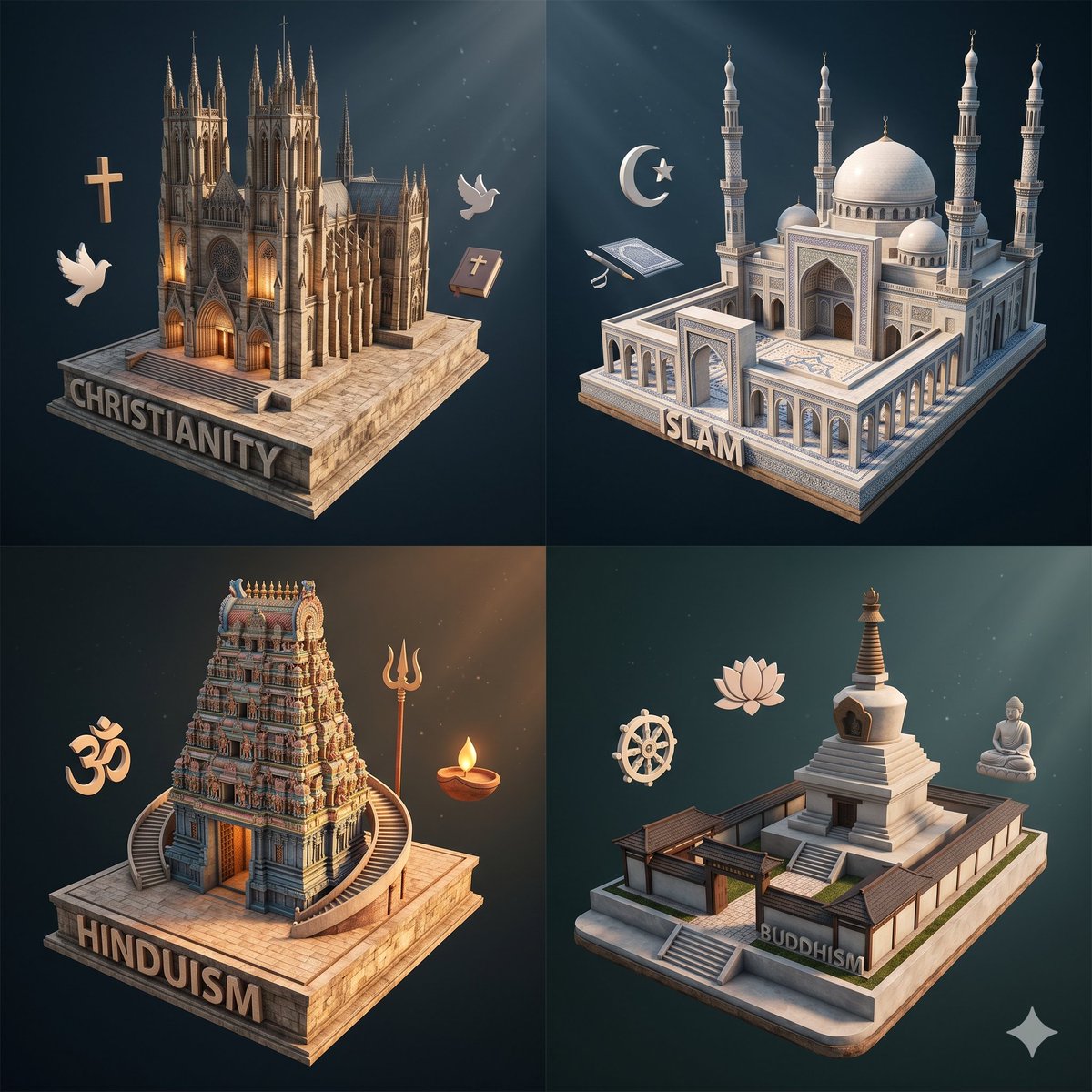
Create a museum-quality 3D isometric comparison of four faiths as detailed miniature building models with atmospheric lighting and symbolic details.
提示词 · EN
type
概念性宗教模型对比海报style
高端 3D 等距立体模型渲染,简洁的博物馆级微缩建筑,柔和的电影级体积光,深青色渐变背景,抛光石材底座,微妙的悬浮符号物体,细节丰富但为清晰起见进行了简化subject
四种主要宗教以 2x2 网格形式呈现为独立的微缩建筑layout
grid
rows
2columns
2count
4sections
item 1
title
基督教position
左上count
4labels
item 1
哥特式大教堂微缩模型item 2
十字架符号item 3
白鸽item 4
闭合的圣经item 2
title
伊斯兰教position
右上count
4labels
item 1
带有圆顶和四座宣礼塔的大清真寺微缩模型item 2
新月与星符号item 3
古兰经item 4
小型礼拜标记状字形item 3
title
印度教position
左下count
4labels
item 1
带有塔门的南印度寺庙微缩模型item 2
唵符号item 3
三叉戟item 4
带火焰的油灯item 4
title
佛教position
右下count
4labels
item 1
佛塔与寺庙建筑群微缩模型item 2
法轮item 3
莲花item 4
坐佛雕像base_labels
item 1
基督教item 2
伊斯兰教item 3
印度教item 4
佛教rendering
camera
略微升高的等距视角composition
每种宗教居中于各自的象限,留有充裕的间距materials
浅米色石材、大理石、雕刻建筑细节、微妙的金属和木质装饰lighting
自上而下的聚光灯束,建筑上有暖色高光,环境阴影偏冷background
深蓝色至青色的晕影,带有微弱的颗粒感details
Christianity
architecture
带有高耸尖塔、尖拱、发光入口的华丽哥特式大教堂,放置在长方形石基座上symbols_count
3Islam
architecture
具有中央圆顶、较小圆顶、四座细长宣礼塔、拱形柱廊的对称清真寺庭院,放置在石基座上symbols_count
3Hinduism
architecture
带有层叠塔门、弯曲前楼梯、温暖内部光芒的精雕寺庙,放置在石基座上symbols_count
3Buddhism
architecture
从带有台阶和深色屋檐的低矮寺庙建筑群中升起的白色佛塔,放置在石基座上symbols_count
3text
visible_labels
每个底座前缘刻有醒目的大写无衬线字体关于这个提示词
Create a museum-quality 3D isometric comparison of four faiths as detailed miniature building models with atmospheric lighting and symbolic details. 它更适合作为 GPT Image 2 的概念艺术起点:先保留画面结构、主体关系和风格约束,再替换成你的品牌、人物或场景。
这条提示词使用结构化 JSON 组织信息,包含 type、style、subject、layout、rendering、details、text 等字段。保留这种层级能让模型更清楚地区分画面主题、布局、界面元素和细节约束。
使用时建议先小幅修改主体、场景、镜头和色调,再生成多个版本对比构图与细节。这样页面内容对用户有实际帮助,也避免把模型名或标签机械堆在正文里。
如何使用这个提示词
- Copy the prompt from this page.
- Open Sora 2 or another AI image/video model (Midjourney, DALL-E 3).
- Paste the prompt and set aspect ratio to 1:1 or 4:5 for a poster layout.
- Generate your image and refine by tweaking colors or symbols if needed.
- Use the result for cultural infographics, editorial art, or AI style exploration.