
GPT Image 2AI 提示词
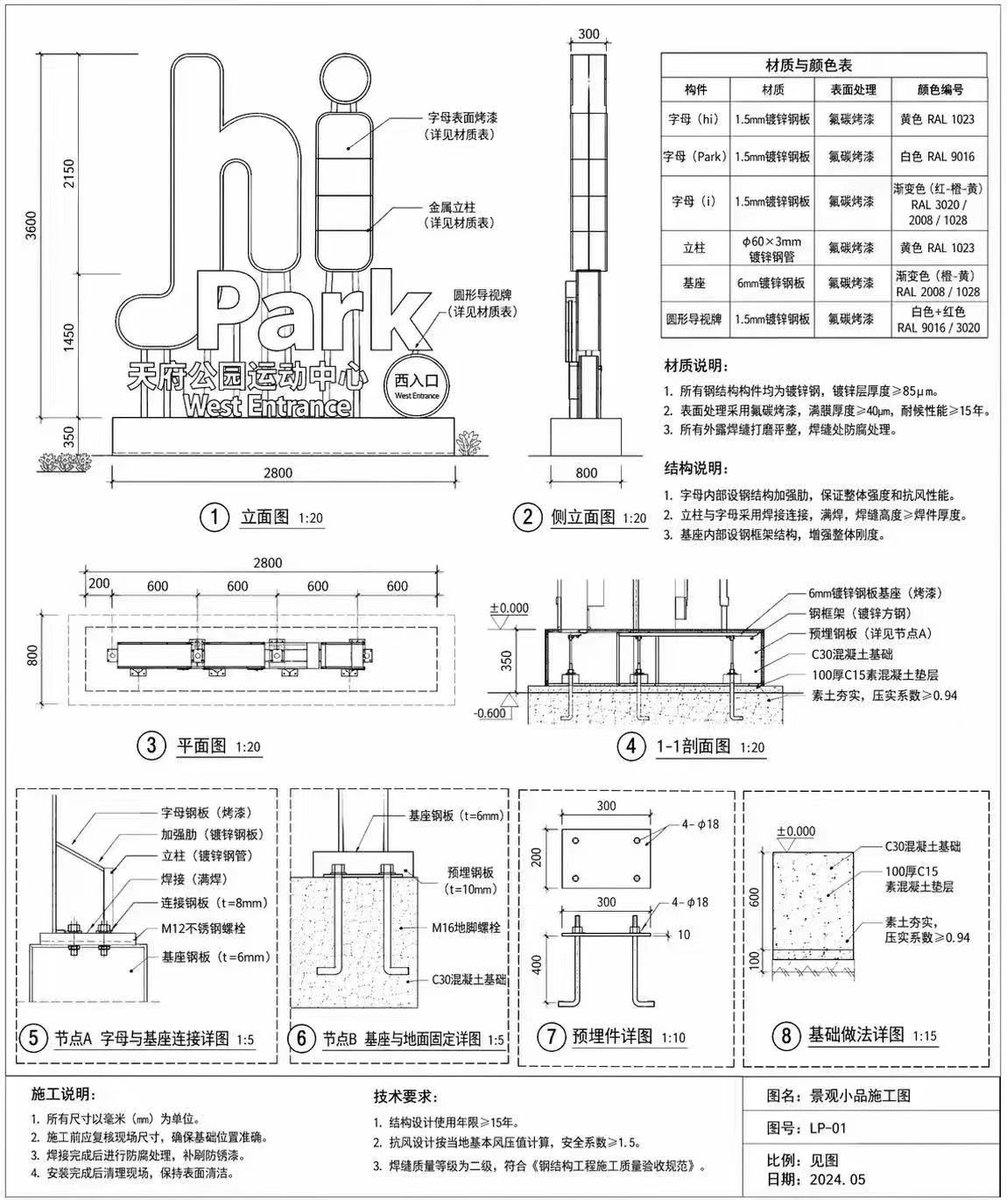
Signage Blueprint with Engineering Annotations — Sora Prompt
Instant outdoor signage blueprints with 8 detailed views, material tables, and Chinese engineering annotations.
提示词 · EN
type
建筑施工图subject
户外景观标识style
黑白技术线条图,精确尺寸,工程标注,中文注释sign_details
main_text
{argument name="main sign text" default="hi Park"}sub_text
{argument name="sub sign text" default="天府公园运动中心"}english_sub_text
West Entrancelayout
diagrams_count
8sections
item 1
position
左上title
① 立面图 1:20description
展示整体尺寸及指向文字与基座的标注的前立面图。item 2
position
中上title
② 侧立面图 1:20description
展示深度尺寸的侧立面图。item 3
position
右上elements
item 1
type
tabletitle
材质与颜色表rows
6columns
4item 2
type
text_blocktitle
材质说明:points_count
3item 3
type
text_blocktitle
结构说明:points_count
3item 4
position
左中title
③ 平面图 1:20description
带有水平尺寸的俯视平面图。item 5
position
右中title
④ 1-1 剖面图 1:20description
展示基础和地面高度的横截面图。item 6
position
底部description
四个包含在虚线框内的详细节点图。details
item 1
⑤ 节点 A 字母与基座连接详图 1:5item 2
⑥ 节点 B 基座与地面固定详图 1:5item 3
⑦ 预埋件详图 1:10item 4
⑧ 基础做法详图 1:15footer
position
底边blocks
item 1
title
施工说明:points_count
4item 2
title
技术要求:points_count
3item 3
title
图签fields
item 1
图名:{argument name="project title" default="景观小品施工图"}item 2
图号:{argument name="drawing number" default="LP-01"}item 3
比例:见图item 4
日期:{argument name="drawing date" default="2024.05"}关于这个提示词
Instant outdoor signage blueprints with 8 detailed views, material tables, and Chinese engineering annotations. 它更适合作为 GPT Image 2 的概念艺术起点:先保留画面结构、主体关系和风格约束,再替换成你的品牌、人物或场景。
这条提示词使用结构化 JSON 组织信息,包含 type、subject、style、sign details、layout 等字段。保留这种层级能让模型更清楚地区分画面主题、布局、界面元素和细节约束。
使用时建议先小幅修改主体、场景、镜头和色调,再生成多个版本对比构图与细节。这样页面内容对用户有实际帮助,也避免把模型名或标签机械堆在正文里。
如何使用这个提示词
- Copy the prompt text from this page.
- Paste it into your AI image generator (e.g., Sora, Midjourney, or DALL·E).
- Customize the variable arguments like main sign text, sub text, project title, drawing number, and date.
- Generate the output and review the technical drawings; adjust parameters if needed.


