
Sora2 Hub
Sora2 Hub
  • 提示词库
  • 定价
  • 案例展示
Sora2 Hub
Sora2 Hub
Sora2 Hub

Sora2 Hub

由 Sora 2、Veo 3.1 和 Nano Banana Pro 驱动的专业 AI 创作平台。提供高级控制、高清画质和无水印的视频与工作室级图像创作。

Email:support@sora2hub.org

AI 视频生成

  • 文生视频
  • 图生视频
  • Veo 3.1
  • Sora 2
  • Kling 3.0
  • Kling 2.6
  • Kling 2.5
  • Runway
  • Wan 2.6
  • Seedance 2.0
  • Hailuo 2.3
  • Grok Imagine
  • HappyHorse-1.0

AI 图像生成

  • 文生图
  • 图生图
  • Nano Banana Pro
  • Nano Banana
  • 4o Image
  • Flux Kontext
  • Z Image
  • Seedream 4.5
  • Seedream 5.0 Lite
  • Nano Banana 2
  • GPT Image 2
  • AI 图片增强

AI 特效

  • AI 年龄滤镜
  • AI 性别转换
  • AI 亲吻
  • AI 拥抱
  • 吉卜力图片
  • AI 美人鱼滤镜
  • AI 身体摇摆
  • 微笑滤镜
  • AI 变胖
  • 动作人偶

产品

  • 功能特点
  • 案例展示
  • 定价

公司

  • 关于我们
  • 联系我们

© 2025 • Sora2 Hub ORG 保留所有权利。

  • 隐私政策
  • 服务条款
  • 退款政策
  1. 首页
  2. /
  3. 提示词
  4. /
  5. GPT Image 2
  6. /
  7. Paris Night Fashion Photography Prompt with Face Reference
GPT Image 2AI 提示词

Paris Night Fashion Photography Prompt with Face Reference

Transform your face into a cinematic fashion portrait set in a dramatic Paris night, complete with Eiffel Tower and Bugatti, using this customizable AI prompt.
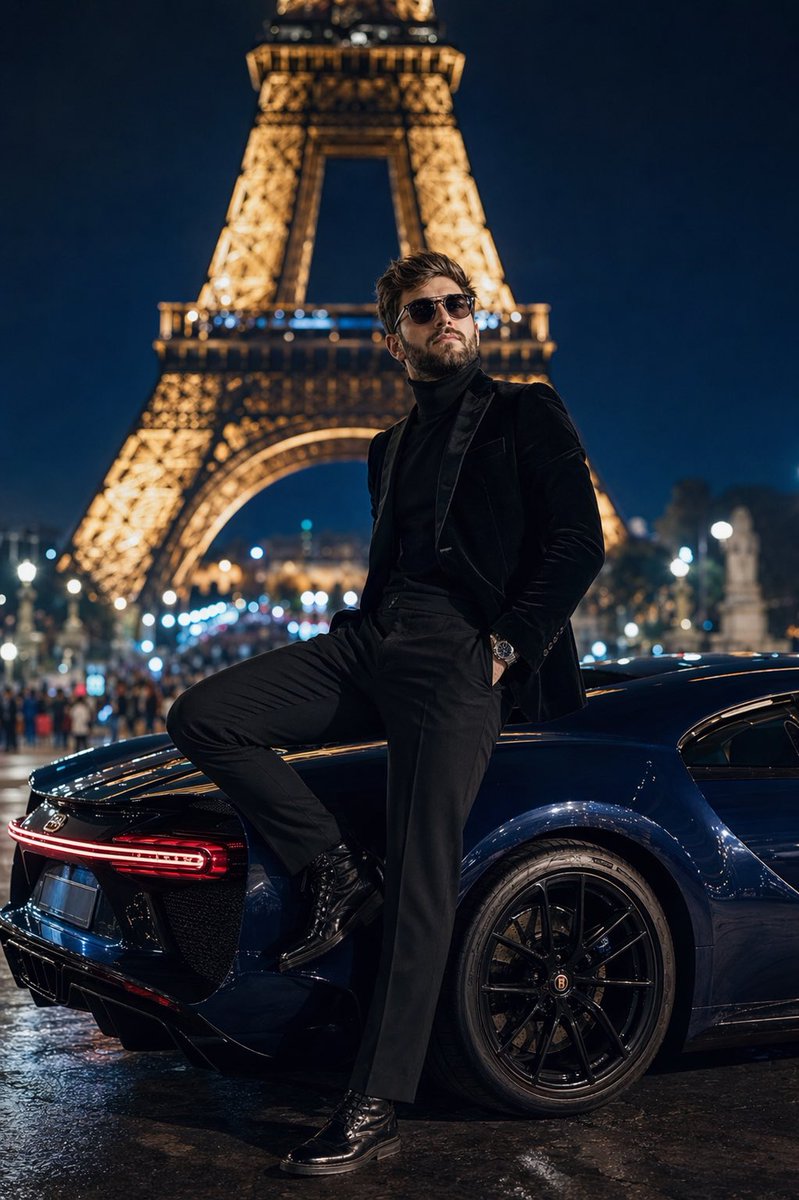
Paris Night Fashion Photography Prompt with Face Reference
提示词 · EN
采用 50mm 镜头、f/1.4 光圈拍摄的低角度地面全身照,主角为 arguploaded face reference: 上传的人脸参考(整洁的胡须、大背头、佩戴时尚飞行员墨镜、身着剪裁考究的现代高定服装),站在夜晚的 arglocation: 特罗卡迪罗广场 平台上。他身穿 argoutfit: 黑色丝绒修身西装外套,内搭黑色羊绒高领毛衣,搭配剪裁合身的黑色长裤和擦得锃亮的黑色皮靴,正凝视着背景中灯火辉煌的埃菲尔铁塔。他身后是一辆深宝石蓝色的 Bugatti Chiron,车身映照着周围的城市灯光。他的一只脚踩在后轮胎上,身体随意地向后倚靠。构图采用浅景深,将远处的巴黎街灯和人群虚化为奶油般的焦外成像。城市路灯的聚光效果营造出戏剧性的高对比度阴影。8k 分辨率,照片级真实感,电影级高定时尚杂志风格。

关于这个提示词

Transform your face into a cinematic fashion portrait set in a dramatic Paris night, complete with Eiffel Tower and Bugatti, using this customizable AI prompt. 它更适合作为 GPT Image 2 的概念艺术起点:先保留画面结构、主体关系和风格约束,再替换成你的品牌、人物或场景。

使用时优先替换 uploaded face reference、location、outfit 等占位符,并保持镜头、构图和材质描述的顺序不变。这样更容易获得稳定的画面结果,也方便继续做多版本对比。

如何使用这个提示词

  1. Copy the entire prompt below.
  2. Open your preferred AI image generator (Midjourney, DALL·E, Sora) and upload your face reference image.
  3. Replace the placeholder {uploaded face reference} with the link or filename of your image, and adjust {location} or {outfit} if desired.
  4. Paste the customized prompt into the prompt field and click generate.
  5. Review the result and refine by tweaking camera angles or lighting descriptions for perfection.

常见问题

Duet | AI

@Sheldon056→

发布时间
2026年4月25日
原始语言
EN
模型
GPT Image 2
分类
概念艺术
GPT Image 2概念艺术gpt-image-2twitter
浏览
186
复制
21
点赞
7

分享

更多来自 GPT Image 2

浏览全部
Sacred Dragon Dome Ceiling Mural — Sora 2 Prompt

Sacred Dragon Dome Ceiling Mural — Sora 2 Prompt

@KanaWorks_AI
AI-Generated Crossover Fighter Screenshot — Sora 2 Prompt

AI-Generated Crossover Fighter Screenshot — Sora 2 Prompt

@momoringo_sub
Dark Anime Devil Girl Mario Kart Poster — Sora 2 Prompt

Dark Anime Devil Girl Mario Kart Poster — Sora 2 Prompt

@opener_ai

用 Sora2Hub 提示词更快创作。

把精选提示词页面作为可搜索入口,然后带着模型上下文直接进入生成流程。

探索更多提示词

