
GPT Image 2AI 提示词
Han Dynasty Quju Shenyi — Traditional Garment Infographic
Generates a detailed, multi-section educational infographic visualizing the structure, materials, and cultural aesthetics of the Han Dynasty Quju Shenyi garment.
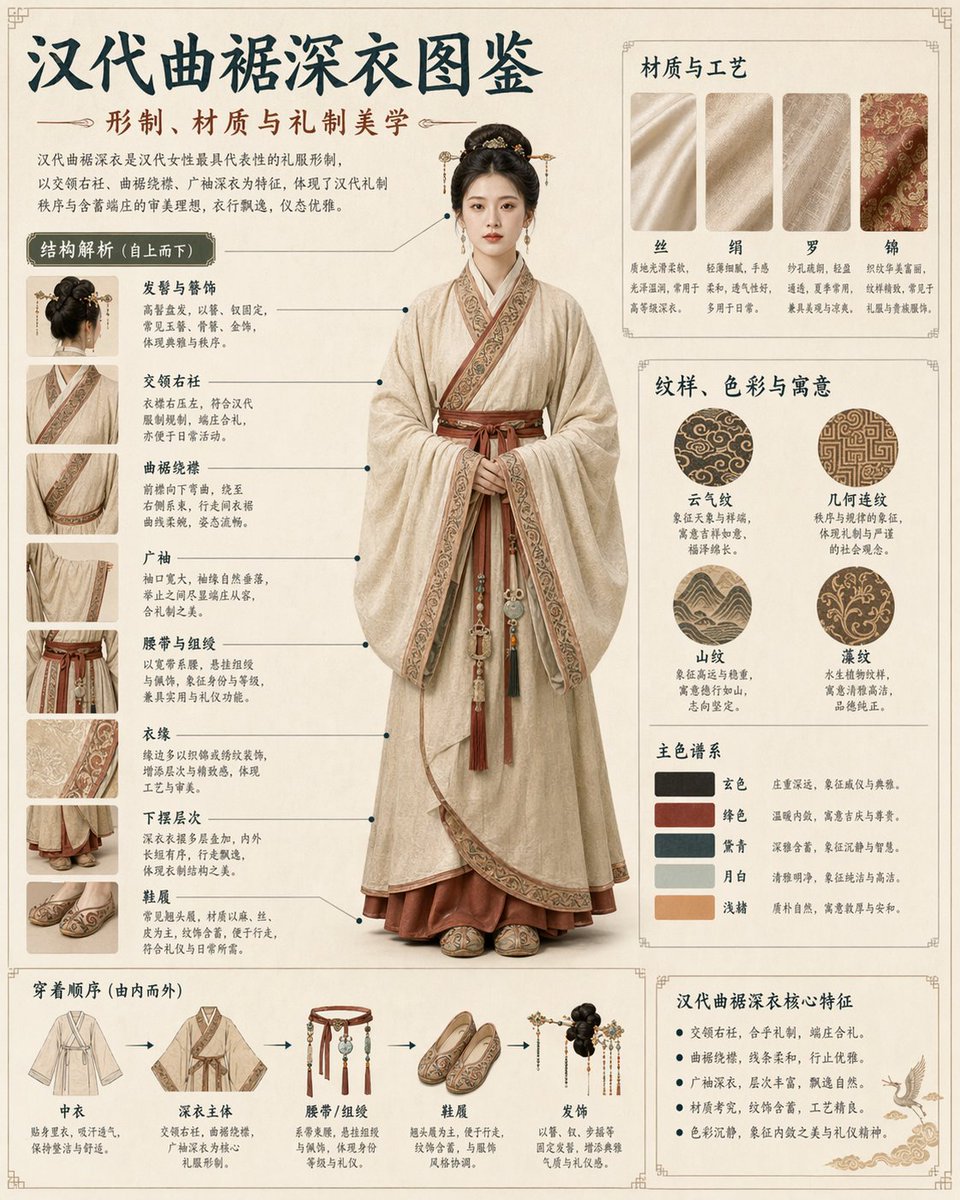
提示词 · EN
type
综合文化信息图与视觉指南subject
description
{argument name="subject description" default="梳着优雅传统发髻的中国年轻女性"}garment
传统汉服,特指曲裾深衣colors
{argument name="garment color" default="米色与褐红色"}pose
全身站立,面向前方,双手恭敬交叠layout
background
{argument name="background style" default="带有精致传统边框的复古羊皮纸"}header
title
{argument name="main title" default="汉代曲裾深衣图鉴"}subtitle
{argument name="subtitle" default="形制、材质与礼制美学"}description
介绍服饰历史与意义的导言段落centerpiece
主体人物的大型写实全身肖像sections
item 1
title
结构解析 (自上而下)position
左侧栏count
8format
带有连接线指向中心人物的特写照片缩略图labels
item 1
发髻与簪饰item 2
交领右衽item 3
曲裾绕襟item 4
广袖item 5
腰带与组绶item 6
衣缘item 7
下摆层次item 8
鞋履item 2
title
材质与工艺position
右上角count
4format
矩形面料纹理样本labels
item 1
丝item 2
绢item 3
罗item 4
锦item 3
title
纹样、色彩与寓意position
中右侧count
2subsections
item 1
type
patternscount
4format
圆形纹样样本labels
item 1
云气纹item 2
几何连纹item 3
山纹item 4
藻纹item 2
type
color palettecount
5format
矩形色块样本labels
item 1
玄色item 2
绛色item 3
黛青item 4
月白item 5
浅赭item 4
title
穿着顺序 (由内而外)position
左下角count
5format
由顺序箭头连接的服饰单品插图labels
item 1
中衣item 2
深衣主体item 3
腰带/组绶item 4
鞋履item 5
发饰item 5
title
汉代曲裾深衣核心特征position
右下角count
5format
带有飞鹤小插图的项目符号文本列表labels
item 1
交领右衽,合乎礼制,端庄合礼。item 2
曲裾绕襟,线条柔和,行走优雅。item 3
广袖深衣,层次丰富,飘逸自然。item 4
材质考究,纹饰含蓄,工艺精良。item 5
色彩沉静,象征内敛之美与礼仪精神。关于这个提示词
Generates a detailed, multi-section educational infographic visualizing the structure, materials, and cultural aesthetics of the Han Dynasty Quju Shenyi garment. 它更适合作为 GPT Image 2 的概念艺术起点:先保留画面结构、主体关系和风格约束,再替换成你的品牌、人物或场景。
这条提示词使用结构化 JSON 组织信息,包含 type、subject、layout 等字段。保留这种层级能让模型更清楚地区分画面主题、布局、界面元素和细节约束。
使用时建议先小幅修改主体、场景、镜头和色调,再生成多个版本对比构图与细节。这样页面内容对用户有实际帮助,也避免把模型名或标签机械堆在正文里。
如何使用这个提示词
- Copy the entire prompt JSON object.
- Paste it into your preferred AI image generation model (e.g., Midjourney, Stable Diffusion, DALL·E).
- Customize the optional variables (marked with
{argument ...}) likesubject descriptionorgarment colorto change the subject or background. - Generate the image. The AI will produce a comprehensive, annotated infographic based on the structured layout.


