
GPT Image 2AI 提示词
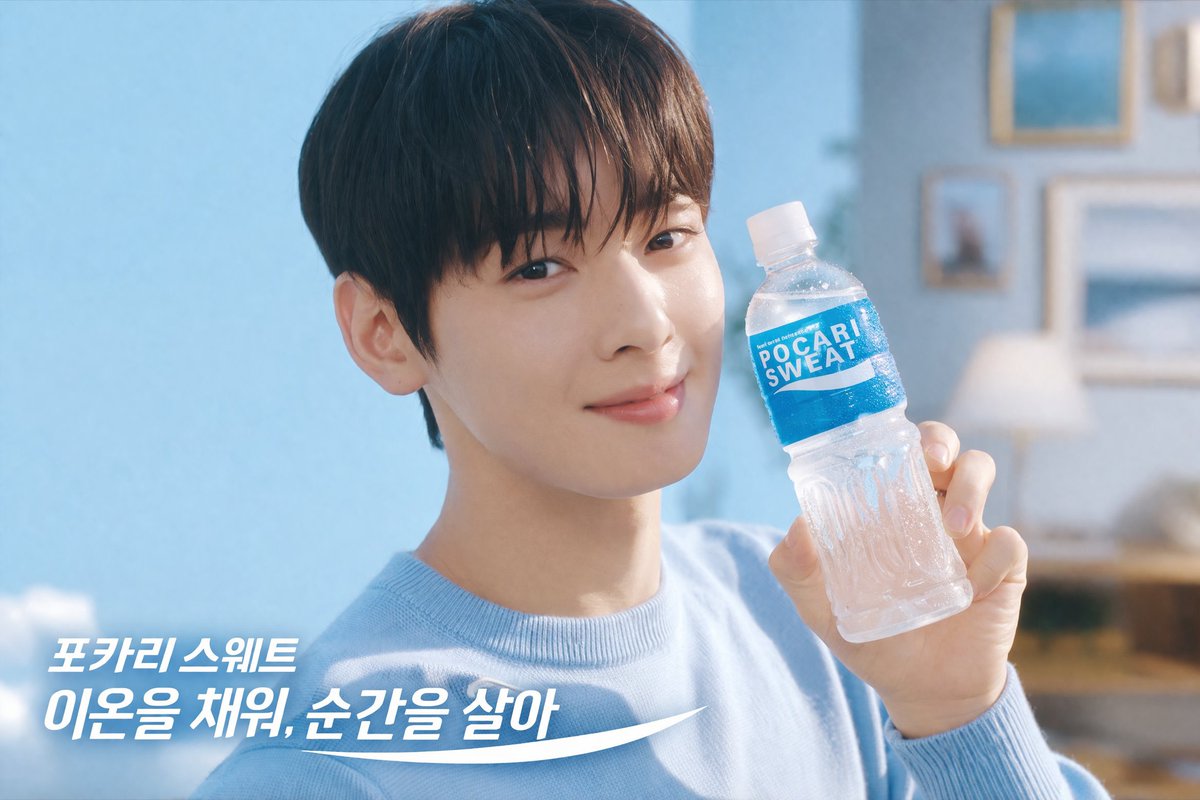
Pocari Sweat Commercial Portrait — Sora 2 Prompt
Generate a bright, refreshing commercial photo of a male model holding a branded water bottle with customizable Korean text overlay using this Sora 2 prompt.
提示词 · EN
一张明亮清爽的商业摄影作品,主角为一位 argsubject description: 留着黑色短发的帅气年轻亚裔男性,身穿一件 argclothing: 浅蓝色针织毛衣。他面带柔和微笑,直视镜头,手中拿着一瓶挂着水珠的透明塑料水瓶。瓶身贴有亮蓝色标签,上面印有白色文字“argproduct label: POCARI SWEAT”。背景分为两部分:左侧窗外可见清澈的浅蓝色天空,右侧为柔焦处理的温馨室内,配有相框和暖色调台灯。左下角有清晰的白色叠加文字,显示为“argoverlay text line 1: 포카리 스웨트”,下方是一行更大的文字“argoverlay text line 2: 이온을 채워, 순간을 살아”,并配有底部的白色弧形动感图形。整体光线柔和、自然且通透,营造出一种纯净、补水的氛围。
关于这个提示词
Generate a bright, refreshing commercial photo of a male model holding a branded water bottle with customizable Korean text overlay using this Sora 2 prompt. 它更适合作为 GPT Image 2 的概念艺术起点:先保留画面结构、主体关系和风格约束,再替换成你的品牌、人物或场景。
使用时优先替换 subject description、clothing、product label、overlay text line 1 等占位符,并保持镜头、构图和材质描述的顺序不变。这样更容易获得稳定的画面结果,也方便继续做多版本对比。
如何使用这个提示词
- Copy the prompt text from this page.
- Choose Sora 2 or another compatible AI image model (e.g., Midjourney, DALL·E 3).
- Replace the variables in curly braces (e.g., subject description, clothing, product label, overlay text) with your own details.
- Paste the customized prompt into your chosen model and generate.
- Fine-tune by adjusting the variables or adding extra style keywords to perfect the commercial look.


