
GPT Image 2AI 提示词
9 Hairstyle Try-On Grid — Photo-Realistic Sora 2 Prompt
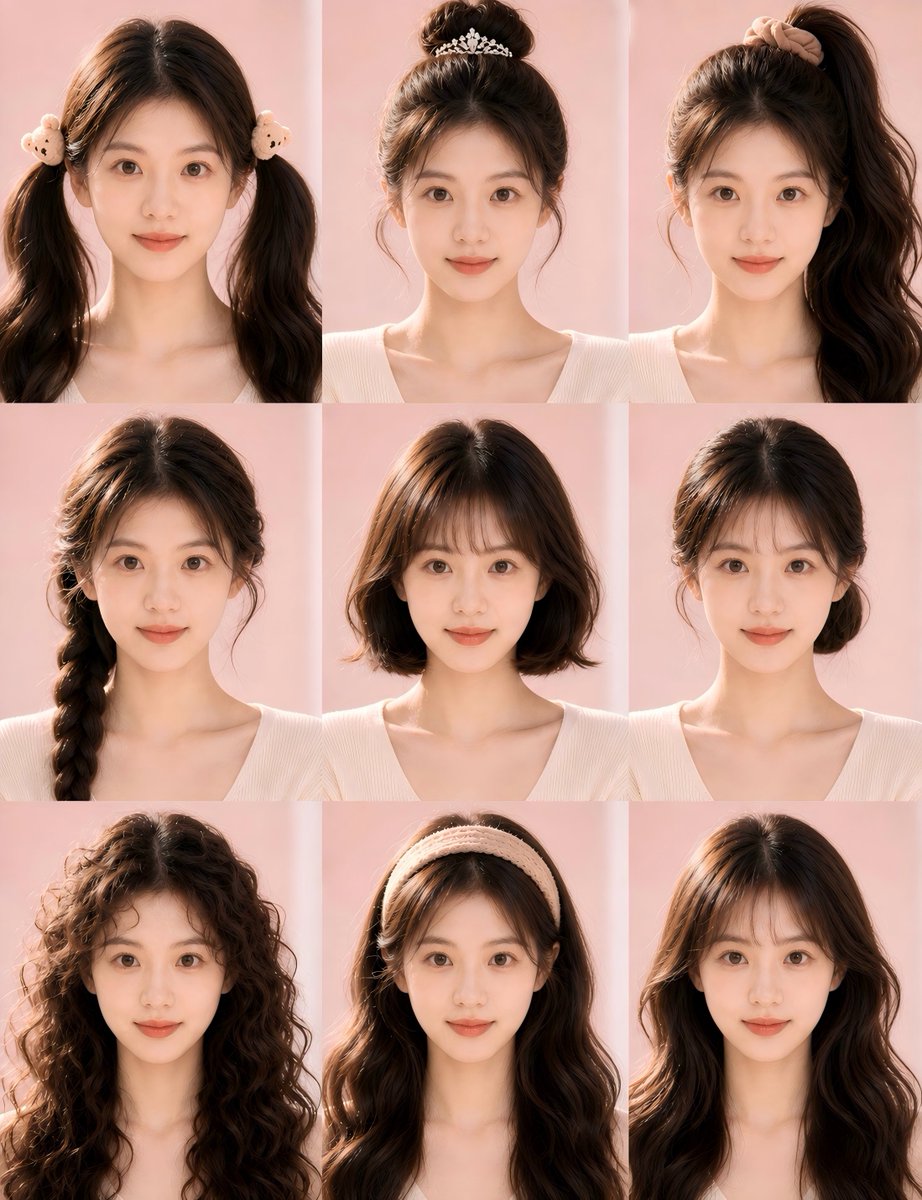
Create a photorealistic 3×3 beauty grid showing one woman with 9 different hairstyles—perfect for salon mood boards and social media comparisons.
提示词 · EN
type
照片级逼真发型试戴拼图subject
person
每个面板中均为同一位年轻女性,胸部以上正面肖像,面部由居中的柔和矩形肤色模糊遮罩进行匿名处理hair
base color
{argument name="hair color" default="深巧克力棕色"}texture
浓密、有光泽、蓬松柔软outfit
{argument name="top style" default="奶油色罗纹 V 领针织衫"}skin tone
暖浅米色pose
中性直立摄影棚姿势,露出肩膀,所有面板构图一致layout
format
3x3 网格拼图,包含 9 个等大的肖像面板,无文字标签,面板间距细小且无缝background
{argument name="background color" default="柔和粉彩粉色摄影棚背景"}lighting
左侧暖色自然阳光,发丝有柔和高光,阴影柔和,美妆杂志风格count
9panels
item 1
position
左上hairstyle
双高马尾,长而蓬松的卷发,中分,双耳附近带有可爱的毛绒小熊发圈item 2
position
中上hairstyle
高丸子头,脸颊两侧有凌乱的碎发,装饰有精致的银色花朵头饰item 3
position
右上hairstyle
侧高马尾,偏向右侧,长而浓密的松散卷发,头顶带有米色发圈item 4
position
左中hairstyle
单侧粗麻花辫,垂在左肩,脸颊两侧有柔和的发丝,头顶略显蓬松item 5
position
正中hairstyle
齐肩短波波头,中分,发尾微卷,自然蓬松感item 6
position
右中hairstyle
低发髻,位于颈后,整齐中分,有细微的侧边发丝,优雅简约的盘发item 7
position
左下hairstyle
超长蓬松卷发,发卷紧致清晰,脸部周围有自然的毛躁感和丰盈感item 8
position
中下hairstyle
长卷发,佩戴厚实的奶油色针织发带,发带下方可见中分发缝item 9
position
右下hairstyle
长款层次感卷发,配有法式刘海,中分,精致的沙龙吹整效果style
medium
高分辨率照片级逼真美妆摄影camera
人像镜头,正面角度,所有面板裁剪一致mood
柔和女性化发型目录,简洁的社交媒体美妆对比图quality
逼真的发丝细节,自然光泽,色调统一,无文字,无 Logo,除发饰外无额外配饰customization
overall request
创建一个发型对比网格,展示同一个人尝试 9 种不同发型的效果。optional theme
{argument name="style theme" default="柔和韩系沙龙风格"}关于这个提示词
Create a photorealistic 3×3 beauty grid showing one woman with 9 different hairstyles—perfect for salon mood boards and social media comparisons. 它更适合作为 GPT Image 2 的概念艺术起点:先保留画面结构、主体关系和风格约束,再替换成你的品牌、人物或场景。
这条提示词使用结构化 JSON 组织信息,包含 type、subject、layout、style、customization 等字段。保留这种层级能让模型更清楚地区分画面主题、布局、界面元素和细节约束。
使用时建议先小幅修改主体、场景、镜头和色调,再生成多个版本对比构图与细节。这样页面内容对用户有实际帮助,也避免把模型名或标签机械堆在正文里。
如何使用这个提示词
- Copy the full prompt JSON above.
- Choose a compatible image generation model (e.g. Sora 2, Midjourney v6, or Stable Diffusion XL).
- Customize the
hair color,top style,background color, andstyle themearguments to match your preferences. - Submit the prompt and wait for the 3×3 grid image to render.
- Download and share the result on social media or present it to your stylist for reference.


