
GPT Image 2AI 提示词
Chinese Emperor Social Media Post — Sora 2 AI Prompt
Create a stunning dark-mode Twitter/X mockup post featuring a historical Chinese emperor with customizable text, profile details, and a 3-image grid.
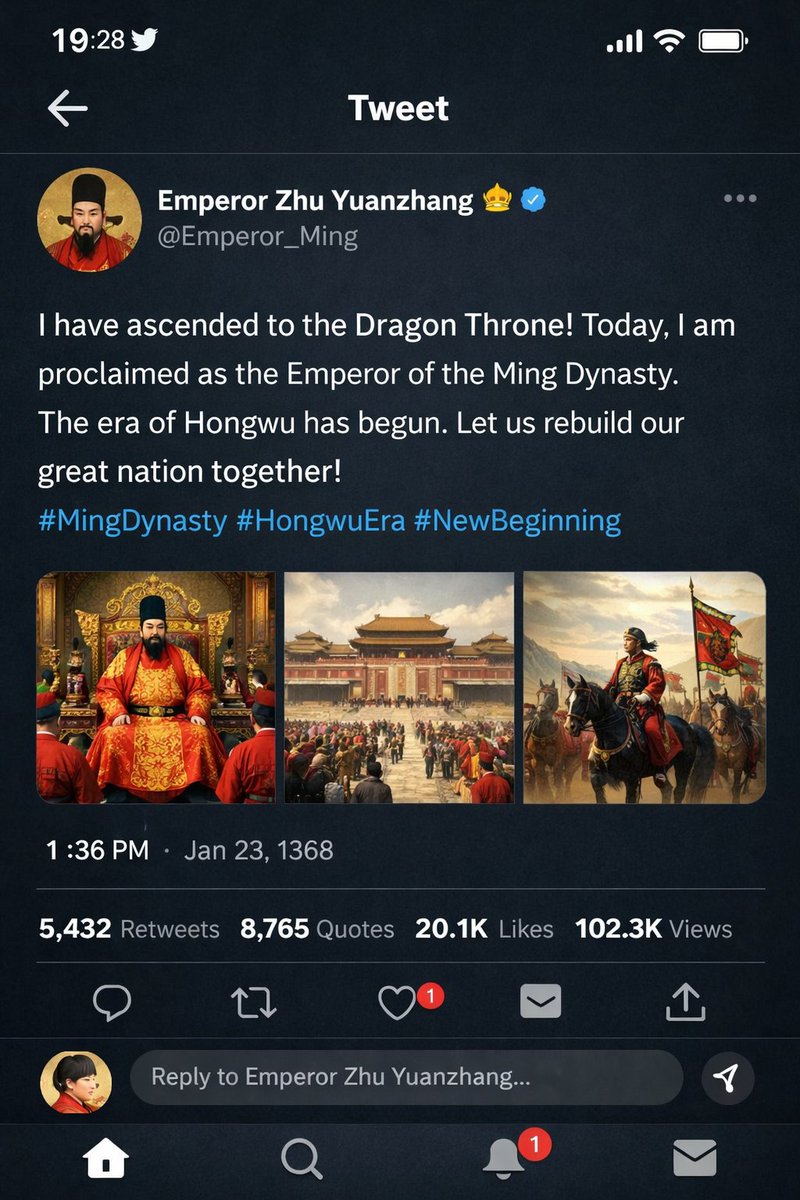
提示词 · EN
type
移动端社交媒体应用 UI 模拟图platform
Twitter/X 深色模式header
status_bar
时间 19:28,鸟形图标,信号,WiFi,电池navigation
返回箭头,'推文' 标题post
author
avatar
身穿红袍、头戴黑冠的中国皇帝肖像display_name
{argument name="display name" default="明太祖朱元璋"} 👑 [认证徽章]handle
{argument name="handle" default="@Emperor_Ming"}content
text
{argument name="tweet text" default="朕已登临龙椅!今日,朕正式登基为大明皇帝。洪武时代由此开启。让我们共同重建伟大的国家!"}hashtags
#大明王朝 #洪武时代 #新纪元media_grid
count
3images
item 1
身着红金龙袍、端坐在华丽金銮殿上的皇帝item 2
宏伟的中国宫殿庭院全景,人群熙攘item 3
皇帝骑马率领军队,高举红龙旗帜metadata
timestamp
{argument name="timestamp" default="下午 1:36 · 1368 年 1 月 23 日"}engagement
5,432 次转发,8,765 次引用,2.01 万次点赞,10.23 万次浏览actions
回复,转发,点赞(带 '1' 的红色心形),分享,上传footer
reply_bar
avatar
红衣女子placeholder
回复明太祖朱元璋...navigation_bar
首页,搜索,通知(红色 '1' 徽章),消息关于这个提示词
Create a stunning dark-mode Twitter/X mockup post featuring a historical Chinese emperor with customizable text, profile details, and a 3-image grid. 它更适合作为 GPT Image 2 的概念艺术起点:先保留画面结构、主体关系和风格约束,再替换成你的品牌、人物或场景。
这条提示词使用结构化 JSON 组织信息,包含 type、platform、header、post、footer 等字段。保留这种层级能让模型更清楚地区分画面主题、布局、界面元素和细节约束。
使用时建议先小幅修改主体、场景、镜头和色调,再生成多个版本对比构图与细节。这样页面内容对用户有实际帮助,也避免把模型名或标签机械堆在正文里。
如何使用这个提示词
- Copy this prompt and paste it into an AI image generator that supports Sora 2 or similar advanced models.
- Choose the
sora2model or the best available text-to-image option for realistic UI rendering. - Customize the variables like
{display name},{handle},{tweet text}, and{timestamp}to feature any historical figure or event you want. - Generate the image and review the output. Tweak the prompt's media grid descriptions for more specific scene details if needed.


