
GPT Image 2AI 提示词
Photo Vocabulary Notebook — English Learning Overlay Prompt
Turn a real apartment photo into a cute English vocabulary notebook with labeled objects and example sentences for visual learning.
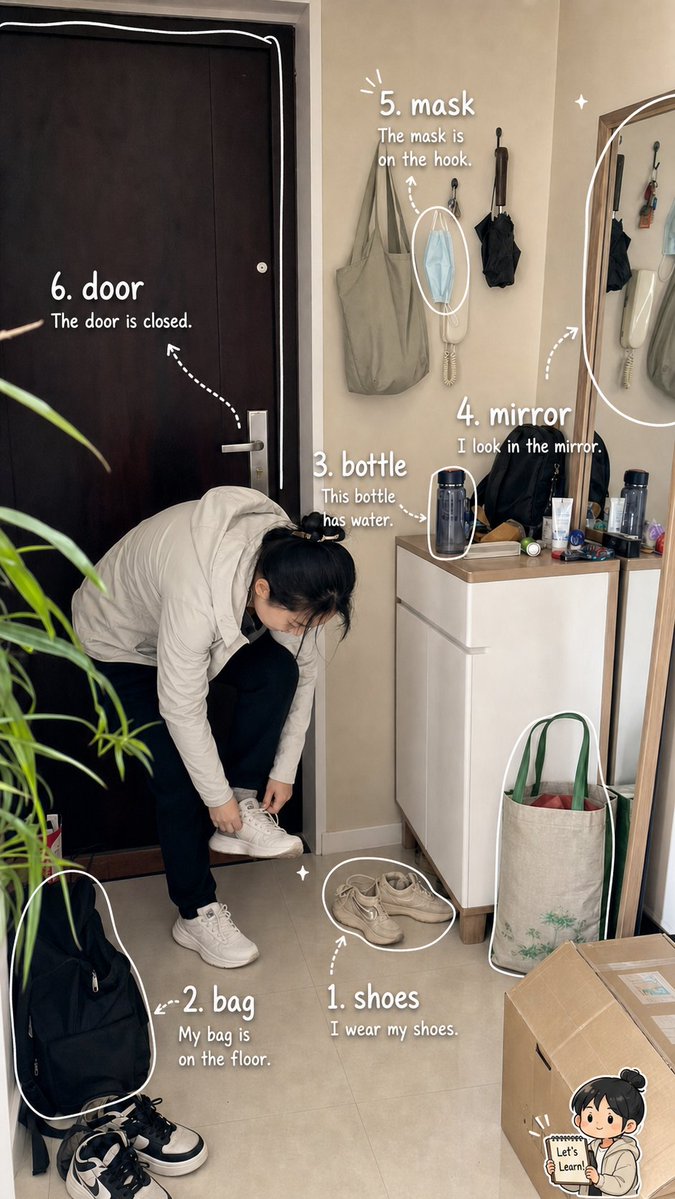
提示词 · EN
type
带标注的照片转词汇学习笔记页面goal
创建一张写实的竖屏手机照片,将一个小公寓的玄关转化为可爱的英语学习笔记本叠加层。保持底图的摄影质感与自然感,添加手绘白色马克笔标注、箭头、圆圈、闪光点以及一个可爱的小型学习吉祥物贴纸。format
aspect_ratio
9:16 竖屏style
写实风格的室内抓拍照片,配以整洁的手写教育涂鸦overlay_style
白色手写字体,粉笔马克笔质感,圆润的非正式字体,虚线箭头,物体周围的粗白色轮廓圆圈,俏皮的闪光点scene
location
深色前门旁的紧凑型居家玄关main_subject
一名身穿浅米色羽绒服、深色裤子和白色运动鞋的人正弯腰系鞋带;面部经过柔焦处理以保护隐私environment
米色墙壁,左侧为关闭的黑色大门,右侧为白色鞋柜,最右侧为全身镜,镜中反射出墙上的挂钩和物品,地砖,左侧边缘有盆栽,右下角有纸箱,鞋柜旁靠着购物袋vocabulary_overlay
headline
基于日常快照的视觉英语词汇笔记count
6items
item 1
number
1word
{argument name="word one" default="shoes"}sentence
{argument name="sentence one" default="I wear my shoes."}target
鞋柜附近地板上的一双米色鞋子position
中下方annotation
鞋子周围的白色椭圆,并配有从文字指向它的虚线箭头item 2
number
2word
bagsentence
My bag is on the floor.target
左下角地板上的黑色背包position
左下方annotation
背包周围的大型白色轮廓和短虚线箭头item 3
number
3word
bottlesentence
This bottle has water.target
鞋柜上方站立的深色水瓶position
中右侧annotation
水瓶周围的小型白色轮廓,配有从文字指向它的箭头item 4
number
4word
mirrorsentence
I look in the mirror.target
右侧高大的木框镜子position
右侧中央annotation
沿镜子边缘的大型弧形白色轮廓,配有虚线箭头item 5
number
5word
masksentence
The mask is on the hook.target
挂在墙钩上的蓝色一次性口罩position
中上方偏右annotation
口罩周围的白色椭圆,指向它的虚线箭头,以及少量放射状线条item 6
number
6word
doorsentence
The door is closed.target
左侧大型深棕色关闭的入户门position
左上方annotation
沿门框描绘的白色边框,以及指向门的虚线箭头decorative_details
mascot
右下角的小型 Q 版儿童贴纸,手里拿着写有“Let’s Learn!”的牌子extra_marks
鞋子和鞋柜附近的微小白色闪光点,随意的笔记本风格箭头,无厚重的 UI 面板text_rules
所有可见的教育文本必须为英文。使用清晰、易读的手绘白色字体。严格保留 1 到 6 的编号,并将每个标签放置在靠近其对应物体的位置,且不得遮挡主体人物的身体。关于这个提示词
Turn a real apartment photo into a cute English vocabulary notebook with labeled objects and example sentences for visual learning. 它更适合作为 GPT Image 2 的概念艺术起点:先保留画面结构、主体关系和风格约束,再替换成你的品牌、人物或场景。
这条提示词使用结构化 JSON 组织信息,包含 type、goal、format、scene、vocabulary overlay、decorative details、text rules 等字段。保留这种层级能让模型更清楚地区分画面主题、布局、界面元素和细节约束。
使用时建议先小幅修改主体、场景、镜头和色调,再生成多个版本对比构图与细节。这样页面内容对用户有实际帮助,也避免把模型名或标签机械堆在正文里。
如何使用这个提示词
- Copy this prompt and paste it into a Sora 2 compatible AI image generator. 2. Choose a model that supports photorealistic styles and text overlays. 3. Customize the variables like word one and sentence one to fit your vocabulary list. 4. Generate the image and review the labeled vocabulary notebook result.


