
GPT Image 2AI 提示词
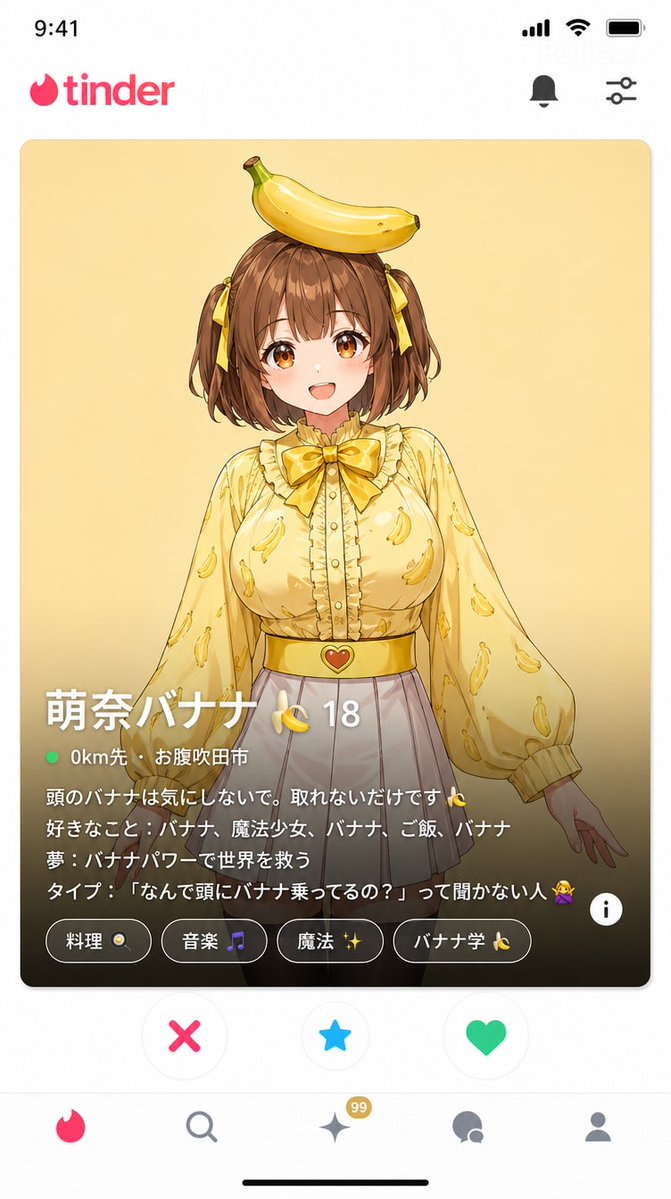
Tinder Profile Screenshot Replica — Sora 2 Prompt
Generate a pixel-perfect Tinder UI mockup with customizable character details, perfect for social media content or app design previews.
提示词 · EN
一张约会软件 "Tinder" 的截图风格图像(9:16 纵横比)。 完全复刻 Tinder UI:
- 顶部显示 "Tinder" 标志
- 中心滑动卡片:argcharacter name: Mona 的照片(头上顶着香蕉,身穿黄色衬衫,白色短裙)。面带微笑,面向前方。 卡片底部的信息(Tinder 特有设计):
个人资料名称:"argprofile name: Mona Banana 🍌"
年龄:"argage: 18"
距离:"argdistance: 0km away · Suita City" 个人简介(正文)文本:
"别在意我头上的香蕉,它就是拿不下来 🍌
爱好:香蕉、魔法少女、香蕉、米饭、香蕉
梦想:用香蕉的力量拯救世界
理想型:不问我‘为什么你头上顶着香蕉?’的人 🙅" 兴趣标签:"烹饪 🍳"、"音乐 🎵"、"魔法 ✨"、"香蕉研究 🍌" 底部用于 "喜欢 / 超级喜欢 / 跳过" 的按钮 UI 一张看起来与真实 Tinder 应用完全一致的截图。
关于这个提示词
Generate a pixel-perfect Tinder UI mockup with customizable character details, perfect for social media content or app design previews. 它更适合作为 GPT Image 2 的概念艺术起点:先保留画面结构、主体关系和风格约束,再替换成你的品牌、人物或场景。
使用时优先替换 character name、profile name、age、distance 等占位符,并保持镜头、构图和材质描述的顺序不变。这样更容易获得稳定的画面结果,也方便继续做多版本对比。
如何使用这个提示词
- Copy the entire prompt and paste it into a compatible AI image generator.
- Select a model that excels in UI rendering and text generation (e.g., Sora 2).
- Customize the character details by changing the
{argument}tags (e.g., name, age, bio). - Adjust the aspect ratio to 9:16 for a mobile-optimized view.
- Generate and refine until the Tinder interface and text appear accurate.


