
GPT Image 2AI 提示词
Luxury Street Fashion Portrait — Sora 2 Prompt
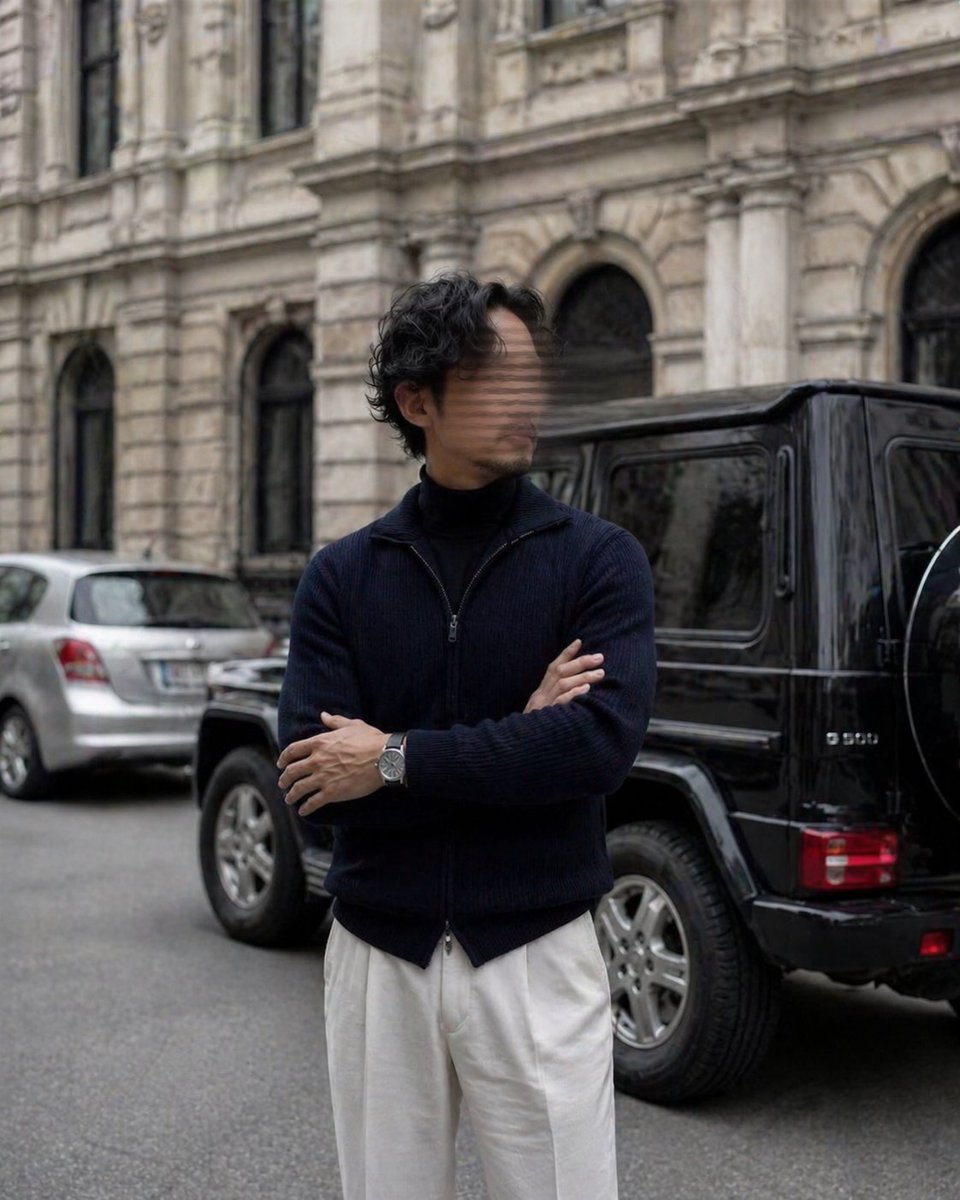
Generate a photorealistic high-fashion editorial portrait of a tall man on a European city street with soft daylight, shallow depth of field, and cinematic elegance.
提示词 · EN
一张逼真的编辑风格街头时尚照片,一位身材高挑瘦削的男士站在欧洲城市街道上,背景是一座装饰华丽、带有拱形窗户和精美石雕细节的历史建筑。构图采用垂直全身至大腿中部的中景,他双臂交叉,姿态从容自信,目光微微侧向一边。他的面部经过柔和的矩形模糊处理。他留着浓密的深色波浪卷发,中等长度,略显凌乱。他身穿深海军蓝罗纹拉链针织开衫,内搭黑色高领毛衣,下着宽松的高腰米白色长裤,左手腕佩戴银色腕表。他右后方停放着一辆黑色的 Mercedes G-Class SUV,侧面和后部清晰可见;左后方较远处停着一辆银色紧凑型掀背车。街道为沥青路面,光线为柔和的阴天日光,色调柔和、优雅且略微去饱和。采用浅景深效果,主体聚焦,背景建筑和车辆呈现柔和的虚化感。奢华男装编辑风格,随性而不失精致,比例自然,照片级真实感,高细节,微妙的电影质感。
关于这个提示词
Generate a photorealistic high-fashion editorial portrait of a tall man on a European city street with soft daylight, shallow depth of field, and cinematic elegance. 它更适合作为 GPT Image 2 的概念艺术起点:先保留画面结构、主体关系和风格约束,再替换成你的品牌、人物或场景。
使用时建议先小幅修改主体、场景、镜头和色调,再生成多个版本对比构图与细节。这样页面内容对用户有实际帮助,也避免把模型名或标签机械堆在正文里。
如何使用这个提示词
- Copy the full prompt text and paste it into your chosen AI image generator.
- Select a model that excels at photorealism, such as Sora 2 or a compatible text-to-image platform.
- Tweak variables like clothing color, car brand, or building style to match your creative vision.
- Adjust the aspect ratio to vertical/portrait for best composition.
- Generate the image and refine with additional detail keywords if needed.


