
GPT Image 2AI 提示词
X75 Mechanical Keyboard Luxury Ad Poster — Sora 2 Prompt
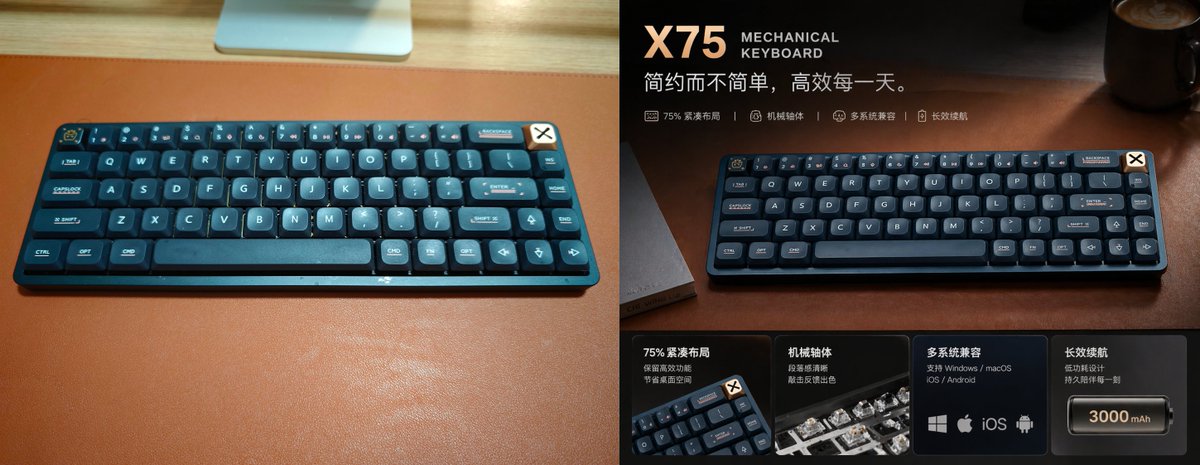
Design a cinematic before-and-after ad poster for the X75 mechanical keyboard, turning a casual photo into a high-end e-commerce visual.
提示词 · EN
type
高端产品广告海报subject
product
{argument name="product name" default="X75"} 机械键盘category
75% 紧凑型无线机械键盘color
深海军蓝,配以深青色点缀material
哑光塑料外壳,搭配圆润键帽branding
键盘右上角的小徽章layout badge
奶油色方形徽章,带有黑色 X 符号,贴在键盘右上角边缘scene
setting
温暖且富有氛围感的桌面布置surface
浅色木质桌面上铺设深棕色皮革桌垫lighting
来自右上角的电影级暖色定向光,柔和的反射,奢华科技广告氛围background
暗色模糊的办公室或桌面环境,右上角有一个咖啡杯,隐约可见桌面物品composition
format
左右分屏的前后对比宣传图panels
item 1
position
左半部分style
朴素的随意快照description
键盘在大型棕色桌垫上居中的俯视角度照片,明亮的室内环境光,顶部可见浅色木质桌面边缘,顶部中央有显示器支架或银色设备的一部分,真实的未修饰产品照片item 2
position
右半部分style
升级版高端广告设计description
同一款键盘在棕色皮革桌垫上以戏剧性的方式呈现,曝光更暗,对比度更丰富,暖色高光,浅景深,经过精细的商业修图text elements
headline
{argument name="headline text" default="X75"}subheadline
机械键盘tagline
{argument name="tagline" default="简约而不简单,高效每一天。"}feature line count
4feature line items
item 1
75% 紧凑布局item 2
机械轴体item 3
多系统兼容item 4
长效续航bottom feature cards
count
4cards
item 1
title
75% 紧凑布局description
保留高效区 节省桌面空间visual
键盘角落的小角度特写item 2
title
机械轴体description
段落感清晰 敲击反馈出色visual
带有半透明外壳的机械轴体特写item 3
title
多系统兼容description
支持 Windows / macOS / iOS / Androidvisual
4 个平台图标:Windows, Apple, iOS, Androiditem 4
title
长效续航description
低功耗设计 持久陪伴每一刻visual
电池图标,标注为 {argument name="battery capacity" default="3000 mAh"}style
design language
高端中国电商主图海报color palette
深海军蓝、炭灰色、铜棕色、暖琥珀色高光、奶油色排版typography
产品名称采用粗体现代无衬线字体,较小的全大写英文字幕,简洁的中文正文finish
精致的商业修图,细腻的暗角处理,光泽感高光,高端氛围关于这个提示词
Design a cinematic before-and-after ad poster for the X75 mechanical keyboard, turning a casual photo into a high-end e-commerce visual. 它更适合作为 GPT Image 2 的概念艺术起点:先保留画面结构、主体关系和风格约束,再替换成你的品牌、人物或场景。
这条提示词使用结构化 JSON 组织信息,包含 type、subject、scene、composition、text elements、bottom feature cards、style 等字段。保留这种层级能让模型更清楚地区分画面主题、布局、界面元素和细节约束。
使用时建议先小幅修改主体、场景、镜头和色调,再生成多个版本对比构图与细节。这样页面内容对用户有实际帮助,也避免把模型名或标签机械堆在正文里。
如何使用这个提示词
- Copy the prompt and paste it into a text-to-image model like Sora 2 or Midjourney.
- Adjust variables like
product name,headline text,tagline, andbattery capacityfor your brand. - Ensure the model supports split‑screen composition; if not, generate left and right panels separately.
- Generate, then refine prompt details such as lighting or layout to match your desired aesthetic.
- Download the final image for use in e‑commerce listings, ads, or social media.


