
GPT Image 2AI 提示词
Seedance 2.0 Usage Infographic — Realistic Presenter Guide
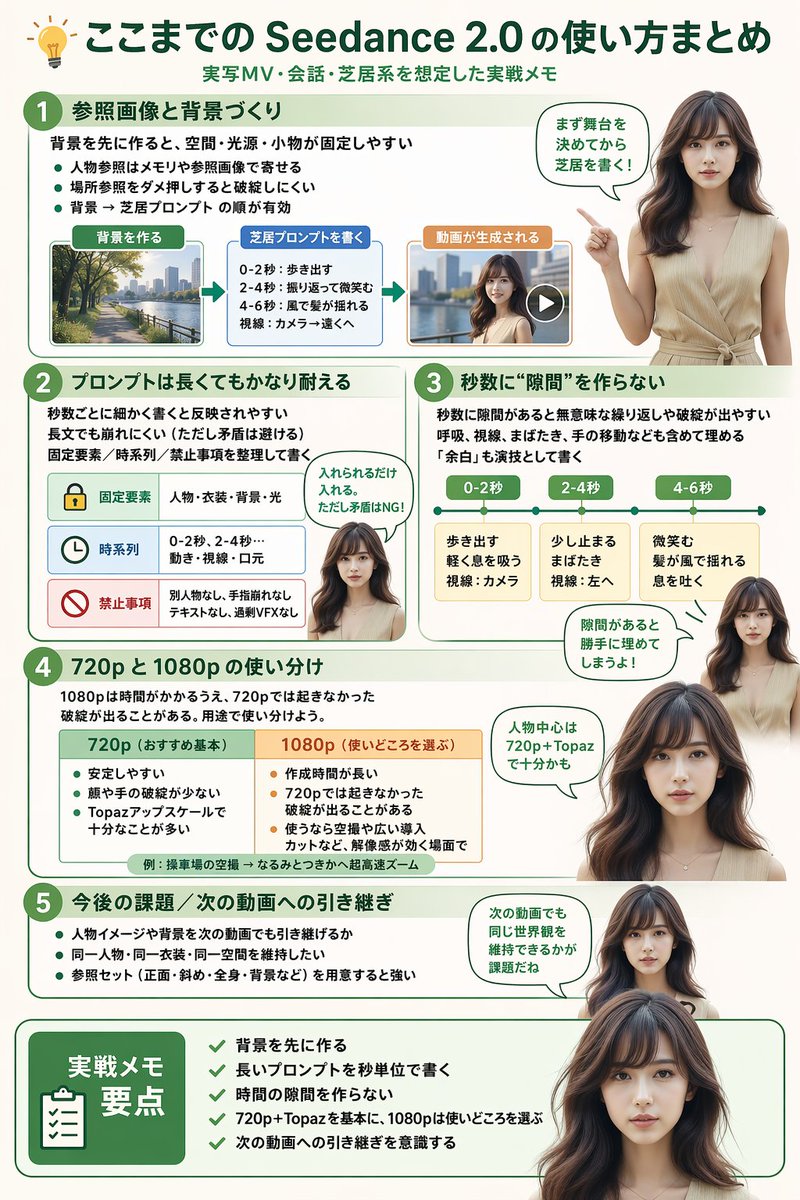
Generate a polished infographic with a realistic Japanese presenter guiding viewers through Seedance 2.0 workflows, from reference images to output resolution tips.
提示词 · EN
type
infographicstyle
简洁、现代、专业,采用柔和的绿色和米色调,融合写实风格人物header
icon
lightbulbtitle
{argument name="main title" default="Seedance 2.0 使用指南总结"}subtitle
{argument name="subtitle" default="针对实拍 MV、对话及表演场景的实践笔记"}presenter_character
{argument name="presenter description" default="一位写实风格的年轻日本女性,留着深棕色长发,身穿米色无袖上衣"}total_presenter_cutouts
6layout
sections
item 1
number
1title
{argument name="section 1 title" default="参考图像与背景制作"}elements
3 个要点,1 个水平 3 步流程图,包含缩略图(城市景观、文本框、视频播放器)presenter_pose
指向左侧的流程图,配有对话气泡item 2
number
2title
{argument name="section 2 title" default="长提示词也能保持良好效果"}elements
2 个要点,1 个包含 3 行内容的表格,带有图标(锁、时钟、禁止标志)presenter_pose
表情中立,目视前方,配有对话气泡item 3
number
3title
确保秒数之间没有“间隙”elements
2 个要点,1 个包含 3 个片段的水平时间轴图形presenter_pose
向上指,视线微向左,配有对话气泡item 4
number
4title
720p 与 1080p 的使用区别elements
文本描述,1 个双列对比表格(绿色列、橙色列)presenter_pose
目视前方,配有对话气泡item 5
number
5title
未来课题 / 下一视频的衔接elements
4 个要点presenter_pose
视线微向右,配有对话气泡item 6
type
summary_boxtitle
实践笔记要点elements
剪贴板图标,5 个带有绿色勾选标记的清单项presenter_pose
胸部以上的大幅肖像,直视观众关于这个提示词
Generate a polished infographic with a realistic Japanese presenter guiding viewers through Seedance 2.0 workflows, from reference images to output resolution tips. 它更适合作为 GPT Image 2 的概念艺术起点:先保留画面结构、主体关系和风格约束,再替换成你的品牌、人物或场景。
这条提示词使用结构化 JSON 组织信息,包含 type、style、header、presenter character、total presenter cutouts、layout 等字段。保留这种层级能让模型更清楚地区分画面主题、布局、界面元素和细节约束。
使用时建议先小幅修改主体、场景、镜头和色调,再生成多个版本对比构图与细节。这样页面内容对用户有实际帮助,也避免把模型名或标签机械堆在正文里。
如何使用这个提示词
- Copy the entire prompt into an AI image generator like Midjourney or DALL·E 3 capable of structured infographics.
- Replace the
{argument}placeholders (title, subtitle, presenter, section titles) with your custom content. - Set a portrait aspect ratio (e.g., 9:16) to accommodate the multi-section layout.
- Generate and refine if needed by adjusting prompt weights for better element alignment.


