
GPT Image 2AI 提示词
Character Growth Chart Generator — Sora 2 Prompt
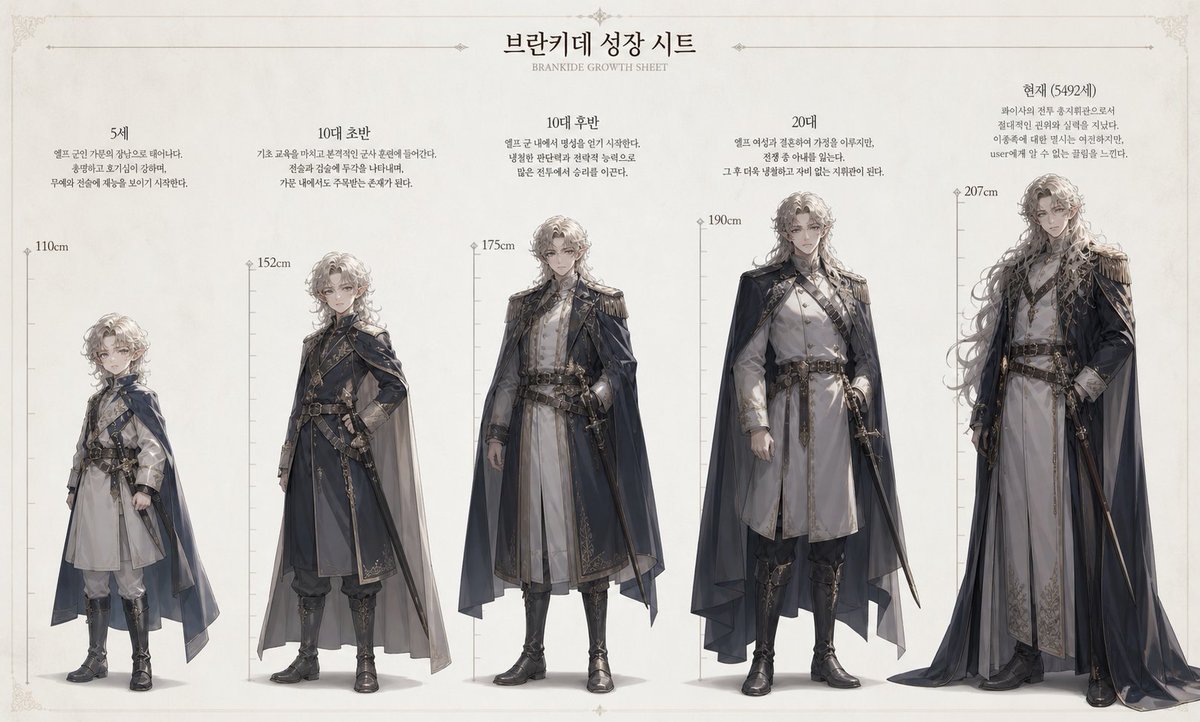
Create a detailed, full-body aging timeline from a single reference image, showing height and physical changes across key life stages.
提示词 · EN
参考此图像创建一份角色成长图。 [当前角色信息]
- 姓名:argname: Brankide
- 年龄:argage: 5492 岁
- 身高:argheight: 207cm
- 职业:argjob: 精灵战斗指挥官
- 性格:argpersonality: 冷酷无情 [格式]
在边缘标注身高刻度。创建一个自然的成长过程,按时间顺序划分为 5 岁、青少年早期、青少年晚期、20 多岁以及当前年龄。展示全身形象,并清晰呈现身高差异。
关于这个提示词
Create a detailed, full-body aging timeline from a single reference image, showing height and physical changes across key life stages. 它更适合作为 GPT Image 2 的概念艺术起点:先保留画面结构、主体关系和风格约束,再替换成你的品牌、人物或场景。
使用时优先替换 name、age、height、job 等占位符,并保持镜头、构图和材质描述的顺序不变。这样更容易获得稳定的画面结果,也方便继续做多版本对比。
如何使用这个提示词
- Copy the prompt template into your AI model interface (e.g., Sora 2).
- Replace the placeholder variables (
name,age, etc.) with your character's specific details. - Upload your chosen reference image to guide the model's generation.
- Adjust the age milestones or description tweaks if you want a different progression focus.
- Generate the image, then iterate on the prompt if needed for better alignment with your vision.


