
GPT Image 2AI 提示词
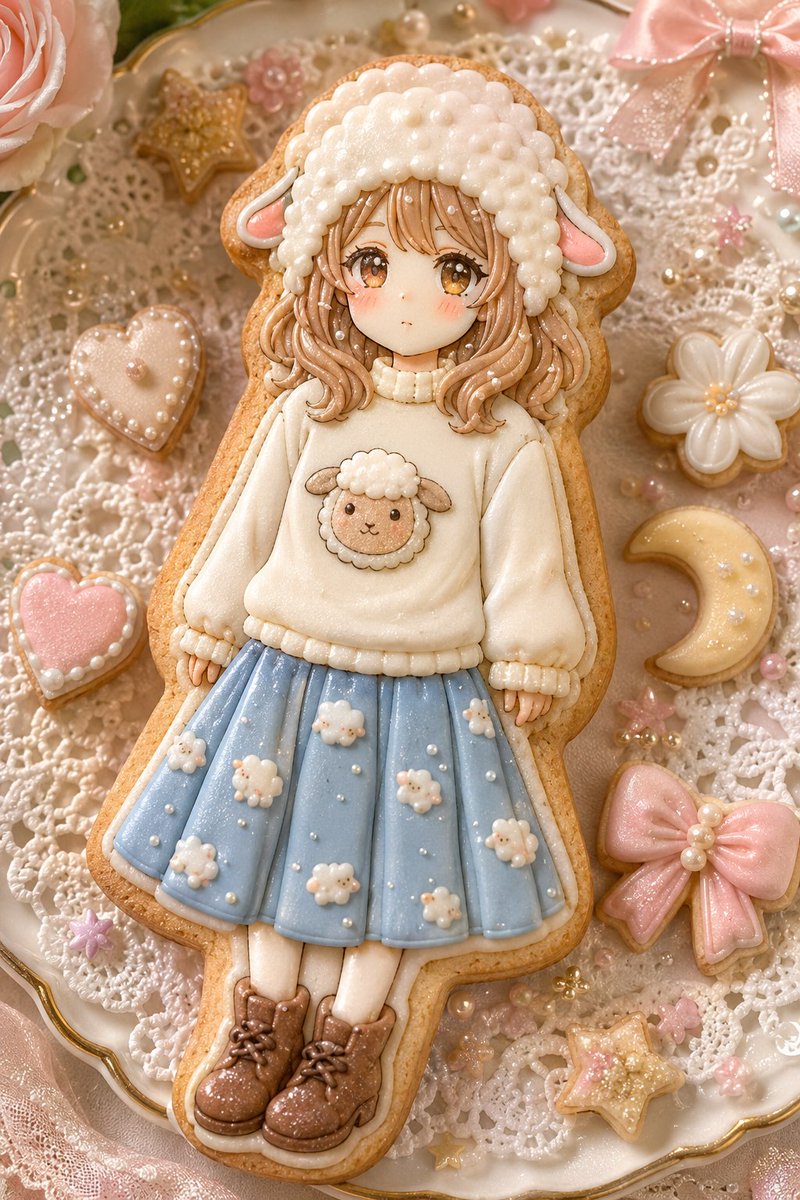
Sheep Girl Sugar Cookie Scene — Sora 2 Prompt
Create a dreamy, pastel-toned macro flatlay photo of a handmade sheep-girl fondant cookie, surrounded by adorable decorated cookies and lace details.
提示词 · EN
type
垂直可爱风写实糖霜饼干场景main_subject
description
一块大型手工装饰的糖饼,形状为可爱的羊角少女,放置在装饰华丽的盘子中央face
少女脸部区域被一个平坦的方形米色遮挡块覆盖,没有五官hair
波浪状浅棕色糖霜头发垂至肩部,带有光泽的挤花发丝hat
蓬松的白色羊角头套,由许多圆润的珍珠状糖霜球组成,带有两只柔软的粉色内耳outfit
top
奶油色超大号毛衣,带有罗纹领口、袖口和下摆chest_motif
毛衣上带有小巧的微笑羊角贴花饼干skirt
淡粉蓝色百褶裙,装饰有微小的白色羊角和珍珠点legs
白色连裤袜shoes
棕色系带短靴,带有光泽的糖霜高光layout
camera
特写俯拍平铺,肖像构图,微距美食摄影surface
白色钩针蕾丝垫,放置在带有细金边的扇形瓷盘上decorative_cookie_count
7decorative_cookies
item 1
左上角的金粉星星饼干item 2
左中部的珍珠镶边奶油色心形饼干item 3
左下角的珍珠边粉色心形饼干item 4
右中部的白色雏菊饼干item 5
右侧的淡黄色月牙饼干,带有珍珠点item 6
右下角的大型粉色蝴蝶结饼干,带有珍珠中心item 7
右下角的金粉星星饼干non_cookie_decorations
item 1
左上角部分可见的大型淡粉色玫瑰item 2
右上角部分可见的粉色缎带蝴蝶结item 3
散落的白色、粉色和金色食用珍珠item 4
微小的粉色花朵糖珠item 5
盘子周围精致的蕾丝纹理style
aesthetic
甜美洛丽塔,童话烘焙坊,柔和可爱风,手工糖霜饼干艺术materials
蛋白糖霜,糖饼边缘,食用闪粉,珍珠糖珠lighting
温暖柔和的漫射光,糖霜上的柔和高光,浅景深color_palette
奶油色,腮红粉,粉蓝色,焦糖棕,珍珠白,柔和金detail_level
高度精细的挤花糖霜纹理,可见的饼干碎屑边缘,闪烁的糖粒,逼真的食用工艺摄影customization
character theme
{argument name="character theme" default="羊角少女"}skirt color
{argument name="skirt color" default="淡粉蓝色"}sweater motif
{argument name="sweater motif" default="小巧的微笑羊角"}background style
{argument name="background style" default="放置在金边瓷盘上的白色钩针蕾丝垫"}overall palette
{argument name="overall palette" default="奶油色,腮红粉,粉蓝色,焦糖棕,珍珠白,柔和金"}negative_prompt
无文字,无手部,无餐具,无生硬阴影,无塑料玩具感,无平面矢量图,无凌乱糖霜,无多余肢体关于这个提示词
Create a dreamy, pastel-toned macro flatlay photo of a handmade sheep-girl fondant cookie, surrounded by adorable decorated cookies and lace details. 它更适合作为 GPT Image 2 的概念艺术起点:先保留画面结构、主体关系和风格约束,再替换成你的品牌、人物或场景。
这条提示词使用结构化 JSON 组织信息,包含 type、main subject、layout、style、customization、negative prompt 等字段。保留这种层级能让模型更清楚地区分画面主题、布局、界面元素和细节约束。
使用时建议先小幅修改主体、场景、镜头和色调,再生成多个版本对比构图与细节。这样页面内容对用户有实际帮助,也避免把模型名或标签机械堆在正文里。
如何使用这个提示词
- Copy the full prompt text from the page.
- Choose your preferred AI image generation model (e.g., Sora 2, Midjourney, DALL-E).
- Paste the prompt into the model's input field. You can customize variables like
character themeorskirt colorto change details. - Adjust any model-specific settings like aspect ratio or style intensity.
- Generate your image and refine with slight prompt variations if needed.


