
GPT Image 2AI 提示词
Camera Exploded View Infographic — Sora 2 Prompt
Create a stunning bilingual technical infographic showing a camera's exploded isometric view with a 13-step causal chain of digital photography.
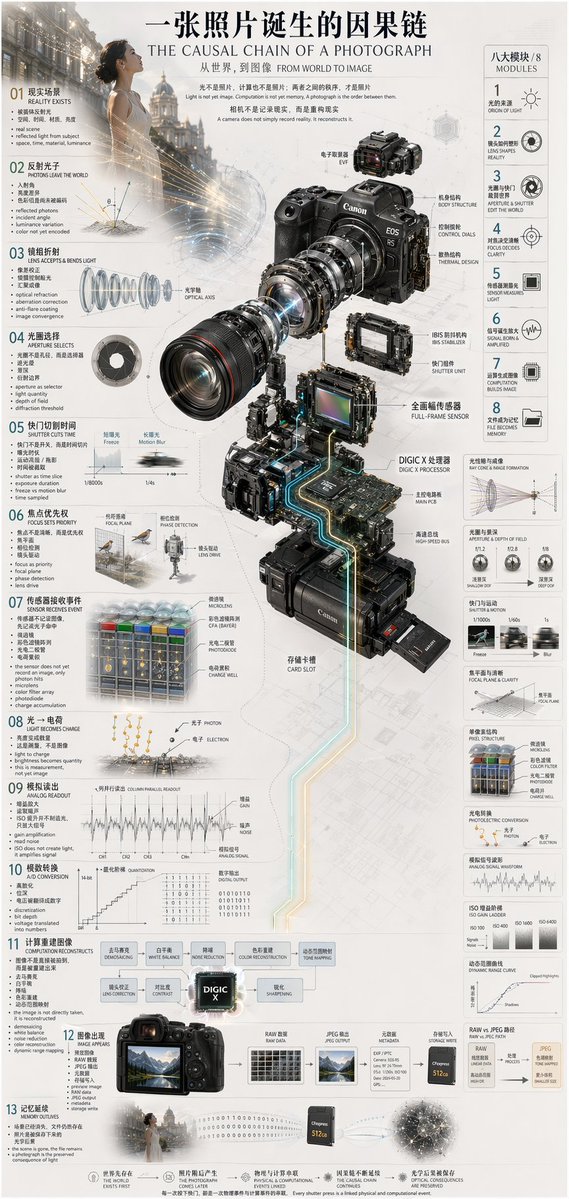
提示词 · EN
type
技术信息图subject
{argument name="subject matter" default="数码摄影流程"}header
title
{argument name="main title" default="一张照片诞生的因果链 THE CAUSAL CHAIN OF A PHOTOGRAPH"}subtitle
从世界,到图像 FROM WORLD TO IMAGEcenterpiece
description
现代无反相机的等轴测爆炸视图model
{argument name="camera model" default="Canon EOS R5"}labeled_parts_count
12labeled_parts
item 1
EVF 电子取景器item 2
机身结构item 3
控制拨盘item 4
散热设计item 5
光轴item 6
IBIS 机身防抖item 7
快门组件item 8
全画幅传感器item 9
{argument name="processor name" default="DIGIC X 处理器"}item 10
主 PCB 电路板item 11
高速总线item 12
存储卡槽layout
left_column
description
时间因果链count
13steps
item 1
01 现实存在item 2
02 光子离开世界item 3
03 镜头接收并折射光线item 4
04 光圈进行选择item 5
05 快门切割时间item 6
06 对焦设定优先级item 7
07 传感器接收事件item 8
08 光转化为电荷item 9
09 模拟信号读取item 10
10 A/D 模数转换item 11
11 计算重构item 12
12 图像呈现item 13
13 记忆留存right_column
title
八大模块 / 8 MODULEScount
8modules
item 1
1 光的起源item 2
2 镜头塑造现实item 3
3 光圈与快门编辑世界item 4
4 对焦决定清晰度item 5
5 传感器测量光线item 6
6 信号产生与放大item 7
7 计算构建图像item 8
8 文件成为记忆side_diagrams
count
7descriptions
item 1
光锥与成像item 2
光圈与景深item 3
快门与运动item 4
焦平面与清晰度item 5
像素结构item 6
光电转换item 7
模拟信号波形footer
count
5description
哲学总结要点style
技术性、精确、线框元素、发光数据线、照片级真实相机组件、简洁排版、双语关于这个提示词
Create a stunning bilingual technical infographic showing a camera's exploded isometric view with a 13-step causal chain of digital photography. 它更适合作为 GPT Image 2 的概念艺术起点:先保留画面结构、主体关系和风格约束,再替换成你的品牌、人物或场景。
这条提示词使用结构化 JSON 组织信息,包含 type、subject、header、centerpiece、layout、style 等字段。保留这种层级能让模型更清楚地区分画面主题、布局、界面元素和细节约束。
使用时建议先小幅修改主体、场景、镜头和色调,再生成多个版本对比构图与细节。这样页面内容对用户有实际帮助,也避免把模型名或标签机械堆在正文里。
如何使用这个提示词
- Copy this prompt into your Sora 2 or compatible AI video/image generator.
- Replace variables like
subject matter,camera model, andprocessor namewith your preferred specs. - Adjust the bilingual labels or step count if you need a different depth of detail.
- Generate and review — iterate on the style keywords (e.g., wireframe, photorealistic) to refine the look.


