
GPT Image 2AI 提示词
Cinematic Rainy Night Visual Novel UI — Sora 2 Prompt
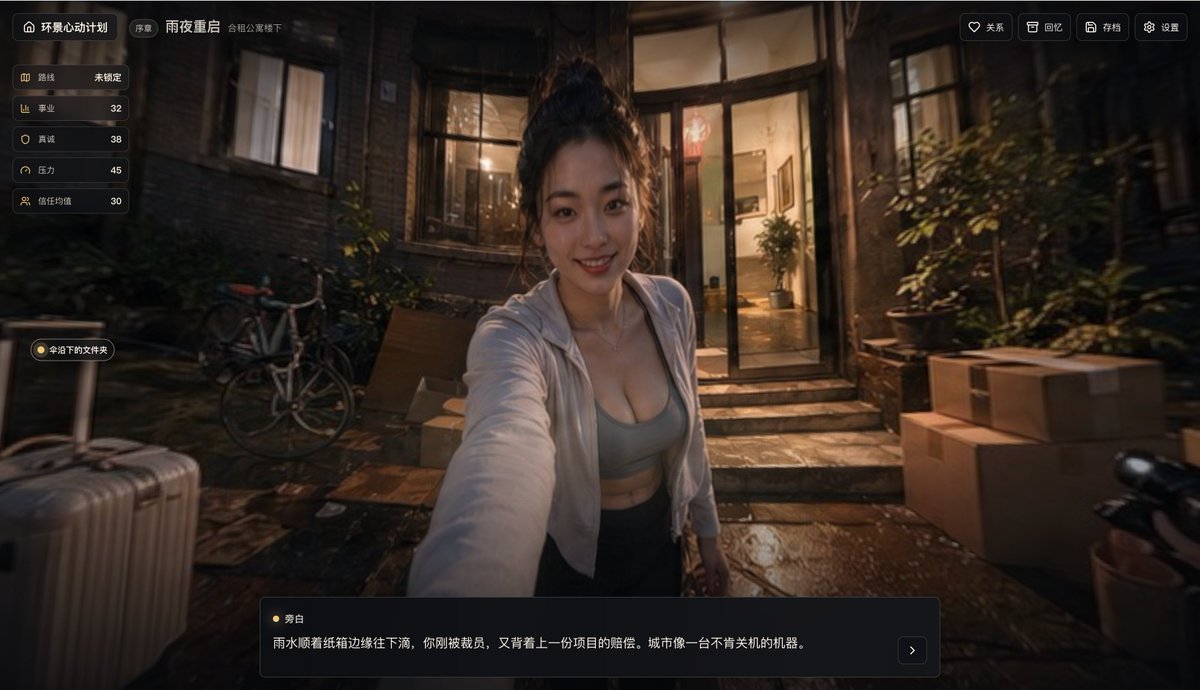
Generate a photorealistic cinematic UI screenshot for a rainy night interactive story game, blending urban realism with a visual novel interface.
提示词 · EN
type
电影级互动故事游戏截图theme
情绪化都市写实风格、雨夜、悬疑生活模拟界面camera
framing
第一人称自拍视角,主体向观众伸出一只手臂,仿佛正在手持手机angle
略高的胸部水平广角镜头depth_of_field
浅景深,背景柔和虚化aspect_ratio
16:9subject
count
1description
一名年轻女性站在夜晚公寓入口处的小庭院中appearance
hair
深色头发扎成凌乱的高丸子头top
浅灰色运动内衣或修身短款上衣,外搭一件半敞开的白色连帽外套bottom
深色长裤pose
居中,身体略微前倾,手臂向镜头伸出face
故意用一个大的矩形模糊块遮挡environment
location
通往温暖明亮玻璃门的旧砖住宅庭院weather
刚下过雨或正在下雨ground
潮湿且具有反射效果的石板路面,带有积水lighting
从公寓内部透出的温暖钨丝灯光,与深蓝棕色的夜间阴影形成对比background_objects
count
7items
item 1
左侧前景的一个银色行李箱item 2
行李箱附近的一个立式路标或窄杆item 3
靠左墙停放的一辆自行车item 4
门口附近的几盆绿色植物item 5
通往入口的一小段石阶item 6
右侧堆放的 4 个搬家纸箱item 7
右侧前景的一辆黑色踏板车或摩托车车把手ui
style
时尚的深色半透明中文视觉小说/决策游戏叠加层,带有圆角和精致的金色装饰top_left
count
3items
item 1
带有标题“环悬心动计划”的主页图标item 2
一个小标签“序章item 3
场景标题“雨夜重启”left_stats_panel
count
5items
item 1
label
路线value
未锁定item 2
label
事业value
32item 3
label
真诚value
38item 4
label
压力value
45item 5
label
信任分值value
30mid_left_button
count
1items
item 1
命运下的文件夹top_right_controls
count
4items
item 1
关系item 2
回忆item 3
存档item 4
设置bottom_dialogue_box
count
2items
item 1
角色名称 雾白item 2
叙述文本:雨水顺着纸箱边缘往下淌,你刚被裁员,又背上一份项目的赔偿。城市像一台不肯关机的机器。bottom_dialogue_box_extra
对话栏右下角的一个右箭头下一页按钮style
photorealism
高mood
紧张、亲密、电影感、略带忧郁color_palette
深棕色、炭黑色、温暖的琥珀色室内光、柔和的灰色衣物、光亮的雨水反射rendering
高级电影剧照与精致游戏 UI 原型的结合关于这个提示词
Generate a photorealistic cinematic UI screenshot for a rainy night interactive story game, blending urban realism with a visual novel interface. 它更适合作为 GPT Image 2 的概念艺术起点:先保留画面结构、主体关系和风格约束,再替换成你的品牌、人物或场景。
这条提示词使用结构化 JSON 组织信息,包含 type、theme、camera、subject、environment、ui、style 等字段。保留这种层级能让模型更清楚地区分画面主题、布局、界面元素和细节约束。
使用时建议先小幅修改主体、场景、镜头和色调,再生成多个版本对比构图与细节。这样页面内容对用户有实际帮助,也避免把模型名或标签机械堆在正文里。
如何使用这个提示词
- Copy the entire prompt from the description.
- Paste it into an AI image generator like Sora 2, DALL·E 3, or Midjourney (use a version that supports detailed scene prompts).
- Optionally adjust variables such as the character’s hairstyle, clothing, or UI text to match your story.
- Generate the image and review the composition—if needed, refine the prompt to improve the lighting or rain effect.
- Use the output for game prototypes, visual novel mockups, or mood boards.


