
GPT Image 2AI 提示词
Satirical 4-Panel Comic Strip Prompt — Sora 2
Creates detailed, black-and-white satirical 4-panel comics with portraits, speech bubbles, and narrative captions for humorous storytelling.
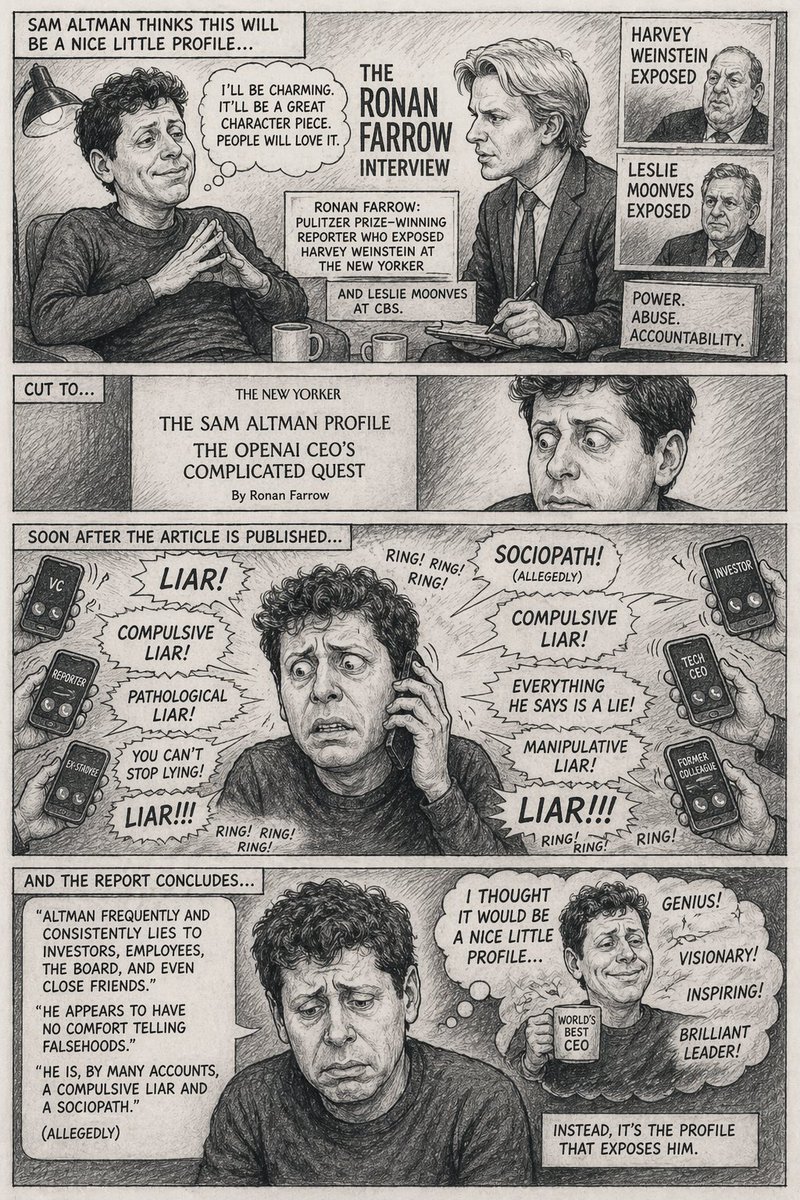
提示词 · EN
type
四格竖版漫画style
{argument name="art style" default="黑白铅笔素描,交叉排线阴影,讽刺漫画风格"}characters
subject_1
{argument name="main character" default="Sam Altman"},卷发,休闲毛衣subject_2
{argument name="interviewer" default="Ronan Farrow"},西装,领带,手持记事本layout
panels
item 1
panel_number
1top_caption
SAM ALTMAN 以为这会是一篇不错的简短人物专访……scene
subject_1 双手交叉呈塔状,神情自鸣得意;subject_2 神情严肃地做着记录。thought_bubble
我会表现得很迷人。这会是一篇很棒的人物特写。大家都会喜欢的。center_text
RONAN FARROW 的采访inset_portraits
count
2labels
item 1
HARVEY WEINSTEIN 丑闻曝光item 2
LESLIE MOONVES 丑闻曝光info_boxes
count
3text
item 1
RONAN FARROW:普利策奖得主,曾为《纽约客》揭露 HARVEY WEINSTEIN 的罪行item 2
以及 CBS 的 LESLIE MOONVES。item 3
权力。滥用。问责。item 2
panel_number
2top_caption
画面切至……scene
subject_1 的特写,神情震惊且惊恐。article_header
{argument name="publication" default="《纽约客》"}
SAM ALTMAN 人物专访
OPENAI CEO 复杂的探索之旅
作者:Ronan Farrowitem 3
panel_number
3top_caption
文章发表后不久……scene
subject_1 看起来压力巨大,满头大汗,正把手机贴在耳边。周围有 6 只手拿着智能手机。phone_labels
item 1
风投item 2
记者item 3
前员工item 4
投资者item 5
科技公司 CEOitem 6
前同事shouts
count
8text
item 1
{argument name="main accusation" default="骗子"}!item 2
撒谎成性!item 3
病态谎言!item 4
你根本停不下来!item 5
骗子!!!item 6
反社会人格!(据称)item 7
他说的每一句话都是谎言!item 8
操纵人心的骗子!sound_effects
铃!铃!铃!item 4
panel_number
4top_caption
报道总结道……scene
subject_1 看起来彻底崩溃且沮丧。quote_box
"ALTMAN 频繁且一贯地欺骗投资者、员工、项目,甚至是亲密朋友。"
"他似乎对撒谎毫无心理负担。"
"据多人描述,他是一个撒谎成性的人和反社会者。"
(据称)thought_bubble
scene
快乐的 subject_1 手持印有“世界最佳 CEO”的马克杯。text
我以为这会是一篇不错的简短人物专访……sparkle_words
count
4text
item 1
天才!item 2
远见卓识!item 3
鼓舞人心!item 4
杰出的领导者!bottom_caption
结果,这篇专访彻底揭穿了他。关于这个提示词
Creates detailed, black-and-white satirical 4-panel comics with portraits, speech bubbles, and narrative captions for humorous storytelling. 它更适合作为 GPT Image 2 的概念艺术起点:先保留画面结构、主体关系和风格约束,再替换成你的品牌、人物或场景。
这条提示词使用结构化 JSON 组织信息,包含 type、style、characters、layout 等字段。保留这种层级能让模型更清楚地区分画面主题、布局、界面元素和细节约束。
使用时建议先小幅修改主体、场景、镜头和色调,再生成多个版本对比构图与细节。这样页面内容对用户有实际帮助,也避免把模型名或标签机械堆在正文里。
如何使用这个提示词
- Copy the prompt's JSON structure.
- Paste it into your preferred AI image or video generation model (like Sora 2).
- Customize the variables, such as
main characterorinterviewer, to fit your story. - Adjust the
art styleif you prefer a different visual approach. - Generate and refine the output until it matches your vision.


