
GPT Image 2AI 提示词
Chinese Dynasty Timeline Prompt — From Xia to Qing Ink Infographic
Generate an educational Chinese history infographic with traditional ink art, detailing dynasties from Xia to Qing with timeline nodes and cultural illustrations.
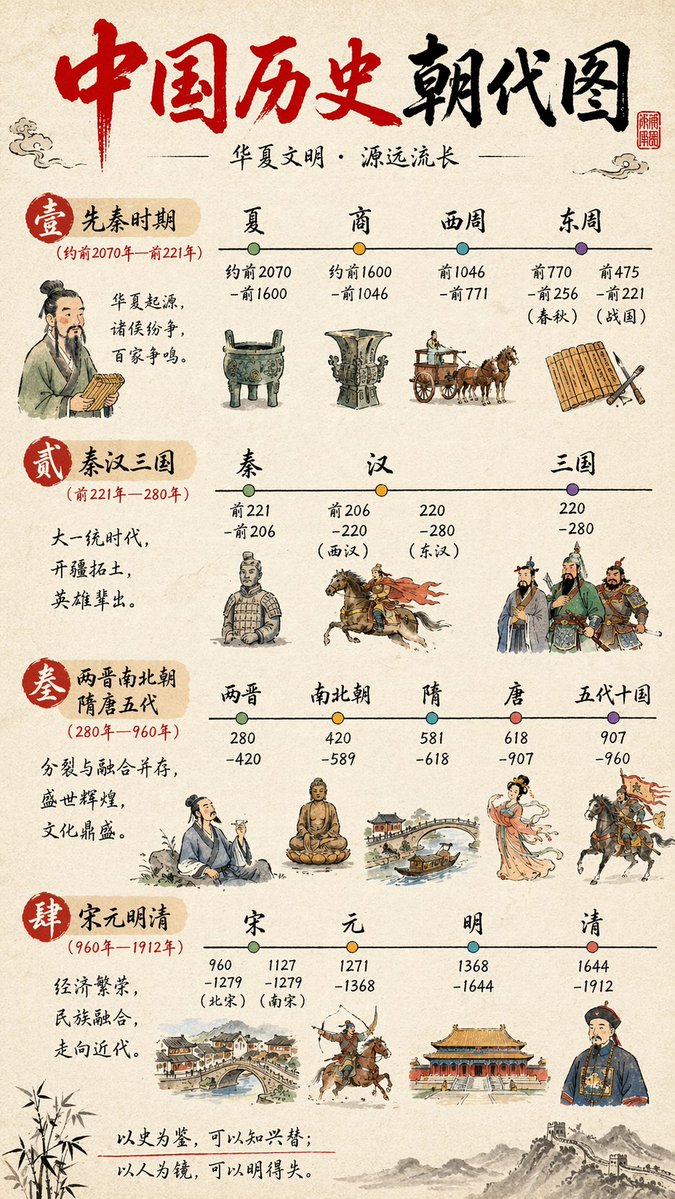
提示词 · EN
type
信息图时间轴style
background
{argument name="background style" default="纹理米色宣纸"}art_style
{argument name="art style" default="传统中国水墨画风格"}header
title
{argument name="main title" default="中国历史朝代图"}subtitle
{argument name="subtitle" default="华夏文明·源远流长"}elements
item 1
红色书法标题item 2
右上角红色方形印章item 3
祥云纹饰layout
sections_count
4sections
item 1
id
1label
壹 先秦时期date_range
(约前 2070 年—前 221 年)description
华夏起源,诸侯纷争,百家争鸣。timeline_nodes
4dynasties
item 1
夏item 2
商item 3
西周item 4
东周illustrations
item 1
手持竹简的学者item 2
青铜鼎item 3
青铜礼器item 4
马车item 5
竹简与毛笔item 2
id
2label
贰 秦汉三国date_range
(前 221 年—280 年)description
大一统时代,开疆拓土,英雄辈出。timeline_nodes
3dynasties
item 1
秦item 2
汉item 3
三国illustrations
item 1
兵马俑item 2
骑马的骑兵item 3
三位身着传统盔甲的将军item 3
id
3label
叁 两晋南北朝 隋唐五代date_range
(280 年—960 年)description
分裂与融合并存,盛世辉煌,文化鼎盛。timeline_nodes
5dynasties
item 1
两晋item 2
南北朝item 3
隋item 4
唐item 5
五代十国illustrations
item 1
饮酒的学者item 2
坐佛像item 3
带船的拱形石桥item 4
优雅的唐代仕女item 5
持旗骑兵item 4
id
4label
肆 宋元明清date_range
(960 年—1912 年)description
经济繁荣,民族融合,走向近代。timeline_nodes
4dynasties
item 1
宋item 2
元item 3
明item 4
清illustrations
item 1
繁华的河畔城镇景观item 2
回身射箭的骑射手item 3
宫殿建筑群item 4
清代官员footer
quote
{argument name="bottom quote" default="以史为鉴,可以知兴替;以人为镜,可以明得失。"}decorations
item 1
左下角竹叶item 2
右下角长城插画关于这个提示词
Generate an educational Chinese history infographic with traditional ink art, detailing dynasties from Xia to Qing with timeline nodes and cultural illustrations. 它更适合作为 GPT Image 2 的概念艺术起点:先保留画面结构、主体关系和风格约束,再替换成你的品牌、人物或场景。
这条提示词使用结构化 JSON 组织信息,包含 type、style、header、layout、footer 等字段。保留这种层级能让模型更清楚地区分画面主题、布局、界面元素和细节约束。
使用时建议先小幅修改主体、场景、镜头和色调,再生成多个版本对比构图与细节。这样页面内容对用户有实际帮助,也避免把模型名或标签机械堆在正文里。
如何使用这个提示词
- Copy the entire prompt from the code block above.
- Open an advanced AI image generator like Sora 2, MidJourney, or DALL-E 3.
- Paste the prompt and adjust any variables (e.g., background style, art style, dynasties, or illustrations) to suit your needs.
- Run the generation and download your custom Chinese history timeline infographic.
- Experiment with different quotes or additional decorations in the footer for a personalized touch.


