
GPT Image 2AI 提示词
Cinematic Shot/Reverse Shot Duptych — Survival Drama Prompt
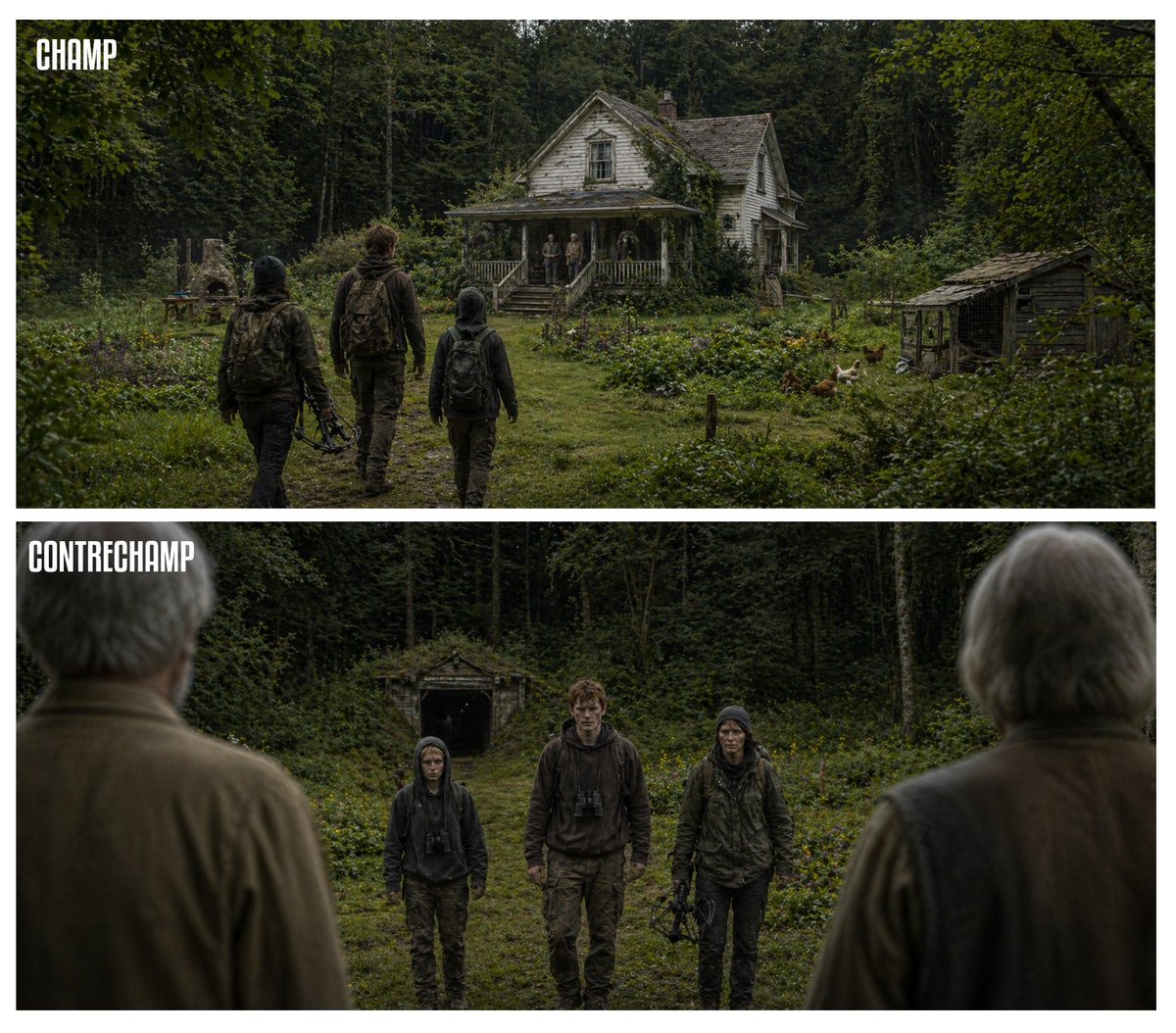
Create a two-panel widescreen survival drama image showing tense encounters at a remote farmhouse, ideal for cinematic storytelling and visual narratives.
提示词 · EN
type
电影级正反打双联画style
写实风格生存剧情,情绪化的自然光,柔和的绿色与棕色调,细腻的胶片颗粒感,紧张的乡村氛围,宽银幕构图layout
format
两个堆叠的水平面板,中间由白色间隙隔开,每个面板均为宽银幕比例sections
item 1
title
CHAMPposition
顶部面板,左上角标签count
1labels
item 1
CHAMPitem 2
title
CONTRECHAMPposition
底部面板,左上角标签count
1labels
item 1
CONTRECHAMPscene
location
被茂密高大树木环绕的杂草丛生的林间农舍空地time
阴天白昼top_panel
camera
从 3 名靠近的人物后方拍摄的后方广角镜头subjects
approaching_group_count
3approaching_group
item 1
1 名穿着深色连帽夹克并背着背包的矮个子青少年item 2
1 名中间穿着棕色连帽衫并背着背包的高个子年轻人item 3
1 名穿着深色风化夹克、携带弩状武器并背着背包的成年女性porch_group_count
3porch_group
item 1
2 名站在门廊上的年长者item 2
1 名靠近门廊入口的额外人物environment_details
house
老旧的白色木制农舍,油漆剥落,带有前门廊、人字形屋顶,藤蔓爬满建筑outbuildings_count
2outbuildings
item 1
院子左侧有一个小型石制户外烤箱或壁炉item 2
右侧有一个破旧的木制鸡舍或棚屋animals_count
4animals
item 1
4 只在院子右侧觅食的鸡ground
穿过野花和杂草丛生植物通往门廊的狭窄草径bottom_panel
camera
从 2 名年长者后方看向 3 名访客的反向视角,前景肩膀处有浅景深效果subjects
foreground_observers_count
2foreground_observers
item 1
左侧灰发年长者,从后方拍摄,焦点柔和item 2
右侧灰发年长者,从后方拍摄,焦点柔和facing_group_count
3facing_group
item 1
左侧同一名矮个子青少年item 2
中间同一名胸前挂着望远镜的高个子年轻人item 3
右侧同一名拿着弩状武器的成年女性faces
面部刻意模糊且处于阴影中background
深色森林墙,群体后方中心处有一个小型木制地窖或棚屋text
labels_style
每个面板左上角的加粗压缩白色大写文本关于这个提示词
Create a two-panel widescreen survival drama image showing tense encounters at a remote farmhouse, ideal for cinematic storytelling and visual narratives. 它更适合作为 GPT Image 2 的概念艺术起点:先保留画面结构、主体关系和风格约束,再替换成你的品牌、人物或场景。
这条提示词使用结构化 JSON 组织信息,包含 type、style、layout、scene、text 等字段。保留这种层级能让模型更清楚地区分画面主题、布局、界面元素和细节约束。
使用时建议先小幅修改主体、场景、镜头和色调,再生成多个版本对比构图与细节。这样页面内容对用户有实际帮助,也避免把模型名或标签机械堆在正文里。
如何使用这个提示词
- Copy the entire prompt code block.
- Choose an advanced AI model capable of cinematic image generation (e.g., Sora 2, Midjourney v6).
- Paste the prompt into the model's input field. You may tweak variables like the number of subjects, weather, or specific descriptive adjectives.
- Generate the image. The output will be a single widescreen composition with two stacked panels labeled 'CHAMP' and 'CONTRECHAMP', showing opposing perspectives of the scene.


