
GPT Image 2AI 提示词
Hiking Photo to Crayon Sketch — Sora 2 Prompt
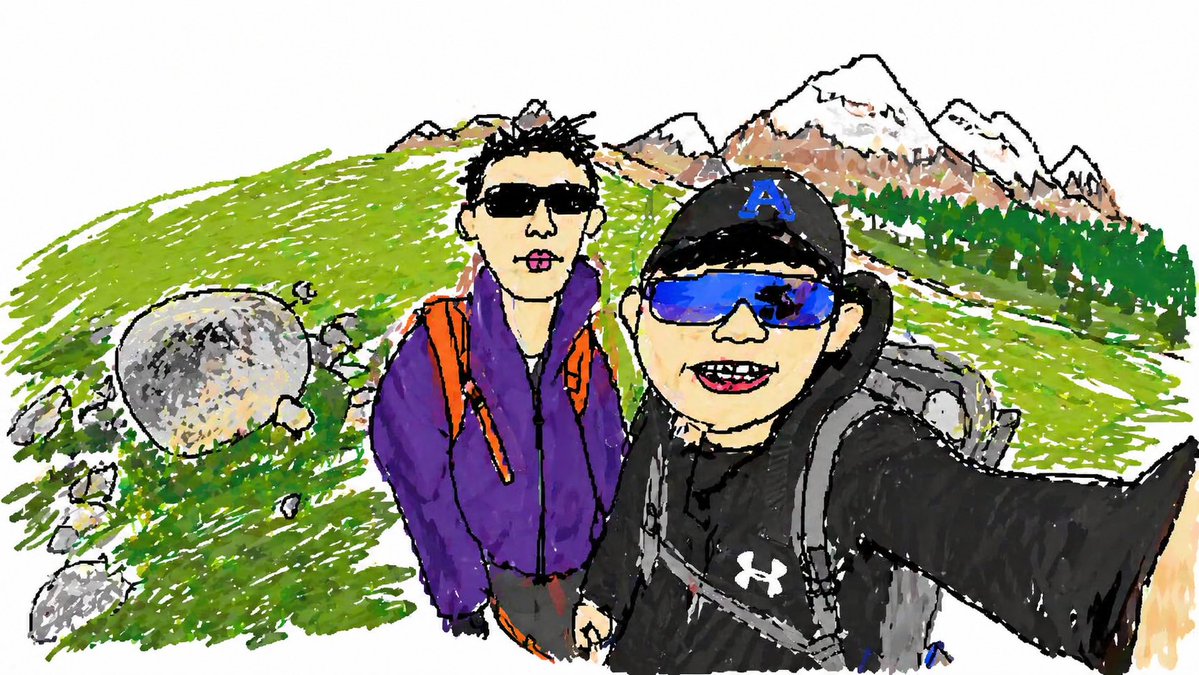
Transform a hiking selfie into a playful hand-drawn sketch with bold outlines, crayon textures, and a whimsical travel diary feel while keeping the original composition.
提示词 · EN
使用提供的参考照片,将同一张徒步自拍照重新绘制为随性的手绘草图插画。保持相同的构图、拍摄角度、两名徒步者、姿势、背包、服装颜色、帽子、岩石、草坡、树线以及雪山位置,但将场景简化为粗犷的黑色轮廓,并采用马克笔和蜡笔风格上色,呈现出明显的涂鸦笔触、不均匀的填色以及俏皮的儿童旅行日记质感。减少照片级的细节,将背景的大部分区域留白,使其看起来像是一幅快速上色的绘本涂鸦,同时保留原始照片中可辨识的布局。
关于这个提示词
Transform a hiking selfie into a playful hand-drawn sketch with bold outlines, crayon textures, and a whimsical travel diary feel while keeping the original composition. 它更适合作为 GPT Image 2 的概念艺术起点:先保留画面结构、主体关系和风格约束,再替换成你的品牌、人物或场景。
使用时建议先小幅修改主体、场景、镜头和色调,再生成多个版本对比构图与细节。这样页面内容对用户有实际帮助,也避免把模型名或标签机械堆在正文里。
如何使用这个提示词
- Copy the full prompt text below.
- Choose an image generation model like Sora 2, DALL·E, or Midjourney that supports style transfer from reference images.
- Upload your hiking photo as the reference image.
- Tweak variables such as "boldness of outlines" or "whitespace ratio" to fine-tune the sketch look.
- Generate and review; iterate if needed for the desired crayon texture.


