
GPT Image 2AI 提示词
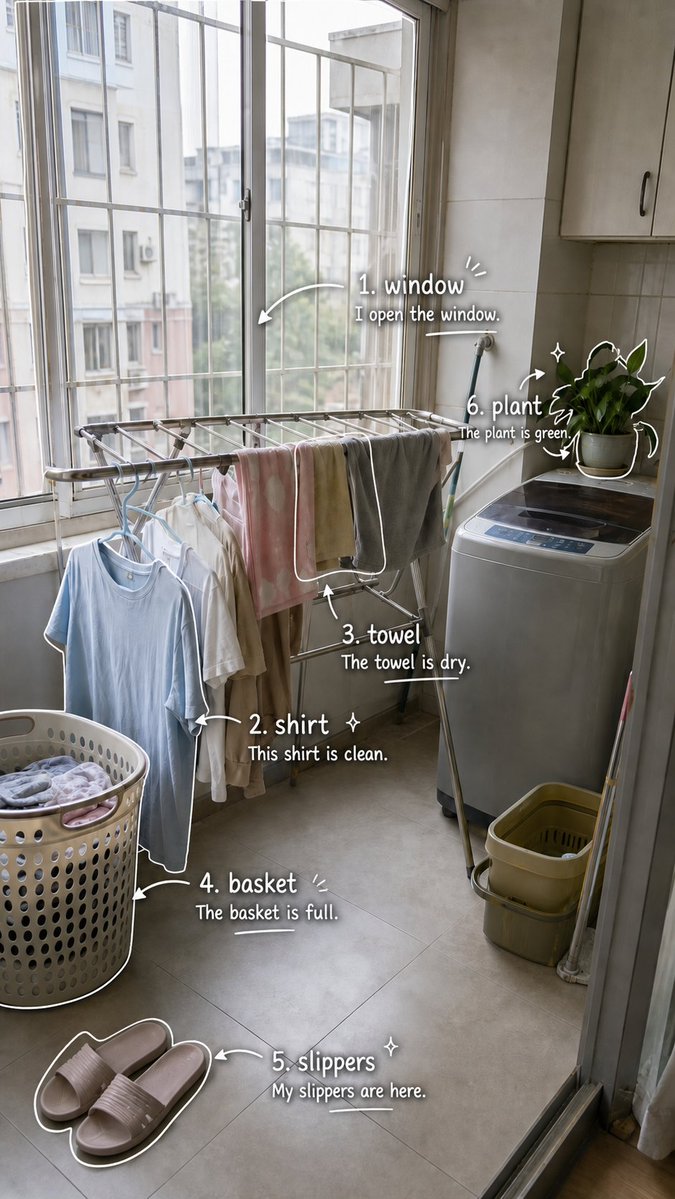
Laundry Balcony Vocabulary Log — Photo-Based Language Prompt
Generate a realistic laundry scene photo with six handwritten English vocabulary labels and example sentences for visual language learning.
提示词 · EN
type
基于照片的视觉化英语词汇日志页面source_scene
一张从门口拍摄的写实竖版智能手机照片,展示了一个小型公寓的洗衣阳台,光线柔和。左侧有高大的栅栏窗,窗外可见邻近建筑;中间是一个挂着衣服的金属晾衣架;右侧是一台洗衣机,上面放着一盆绿植;左下角有一个装满衣物的穿孔洗衣篮;底部附近地板上有粉色家居拖鞋;地面为灰色瓷砖,墙上有米色橱柜style
保持原照片的写实与自然感,随后叠加可爱的白色手写学习笔记,包含手绘箭头、轮廓、闪光点、圆括号和下划线涂鸦;休闲剪贴簿 / 语言学习日记风格;清晰易读的字体,并带有细微阴影以增强对比度format
orientation
竖版 9:16 智能手机海报composition
将标签直接放置在对应物体旁边,且不遮挡场景;使用白色马克笔风格的文字和涂鸦vocabulary_overlay
headline
无主标题,仅在图像周围放置编号词汇标签count
6items
item 1
number
1word
{argument name="word 1" default="window"}example_sentence
{argument name="sentence 1" default="I open the window."}target_object
左上方和中间的大窗格及金属窗栏placement
窗户右上方附近doodles
指向窗户的弯曲箭头、小强调线、句子下方的短下划线item 2
number
2word
{argument name="word 2" default="shirt"}example_sentence
{argument name="sentence 2" default="This shirt is clean."}target_object
晾衣架上挂着的浅蓝色衬衫placement
挂着的衬衫旁,左下方doodles
勾勒衬衫边缘的白色轮廓、指向衬衫的箭头、小闪光点item 3
number
3word
towelexample_sentence
The towel is dry.target_object
挂在金属晾衣架上的灰色毛巾placement
毛巾下方,中间偏右doodles
指向毛巾的向上箭头和简单的下划线item 4
number
4word
basketexample_sentence
The basket is full.target_object
左下方装满衣物的圆形塑料洗衣篮placement
洗衣篮旁,左下方doodles
洗衣篮边缘和侧面的白色轮廓、指向洗衣篮的箭头、小强调笔触、下划线item 5
number
5word
slippersexample_sentence
My slippers are here.target_object
底部附近地板上的一双浅粉色拖鞋placement
拖鞋上方,底部中心偏右doodles
两只拖鞋周围的白色轮廓、指向它们的弯曲箭头、小闪光点、下划线item 6
number
6word
plantexample_sentence
The plant is green.target_object
洗衣机上方的绿色盆栽植物placement
植物旁,右上方doodles
叶片和花盆周围的白色轮廓、环绕植物的箭头、闪光点text_rendering
使用清晰的白色手写字体,词汇加粗,例句字号稍小。按 1 到 6 的顺序为每个项目编号。添加俏皮的笔记本风格标记,但确保所有文字清晰可辨。lighting_and_mood
明亮的阴天光线,温馨的日常家居氛围,写实摄影与迷人学习笔记标注的结合关于这个提示词
Generate a realistic laundry scene photo with six handwritten English vocabulary labels and example sentences for visual language learning. 它更适合作为 GPT Image 2 的概念艺术起点:先保留画面结构、主体关系和风格约束,再替换成你的品牌、人物或场景。
这条提示词使用结构化 JSON 组织信息,包含 type、source scene、style、format、vocabulary overlay、text rendering、lighting and mood 等字段。保留这种层级能让模型更清楚地区分画面主题、布局、界面元素和细节约束。
使用时建议先小幅修改主体、场景、镜头和色调,再生成多个版本对比构图与细节。这样页面内容对用户有实际帮助,也避免把模型名或标签机械堆在正文里。
如何使用这个提示词
- Copy this prompt's JSON code block.
- Choose an image generation model (like Sora) that supports detailed scene descriptions and text overlay.
- Edit the
{argument}variables to change the vocabulary words and example sentences. - Generate the image to get a realistic scene with cute, handwritten learning notes.


