
GPT Image 2AI 提示词
Whimsical Cursive Alphabet Chart — Sora 2 Prompt
Generate a clean grid layout showcasing an experimental, decorative cursive font for every letter A–Z with customizable mood and color.
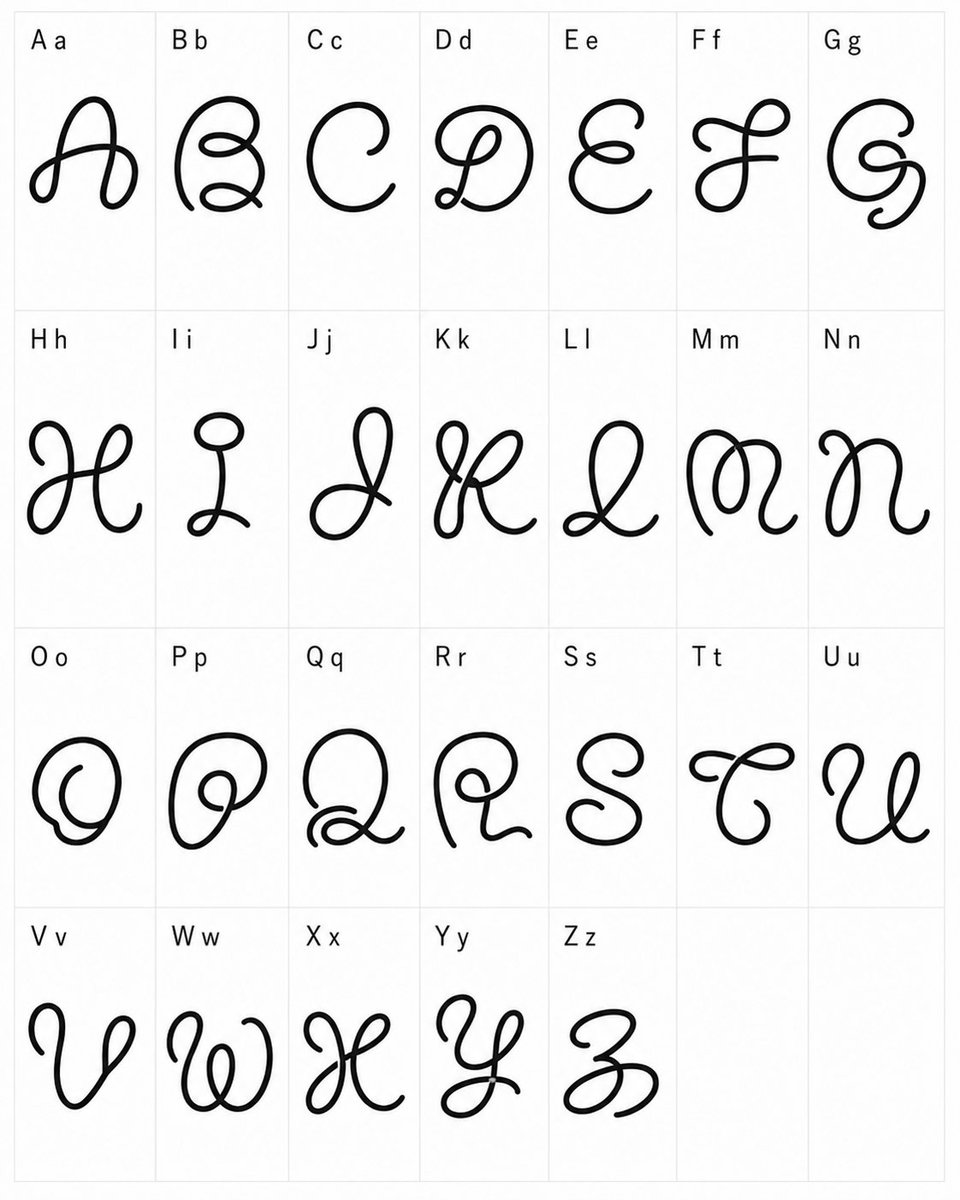
提示词 · EN
type
排版样本字帖style
实验性异想天开的连笔字体设计,黑色单线循环字形,简洁极简的呈现方式canvas
orientation
纵向background
白色grid
浅灰色细线表格,共 4 行 7 列,最后两个单元格留空content
title
自定义字母字体测试alphabet_count
26labels
item 1
A aitem 2
B bitem 3
C citem 4
D ditem 5
E eitem 6
F fitem 7
G gitem 8
H hitem 9
I iitem 10
J jitem 11
K kitem 12
L litem 13
M mitem 14
N nitem 15
O oitem 16
P pitem 17
Q qitem 18
R ritem 19
S sitem 20
T titem 21
U uitem 22
V vitem 23
W witem 24
X xitem 25
Y yitem 26
Z zempty_cells_count
2layout
cell_count
28filled_cells
26rows
item 1
row
1count
7labels
item 1
A aitem 2
B bitem 3
C citem 4
D ditem 5
E eitem 6
F fitem 7
G gitem 2
row
2count
7labels
item 1
H hitem 2
I iitem 3
J jitem 4
K kitem 5
L litem 6
M mitem 7
N nitem 3
row
3count
7labels
item 1
O oitem 2
P pitem 3
Q qitem 4
R ritem 5
S sitem 6
T titem 7
U uitem 4
row
4count
5labels
item 1
V vitem 2
W witem 3
X xitem 4
Y yitem 5
Z zempty_cells
2glyph_design
line_color
{argument name="line color" default="黑色"}stroke
粗细均匀、平滑圆润的单线,手绘矢量风格墨迹font_mood
{argument name="font mood" default="奇特俏皮的连笔风格"}forms
每个大写字母被重新设计为带有卷曲、结节、螺旋和夸张装饰笔触的大型装饰性连笔符号;小写字母仅作为标签中大写字母旁的小型印刷参考label_style
每个单元格左上角的小号纯色无衬线黑色文本composition
在每个填充的单元格中心放置一个超大的装饰性字形,留出充足的留白并保持比例一致。保持字帖平整、正对视角、光照均匀,无阴影、无纹理、无透视变形。custom_text
{argument name="alphabet labels" default="A a, B b, C c, D d, E e, F f, G g, H h, I i, J j, K k, L l, M m, N n, O o, P p, Q q, R r, S s, T t, U u, V v, W w, X x, Y y, Z z"}关于这个提示词
Generate a clean grid layout showcasing an experimental, decorative cursive font for every letter A–Z with customizable mood and color. 它更适合作为 GPT Image 2 的概念艺术起点:先保留画面结构、主体关系和风格约束,再替换成你的品牌、人物或场景。
这条提示词使用结构化 JSON 组织信息,包含 type、style、canvas、content、layout、glyph design、composition 等字段。保留这种层级能让模型更清楚地区分画面主题、布局、界面元素和细节约束。
使用时建议先小幅修改主体、场景、镜头和色调,再生成多个版本对比构图与细节。这样页面内容对用户有实际帮助,也避免把模型名或标签机械堆在正文里。
如何使用这个提示词
- Copy the full prompt JSON from sora2hub.com into your AI model's input field.
- Select an image generation model like Sora 2, DALL·E 3, or Midjourney.
- Tweak the variables: adjust "line color" for stroke hue, "font mood" for style tone, or "alphabet labels" for custom letter sets.
- Generate the image and review the resulting 4×7 grid with decorative glyphs.
- Re-run or iterate by changing arguments until the chart matches your design vision.


