
GPT Image 2AI 提示词
Herbal Chicken Soup Label Design — Sora 2 Prompt
Generate a detailed medicinal chicken soup packaging label with a woven ingredient basket, cooking instructions, and bold herbal branding.
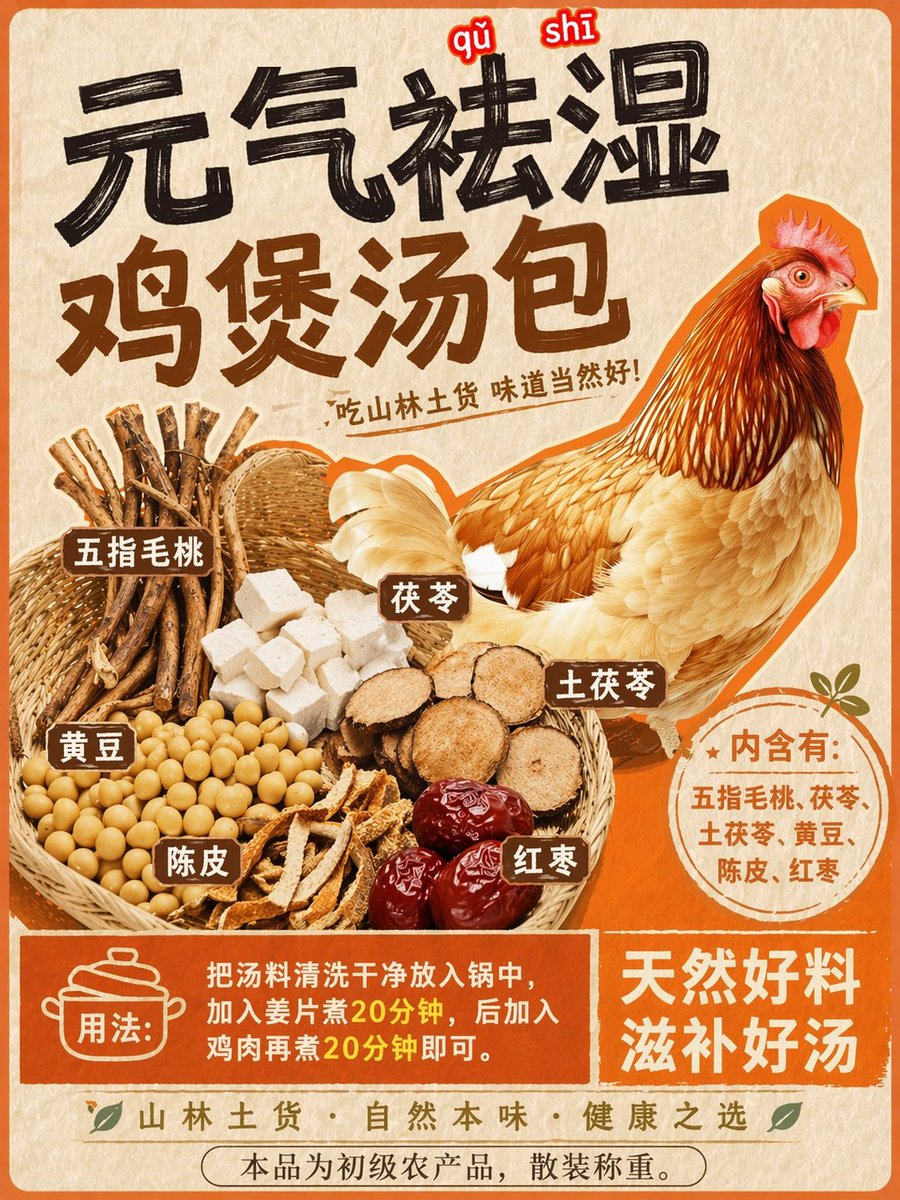
提示词 · EN
以 REFERENCE_0 为基础风格,在保留中央鸡肉插图的同时,将图像转换为药膳汤包的产品包装标签。将鸡肉移至右侧。将顶部文字替换为醒目的大号黑色笔触标题 argmain headline: 元气祛湿 鸡煲汤包 以及较小的副标题 argsubtitle: 吃山林土货 味道当然好!。在左侧添加一个全新的编织篮,篮中包含 6 种不同的食材堆:木质根茎、白色方块、圆形棕色根茎切片、黄豆、陈皮条和深红色红枣。为这些食材贴上 6 个带有白色文字的棕色小长方形标签。在鸡肉下方,添加一个圆形的橙色徽章,内含文字 argingredients list: 内含有:五指毛桃、茯苓、土茯苓、黄豆、陈皮、红枣。在底部,创建一个纯橙色的长方形横幅,其中包含一个烹饪锅图标、文字 argusage instructions: 用法:把汤料清洗干净放入锅中,加入姜片煮20分钟,后加入鸡肉再煮20分钟即可。 以及一条辅助标语 argbottom slogan: 天然好料 滋补好汤。
关于这个提示词
Generate a detailed medicinal chicken soup packaging label with a woven ingredient basket, cooking instructions, and bold herbal branding. 它更适合作为 GPT Image 2 的概念艺术起点:先保留画面结构、主体关系和风格约束,再替换成你的品牌、人物或场景。
使用时优先替换 main headline、subtitle、ingredients list、usage instructions 等占位符,并保持镜头、构图和材质描述的顺序不变。这样更容易获得稳定的画面结果,也方便继续做多版本对比。
如何使用这个提示词
- Copy the prompt and paste it into your AI image generator (Sora 2, DALL·E, etc.).
- Edit the argument fields to customize the headline, subtitle, ingredients, and usage text.
- Select a model with strong text rendering and compositional accuracy.
- Generate the image and tweak the prompt if the layout or text needs adjustment.


