
GPT Image 2AI 提示词
Poster Layout Hack: Flip Portrait, Add Eras — Sora 2 Prompt
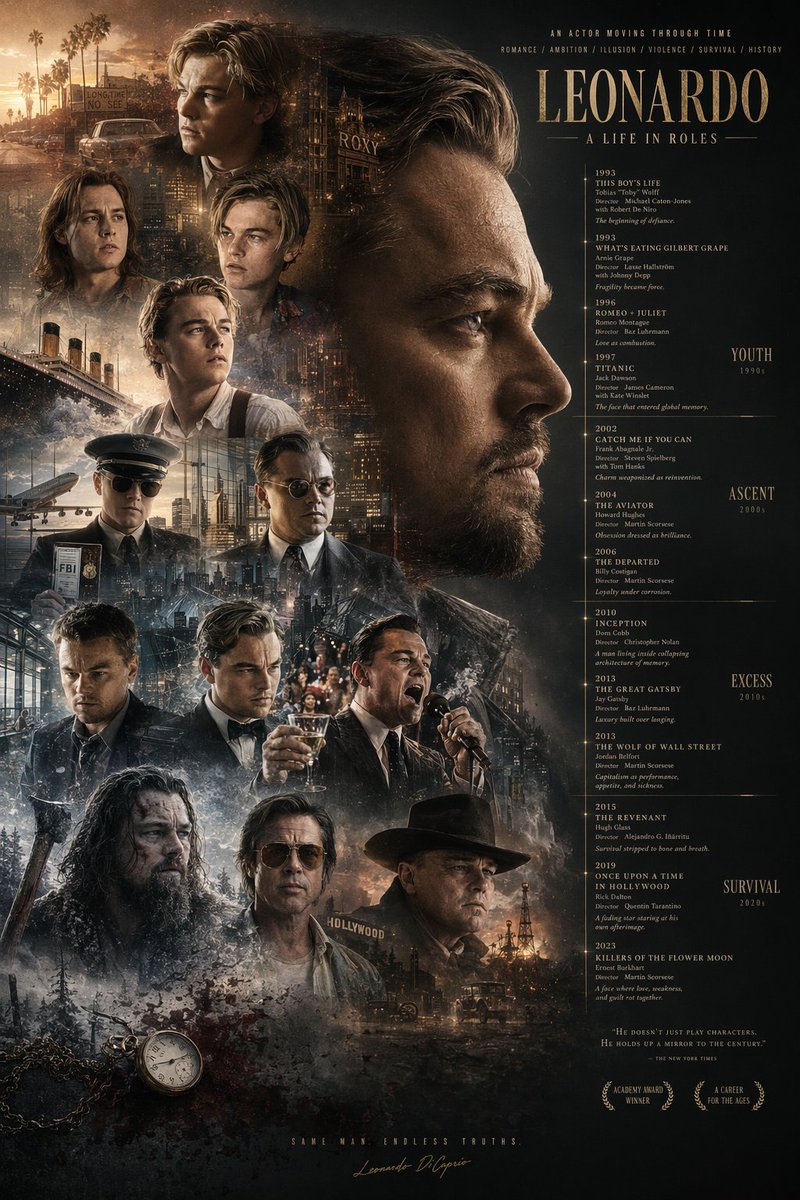
Effortlessly redesign any poster into a rich montage with flipped portraits, era labels, iconic background props, plus a pocket watch and blood.
提示词 · EN
使用提供的参考图像,对海报布局进行重组。将主标题 argmain title: LEONARDO A LIFE IN ROLES 移至右上角。将中央的大幅侧面肖像移至右上象限,并将其水平翻转使其朝向右侧。将时间轴文本重新定位到右侧,并在最右侧添加 4 个新的时代分类:argera categories: YOUTH 1990s, ASCENT 2000s, EXCESS 2010s, SURVIVAL 2020s。在左侧和底部聚拢 13 个较小的角色肖像。在这些肖像后方整合新的背景元素:argbackground elements: Titanic ship, airplane, cityscapes, Hollywood sign, oil derrick。在左下角添加一个 argadded objects: pocket watch with chain and blood splatters。更新底部文本,加入 2 个月桂花环图标以及标语 argbottom tagline: SAME MAN. ENDLESS TRUTHS.。
关于这个提示词
Effortlessly redesign any poster into a rich montage with flipped portraits, era labels, iconic background props, plus a pocket watch and blood. 它更适合作为 GPT Image 2 的概念艺术起点:先保留画面结构、主体关系和风格约束,再替换成你的品牌、人物或场景。
使用时优先替换 main title、era categories、background elements、added objects 等占位符,并保持镜头、构图和材质描述的顺序不变。这样更容易获得稳定的画面结果,也方便继续做多版本对比。
如何使用这个提示词
- Copy the prompt text provided.
- Customize the placeholder values: main title, era categories, background elements, added objects, and bottom tagline.
- Upload a reference poster image as input if using an image-to-image model.
- Select a suitable AI model for image editing, such as Sora 2 or Stable Diffusion.
- Generate the output and experiment with different seeds for varied compositions.


