
GPT Image 2AI 提示词
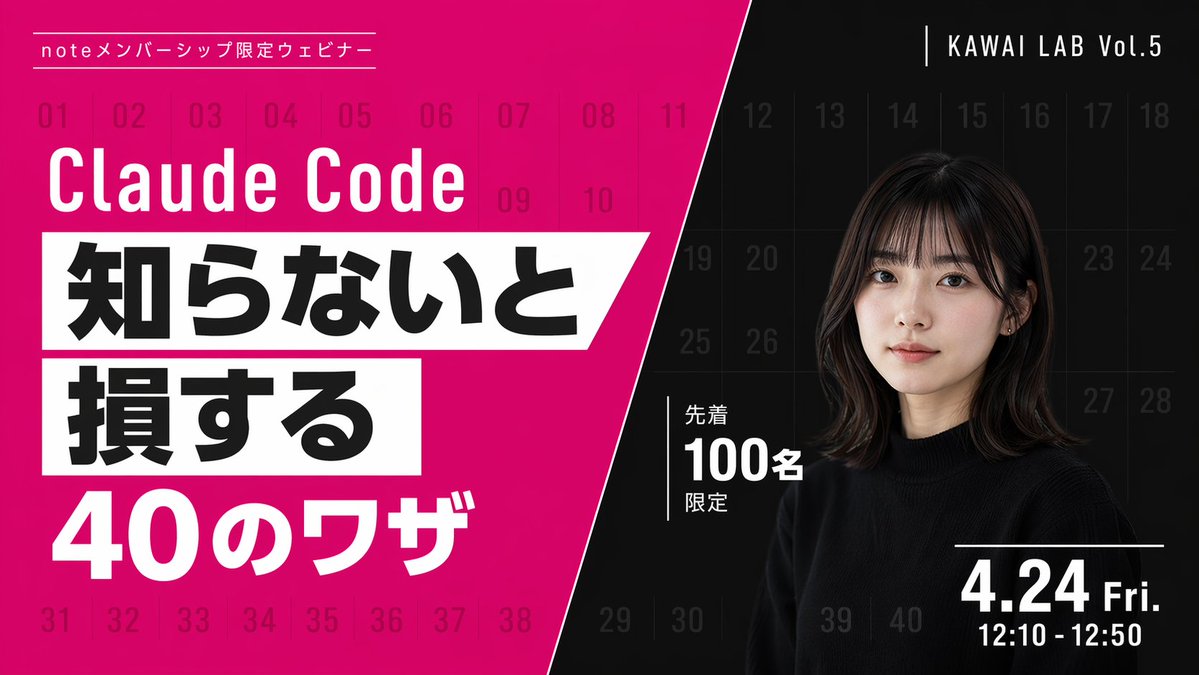
Webinar Banner Prompt: High-Contrast Diagonal Split & Portrait
Create eye-catching webinar banners with diagonal split, bold typography, and a portrait. Perfect for promoting live events and video thumbnails.
提示词 · EN
type
网络研讨会宣传横幅style
现代风格,醒目排版,高对比度,对角线分割布局background
pattern
覆盖整个画布的 40 个从 01 到 40 的序列数字组成的淡网格left_color
鲜艳的洋红色right_color
黑色split_style
从顶部中心到左下角的锐利对角线left_section
top_label
{argument name="top label" default="note 会员专属网络研讨会"}title
{argument name="main title" default="Claude Code"}highlight_box_1
text
{argument name="highlight text 1" default="不知道就会"}style
白色倾斜矩形背景上的黑色文字highlight_box_2
text
{argument name="highlight text 2" default="吃亏"}style
白色倾斜矩形背景上的黑色文字bottom_text
40 个技巧right_section
top_right_label
KAWAI LAB Vol.5subject
一位年轻日本女性的肖像,齐肩深色短发配刘海,身穿黑色圆领毛衣,表情自然,注视镜头middle_badge
text
限前 100 名style
带有垂直线条装饰的白色文字bottom_right_date
{argument name="date and time" default="4 月 24 日 周五 12:10 - 12:50"}关于这个提示词
Create eye-catching webinar banners with diagonal split, bold typography, and a portrait. Perfect for promoting live events and video thumbnails. 它更适合作为 GPT Image 2 的概念艺术起点:先保留画面结构、主体关系和风格约束,再替换成你的品牌、人物或场景。
这条提示词使用结构化 JSON 组织信息,包含 type、style、background、left section、right section 等字段。保留这种层级能让模型更清楚地区分画面主题、布局、界面元素和细节约束。
使用时建议先小幅修改主体、场景、镜头和色调,再生成多个版本对比构图与细节。这样页面内容对用户有实际帮助,也避免把模型名或标签机械堆在正文里。
如何使用这个提示词
- Copy the prompt from the listing.
- Open your AI image generation platform (e.g., Sora 2, DALL-E 3).
- Replace the template variables (
main title,date and time, etc.) with your own content. - Generate the image and preview.
- Optionally regenerate to fine-tune text placement or colors.


